EasyManua.ls Logo

KAM Zoomer 800 V2 - User Manual

KAM Zoomer 800 V2
4 pages
Print Icon
To Next Page IconTo Next Page
Loading...
Due to continuous product development, please ensure that you have downloaded
the latest instruction manual for this product from the Kam website at www.kam.co.uk
MANUAL VERSION 1.0
1 2 - 05- 14
For the latest instruction manual updates and information on the entire Kam range visit:
www.kam.co.uk
Kam products are manufactured by: Lamba plc, Unit 1, Southfields Road, Dunstable, Bedfordshire, United Kingdom LU6 3EJ
Telephone: (+44) (0)1582 690600 • Fax: (+44) (0)1582 690400 • Email: mail@lambaplc.com • Web: www.lambaplc.com
If this product is ever no longer functional please take it to a recycling plant for environmentally friendly disposal.
Due to continuous product development, specifications and appearance are subject to change. © Copyright Lamba plc. E&OE.
Zoomer 800 V2
Compact & transportable PA system with Bluetooth
Question and Answer IconNeed help?

Do you have a question about the KAM Zoomer 800 V2 and is the answer not in the manual?

Summary

Important Safety Information

Electrical Safety and Fire Prevention

Instructions to prevent electrical shock, fire hazards, and proper cable handling.

Installation and Environmental Considerations

Guidance on ventilation, location, temperature limits, and avoiding dust.

Warning Symbol Interpretation

Explains the meaning of hazard symbols like lightning flash and exclamation marks.

Unpacking and Initial Checks

Advises careful unpacking and checking for transit damage before operation.

Manufacturer Declarations and Compliance

Product Compliance and Disposal

States compliance with RoHS, WEEE, and Battery Directives for environmentally friendly disposal.

CE Declaration of Conformity

Confirms compliance with the Low Voltage Directive and notes availability of declarations.

Important Notes Before Using

Battery Charging and Initial Setup

Charge battery fully before first use and ensure all devices are off with volume at zero.

Power On;Off Sequence

Details the correct order for switching on and off audio sources and amplifiers.

Front and Rear Features Overview

Channel Inputs

Describes the microphone, instrument, and CD/AUX/MP3 inputs with their controls.

Equalisation and Volume Controls

Explains the 3-band EQ for frequency response and the master volume control.

Media Player and Connectivity

Details USB, SD card, Bluetooth media playback and input switching.

Detailed Feature Descriptions

Power Input and Switch

Describes the IEC power input for charging and mains operation, and the power switch.

Link Output and Battery Indicator

Explains the link output for connecting to other systems and the battery level indicator.

USB Device Charging Socket

Details the USB socket for charging external devices, noting charging speed variations.

Troubleshooting and Specifications

Troubleshooting Sound Issues

Provides solutions for sound distortion due to input clipping or excessive bass.

Product Specifications

Lists technical details including input voltage, frequency response, and dimensions.

Battery Life and Pole Mount

Details battery life, pole mount specifications, and weight of the unit.
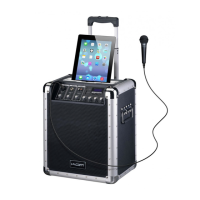
KAM Zoomer 800 V2 Specifications

General IconGeneral
BrandKAM
ModelZoomer 800 V2
CategorySpeakers
LanguageEnglish

Related product manuals