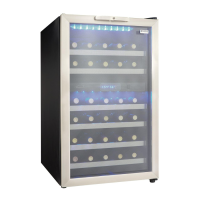
Q
® ® ® ®
",,Upper chamber \ Lowerchamber / _ ,_
l o_ "I",7 lot ,,q_ _.uppo,
O oF] I°F
Activation | j _ ...... ,......
CHAMBRE SUP_RIEURE CHAMBRE INFI_RIEURE
LIGHT @
m
LAMPE
1, Run :indicatorlight illuminatesto signify the
cooling mode ts currentlyin operation,
2. Upper Chamber Display : Display screen
shows currentcabinettemperature and set
temperature of the upper zone,
3. [,ower Chamber Display ; Display screen
shows currentcabinettemperature and set
temperature of the lower zone,
4. _C/°F: Adjacent Indicator light denotes which
scale of temperature is dlsplaye&
5, 'Set Upper' Button : Used toset the
temperaturein theupper zone (see 'Setting
the Temperature' below).
'Set Lower' Button : Used to set the
temperatureIn Ihe lower zone (see 'Setting
the Temperature'below)
6. ' I _ Switch: Continuous illumination.
'O' Switch: Illumination only when the door is
open,
IIIIIIIIIIIi_1_[ ];tlr;_lJid
In the event of a powerfail-
ure,wait 3 to 5 minutes
before restarting.
• To swttchthe display between
the Fahrenheit (°F) and Celsius
(°C) scale, depress the 'Set
Upper' and 'Set Lower' control
buttons simultaneously for
approximately five (5) seconds,
• The temperature range can be
set as low as 39°F(4°C) or as
high as 64°F (I8°C) to suit your
specific wine storage require-
ments, Each depression of the
'Set Upper' or 'Set Lower' button
will allow you to adjust the tem_
perature in 1° increments within
the aforementioned range,
• You may view your 'set' tem-
perature at any time by bdefiy
depressing either the 'Set Upper'
or 'Set Lower' button, The set
temperature will flash In the dis-
play area for 5 seconds before
the display resumes showing the
currentcabinettemperature..
6


 To Next Page