4
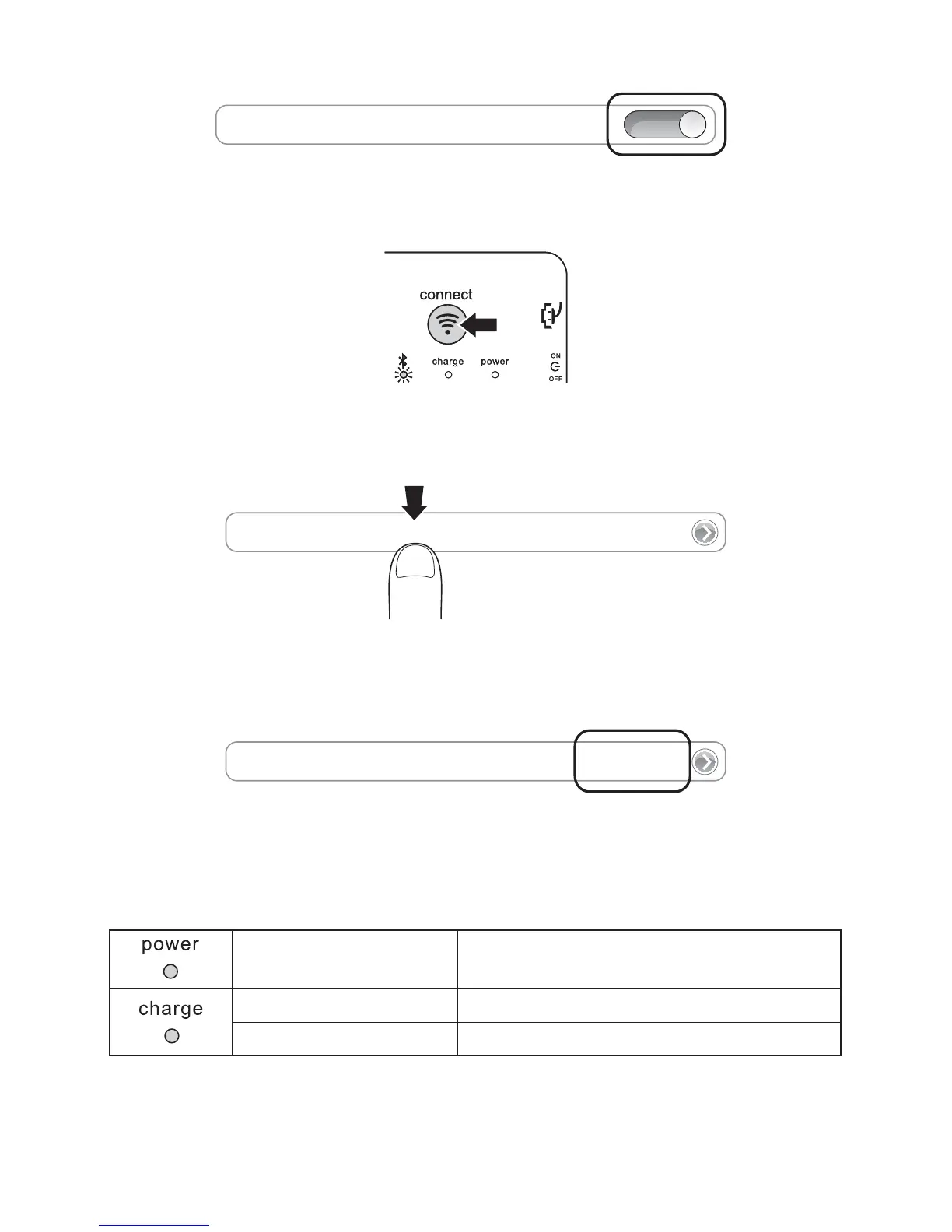
4 Open Bluetooth and make sure Bluetooth is on.
Bluetooth
ON
5 On the Keyboard, press the Connect Button. The Bluetooth Status Indicator Light starts
blinking.
6 The Keyboard now appears on your iPad screen. Tap Bluetooth Wireless Keyboard.
Bluetooth Wireless Keyboard
7 Your iPad screen displays a passkey. Enter the passkey on the Keyboard, and press Enter.
8 Your iPad screen shows the Keyboard as Connected. On the Keyboard, the Bluetooth
Status Indicator Light turns off. You can now use your Keyboard to type in any app.
Bluetooth Wireless Keyboard
Connected
NOTE: The Keyboard will go into sleep mode if left idle for 15 minutes. To wake up the
Keyboard, press any key to resume the connection.
Charging
Blinking Battery needs charging
Glowing red Charging in progress
Turns off Battery is fully charged



 To Next Page