5
REF BARO. The Kestrel will provide accurate weather information for the 4DOF solver at all
times, wherever you travel.
From the main Ballistics screen, scroll down to Enviro…and use the left or right button to ensure
Live is shown as the option. When set to Live, the ballistics engine will continually pull in new
environmental data and update the solution accordingly. It is recommended to expose the
Kestrel to ambient airflow by waving it back and forth for several seconds. If you are going from
extreme temperature shifts (e.g., air conditioned truck to very hot range) please allow more
time for the Kestrel to reach equilibrium. Once you are satisfied with the environmental
capture, we typically tell customers to change Enviro to Lock. If the Kestrel is placed on a hot,
black mat or has direct sunlight hitting the thermistor, the temperature can artificially raise so
that is why locking is recommended. Repeat this process any time conditions change
dramatically or about every 30 minutes to update to current conditions.
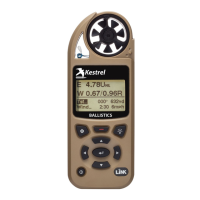
Now that all the gun, bullet, target, wind, and environmental inputs have been set in the Kestrel,
the solution provided on the targeting screen will be based on your environment and shot. Take
a minute to familiarize yourself with the values on the screen and how to implement them in
your scope. Please note that solutions on the Kestrel’s targeting screen are given referencing
point of aim, so W 3.20L indicates a change in point of aim is needed 3.20 to the left of the
target.
8) Calibrate Axial Form Factor
Due to differences in barrel machining, muzzle breaks, propellants and other factors, when the
same bullet is fired from different rifles there will be a slight difference in the drag the bullet will
experience. The Hornady 4DOF solver assumes the bullet will be fired from an "average" barrel
but in reality your rifle may impact the bullet slightly differently. To account for any differences
the Axial Form Factor value can be modified to align the output from the solver to what your
bullet is experiencing.
From the main Ballistics screen, scroll down to Gun and press the center button. Scroll to the
bottom of the Gun submenu and select Cal Axial FF... and press the center button. A step-by-
step guide will assist you in figuring out your gun’s Axial Form Factor. After confirming your
Latitude and Environment, you will want to find a target between 300 and 800 yards. Enter the


 To Next Page
 Loading...