• Convey a marketing message
• Use your company name
• Personalize your combination
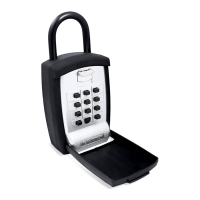
• Familiar phone keypad entry
• Convenience of words and/or numbers
• Easy to use punch buttons
Familiar Phone
Keypad Entry
Large Storage Area
Protective Cover
Large Punch Buttons
Easy to use!
Use alpha
AND numeric
combinations
Large storage
area fits keys
and cards
Secure key
access for
others
Never be
locked out
again
Security,
Peace of mind,
Convenience
TM
The Professional’s Choice
• Real Estate Agents & Investors
• Property Managers
• Cleaning & Maintenance Personnel
• Children and Family
• Emergency Access to Elderly
• Access Cards
• Deliveries
Great for:
Use Easy-to-Remember Words!
Familiar Keypad Entry
Flexibility of text
and/or numbered
punch buttons
like a phone keypad!
2
ABC


 To Next Page

 General