The Keyline Gymkana 994 is a sophisticated key cutting machine designed for precision and ease of use, suitable for both professional locksmiths and automotive key specialists. This quick-start guide provides comprehensive instructions for setting up, operating, and maintaining the device, ensuring optimal performance and longevity.
Function Description
The primary function of the Gymkana 994 is to accurately decode and cut a wide range of metal keys, including those for vehicles. It operates by either decoding an existing key or cutting a new key based on a provided code. The machine is equipped with a touch screen console that serves as the main interface for all operations, guiding the user through each step with clear prompts and visual aids.
The key cutting process involves several stages:
- Machine Registration: Before initial use, the machine must be registered with Keyline USA, either by faxing a completed product registration form or by registering online through the Keyline USA website's Customer Area. Registration is crucial for activating the product warranty and gaining access to software updates, manuals, and quick-start guides.
- Powering On/Off: The machine is powered on by connecting the power cord to a grounded outlet and attaching phone jack cables to the console and the back of the machine. The red Emergency Stop/Power button is rotated outward to initiate startup. For mobile users, a pure sine wave inverter with 1100 watts (or greater) is required to ensure proper motor function. Powering off involves logging out from the main menu and then turning off the console via the emergency stop or on/off button on the cutting unit.
- Login/Password Entry: Upon startup, users are prompted to log in. The default setting allows for a blank password, but an optional password can be created and set through the "SETUP" and "USERS" menus, enhancing security. The touch screen, ideally used with the included stylus, ensures accurate selections during this process.
- Calibration: Calibration is a critical step to ensure cutting accuracy. This involves several sub-processes:
- Tracer Setup: The user is guided to lower and lock the tracer, then press "START." The machine prompts for the removal of the V037 cutter and the installation of the T00 Calibration Tracer into the cutter spindle. After tightening the set screw and closing the shield, the machine initiates the setup process. The user then lifts and moves the tracer to the right, closes the shield, and confirms the action. The machine displays X and Y values, which should be recorded and saved. This process is recommended to be run a second time to verify consistency, with values expected to be within a +/- 3 variation. If values are outside this range, a third calibration run is advised.
- Tracer Adjustment: This step involves removing the T00 Calibration Tracer and installing the V037 cutter. The machine then moves the tracer over the jaw, and the user lowers and locks the tracer, confirming the action.
- Jaw Setup: The final calibration step involves selecting "JAW SETUP" and then "U JAW." The user is instructed to completely remove chips from the tracer, jaw, and key, then press "OK." This process also requires recording X, Y, and Z values, which should be verified for consistency within a +/- 3 variation over multiple runs.
- Key Cutting Operations: The Gymkana 994 supports two primary cutting methods:
- Cut by Decode: This method involves decoding an existing key to obtain its specifications before cutting a new one. Users select "VEHICLES" from the main menu, then specify the make, model, and year range of the vehicle. The original key is clamped in the jaw, and the machine decodes it, displaying the key depths and code. The user then proceeds to cut a new key based on these decoded specifications.
- Cut by Code: For this method, users directly input the key code. From the main menu, "CODES" is selected, followed by the make, model, and year range. The key code (e.g., L527) is entered, and the machine prepares to cut the key.
In both cutting methods, the blank key is clamped in the jaw, and the machine performs the cutting operation. After the first side is cut, the user is prompted to rotate the key 180 degrees, remove any shavings with a brush, and then the machine cuts the second side. The machine defaults to cutting brass keys, but the material type (steel, nickel silver, or aluminum) can be selected on the cutting screen. It is important to note that the Gymkana 994 cannot cut or decode plastic, painted, or non-conductive keys.
Usage Features
The Gymkana 994 is designed with several features to enhance user experience and operational efficiency:
- Intuitive Touch Screen Interface: The console's touch screen, complemented by a stylus, provides a user-friendly interface with clear menus and prompts, making navigation and operation straightforward.
- Safety Shield: A crucial safety feature, the shield works in conjunction with the software. The machine requires the shield to be closed before starting any cut or decode procedure. If the shield is opened during operation, the machine immediately stops and resets, ensuring user safety.
- Favorites Function: This feature allows users to save frequently used key make, model, and year selections, bypassing repetitive menu navigation and streamlining the cutting process for common keys.
- Material Selection: The machine offers flexibility in key material selection (brass, steel, nickel silver, aluminum), catering to various key types.
- Mobile Compatibility: For users operating in mobile environments, the machine is designed to be powered by a pure sine wave inverter, ensuring consistent performance.
Maintenance Features
Regular maintenance is essential for the Gymkana 994's accuracy and longevity. The manual outlines several key maintenance procedures:
- Cutter Replacement: The machine tracks cutter usage and prompts for replacement when necessary. The process involves selecting "REPLACE CUTTER" from the "UTILITY" menu, confirming the replacement, and then physically removing the old cutter using a 2.5mm Allen tool. A new cutter is then inserted and secured. After replacement, the cutter counter can be reset via the console.
- Tracer Replacement: Similar to cutter replacement, the tracer can be replaced by accessing the "REPLACE TRACER" option in the "UTILITY" menu. The old tracer is removed with a 2.5mm Allen tool, and a new one is installed. Crucially, after replacing the tracer, a full tracer setup, tracer adjustment, and jaw calibration must be performed to maintain accuracy.
- Software Updates: The Gymkana 994 supports software updates via a USB memory stick and the Keyonline website. Users can check their current software version from the main menu. The update process involves preparing a blank USB stick, downloading the update file from the Keyonline website onto a PC, transferring it to the USB stick, and then inserting the USB stick into the machine's console. The machine then extracts and installs the update, reboots, and confirms successful installation. This ensures the machine always has the latest features and bug fixes.
- Cleaning: It is emphasized that the jaw, cutter, and tracer must be thoroughly cleaned of all chips before decoding or cutting keys to prevent inaccuracies and damage.
- Spare Parts: A list of essential spare parts, including cutters, tracers, calibration tools, and clamps, is provided with their respective part numbers, facilitating easy ordering and replacement.
- Packaging Retention: Users are advised to retain the original machine packaging for transportation purposes, as it is specifically designed to protect the machine and its components. Keyline is not responsible for providing additional packing material if original boxes are lost or discarded.
- Warranty Information: Detailed warranty information is provided, outlining the terms for machine returns and shipping costs, distinguishing between in-warranty (within 90 days, 91+ days) and out-of-warranty scenarios.
- Operating Temperature: The machine is designed to operate within a temperature range of 32 to 104 degrees Fahrenheit, ensuring reliable performance in various environments.
The Keyline Gymkana 994 is a robust and user-friendly key cutting solution, designed for precision, safety, and long-term reliability through its comprehensive operational and maintenance guidelines.

 Need help?
 General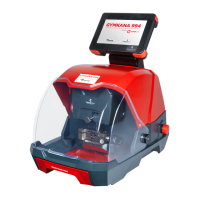

 To Next Page