Operation Manual
E&OE
- 8 -
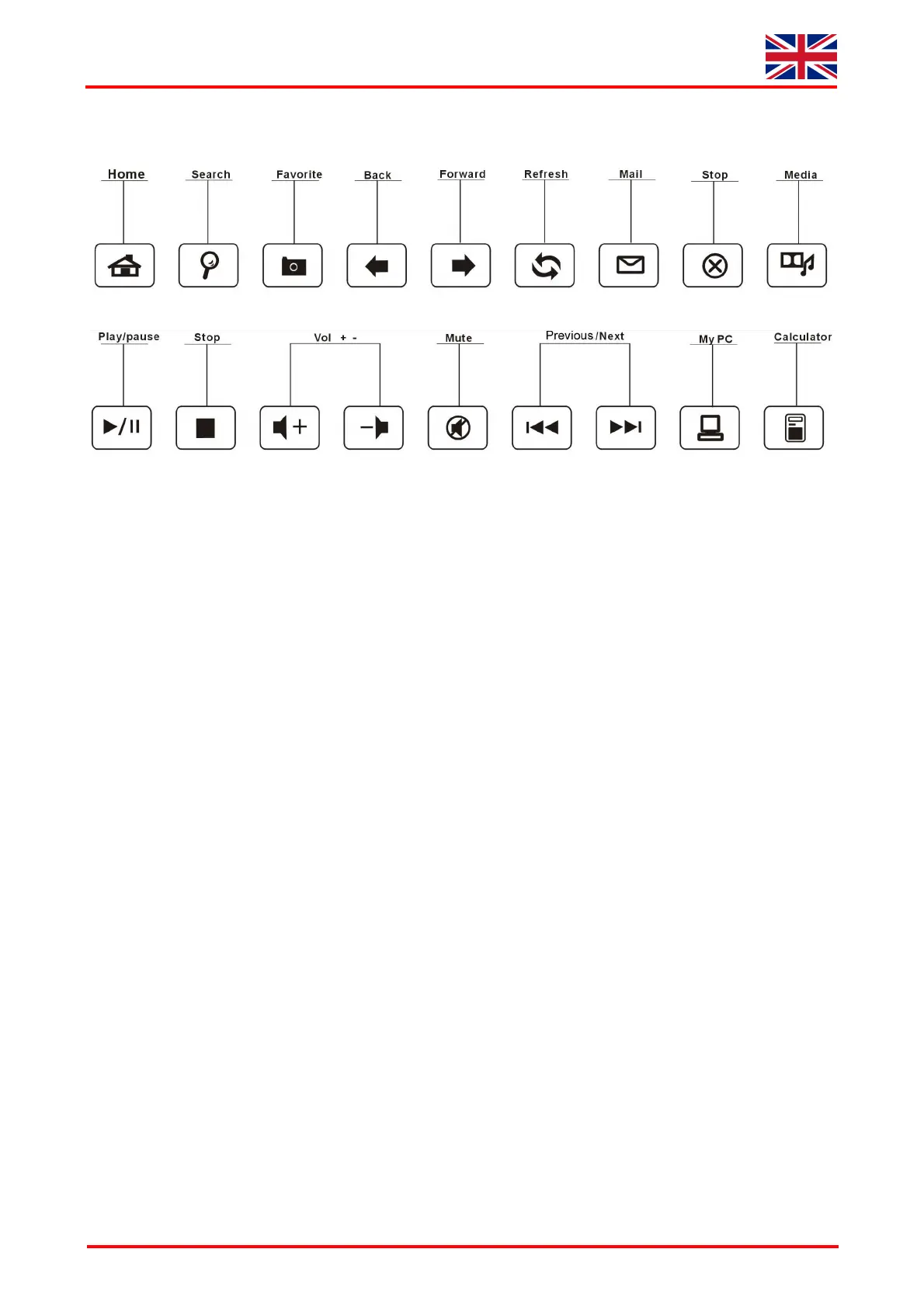
2.2 Multifunction keys
• Home Opens the home page of the preset Internet browser
• Search Opens the search assistant for images, documents, files, printers etc.
• Favorite Opens the favorite few in Internet or file explorer
• Back Opens the previous few, for instance of the Internet explorer
• Forward Opens the next few, for instance of the Internet explorer
• Refresh Refreshes the current shown page in the Internet explorer
• Mail Opens the home page of the preset E-mail program
• Stop1 Stops loading and refreshing of a web side
• Media Opens the home page of a preset media player
• Play/Pause One-time pressing starts the track of a CD, VCD, DVD or media file;
repeated pressing pauses the replay
• Stop 2 Stops the track of the CD, VCD, DVD or media file
• Vol + Raises the sound volume
• Vol - Reduces the sound volume
• Mute Activates or de-activates the muting
• Previous Starts the previous track of the CD, VCD, DVD or media file
• Next Starts the next track of the CD, VCD, DVD or media file
• My PC Opens the „My computer” in the explorer few
• Calculator Opens the screen „calculator“


 To Next Page
 Loading...