EasyManua.ls Logo

Kia B2H58-AP000 B2H58-AP010 - User Manual

Kia B2H58-AP000 B2H58-AP010
7 pages
Print Icon
To Next Page IconTo Next Page
Loading...
User Manual
CHARGER ASSY-WIRELESS PS
B2H58-AP000/010
* This product was designed for Kia Motors’ SOUL (PS).
* Only Qi-certified device can be charged on this product.
1
Question and Answer IconNeed help?

Do you have a question about the Kia B2H58-AP000 B2H58-AP010 and is the answer not in the manual?

Summary

Parts Description

How to Use

Troubleshooting

Troubleshoot Device Not Charging

Steps to resolve issues when the wireless charger is not charging the device, including checking standards and location.

Troubleshoot LED Indicator Issues

Solutions for charge LED blinking fast or not lit, focusing on connections and foreign objects.

Cautions and Service

Product Safety Precautions

Key safety warnings about product use, including avoiding liquids, alterations, and magnetic fields.

Warranty Service Exclusions

Conditions where warranty repairs are not free, such as user misuse or damage from natural disasters.

Warranty Information

Service Inquiry Contact Details

Contact information for service inquiries, including address, phone number, website, and email.

Overview

This document is a user manual for a wireless charger assembly, model B2H58-AP000/010, designed for Kia Motors' SOUL (PS) vehicles. It is a genuine accessory from Kia Motors and Hyundai Mobis.

The primary function of this device is to wirelessly charge Qi-certified devices within a vehicle. It is specifically designed for the Kia Soul (PS) model.

Key Features and Components:

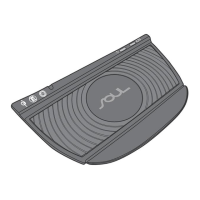
The charger assembly includes several visual indicators and a charging pad:

  • Power LED: Indicates that the device is powered on.
  • Charge LED: Illuminates to show the charging status. It lights red when charging begins and turns green when charging is complete. If charging is not optimal or if some smartphones/cases do not send a full charging signal, the LED may remain red.
  • Qi Logo: Denotes that the product is a Qi-certified wireless charger, meaning it adheres to the Qi standard for inductive power transfer.
  • Rubber Pad: Provides a non-slip surface for the device being charged.

Usage Instructions:

  1. Engine On: Turn on the vehicle's engine. Verify that the product's Power LED (located on the left side) is lit, indicating the charger is receiving power.
  2. Device Placement: Place a Qi-certified device onto the charging pad. For optimal charging, it is recommended to align the device to the center of the pad.
  3. Charging Initiation: Once the device is correctly placed, the Charge LED will light up in red, signifying that charging has commenced.
  4. Charging Completion: When the device is fully charged, the Charge LED will turn green.
  5. Troubleshooting Placement: If the device is not charging effectively, re-align it to the center of the pad.
  6. Signal Limitations: Be aware that some smartphones or their protective cases may not transmit a complete charging signal to the wireless charger. In such instances, the Charge LED might remain red even if the device is charging or fully charged.

Important Safety and Usage Notes (Cautions):

  • Smart Keys and Coins: Do not place smart keys or coins on the charging product. These items can interfere with charging or potentially cause damage.
  • Liquids: Avoid inserting or wetting the device with water or any other liquid. Liquids can cause electrical damage or malfunction.
  • Alterations: Do not disassemble, modify, or alter the product in any way. Unauthorized alterations can void the warranty and may lead to unsafe operation.
  • Magnetic Fields: Keep the charger away from any mechanical devices that could be adversely affected by a magnetic field, as the charger operates using electromagnetic induction.
  • Troubleshooting Abnormalities: If any problems or abnormalities are encountered during use, immediately stop using the product and contact the store where it was purchased for assistance.

Troubleshooting Guide:

  • Device Not Charging:
    • Ensure the device being charged is Qi-standard compatible.
    • Adjust the device's position on the charging pad.
    • Verify if the device is already fully charged.
    • Check for any foreign objects on the wireless charger that might be obstructing charging.
  • Charge LED Blinking Fast or Not Lit:
    • Confirm that your device is properly connected to its appropriate wireless charging case (if applicable).
    • Inspect for any foreign objects inserted between the receiver (device) and the transmitter (charger).
    • Re-position the device on the charging pad.

Maintenance and Warranty Information:

  • Warranty Period: The product comes with a warranty period of "O year" (likely a placeholder, typically one year) starting from the date of purchase.
  • Free Repair Conditions: Free repair services are available at the place of purchase, provided the request is made within the specified warranty period. The product must have been used correctly and normally, as per the instructions in this manual. The original purchase receipt must be presented for warranty claims.
  • Receipt Preservation: The original receipt will not be reissued, so it is crucial to keep it safe to avoid loss.
  • Cases Not Covered by Free Repair (Even within Warranty):
    • Defects resulting from inadequate repair or remodeling performed by the user.
    • Damage or malfunction due to inadequate or careless use of the product after purchase (e.g., dropping the device, other malfunctions, or breakage).
    • Malfunction or damage caused by external factors such as fire, earthquake, lightning, other natural disasters, pollution, irregular voltage, or other external factors.
    • If the receipt does not clearly specify the Date, Customer, and Seller, or if the document has been modified.

Service Inquiry Contact Information:

  • Address: B-405, Bundang Technopark, Yatap-dong, Bundang-gu, Seongnam-si, Gyeonggi-do, Korea
  • Telephone: +82-31-788-5258
  • Website: http://www.wisepower.co.kr
  • Email: willy@wisepower.co.kr

Regulatory Compliance:

  • Industry Canada (IC) Compliance:
    • This device complies with Industry Canada licence-exempt RSS standard(s).
    • Operation is subject to two conditions: (1) this device may not cause interference, and (2) this device must accept any interference, including interference that may cause undesired operation of the device.
    • (French translation provided for IC compliance).
  • FCC Compliance Information (Part 15 of the FCC Rules):
    • This device complies with Part 15 of the FCC Rules.
    • Operation is subject to two conditions: (1) This device may not cause harmful interference, and (2) this device must accept any interference received, including interference that may cause undesired operation.
  • FCC Grantee Responsibility Note: The grantee (manufacturer) is not responsible for any changes or modifications not expressly approved by the party responsible for compliance. Such modifications could void the user's authority to operate the equipment.

Kia B2H58-AP000 B2H58-AP010 Specifications

General IconGeneral
BrandKia
ModelB2H58-AP000 B2H58-AP010
CategoryBattery Charger
LanguageEnglish