Hybrid system overview
81
Charging the plug-in hybrid vehicle
Scheduled charging
僅 You can set reserved charging using
the infotainment system. Refer to the
infotainment system for detailed
information about setting reserved
charging.
僅 Scheduled charging can only be done
when using a AC charger or the porta
-
ble charging cable (ICCB: In-Cable
Control Box).
僅 When scheduled charging is set and
the AC charger or the portable
charging cable (ICCB: In-Cable Con
-
trol Box) is connected for charging,
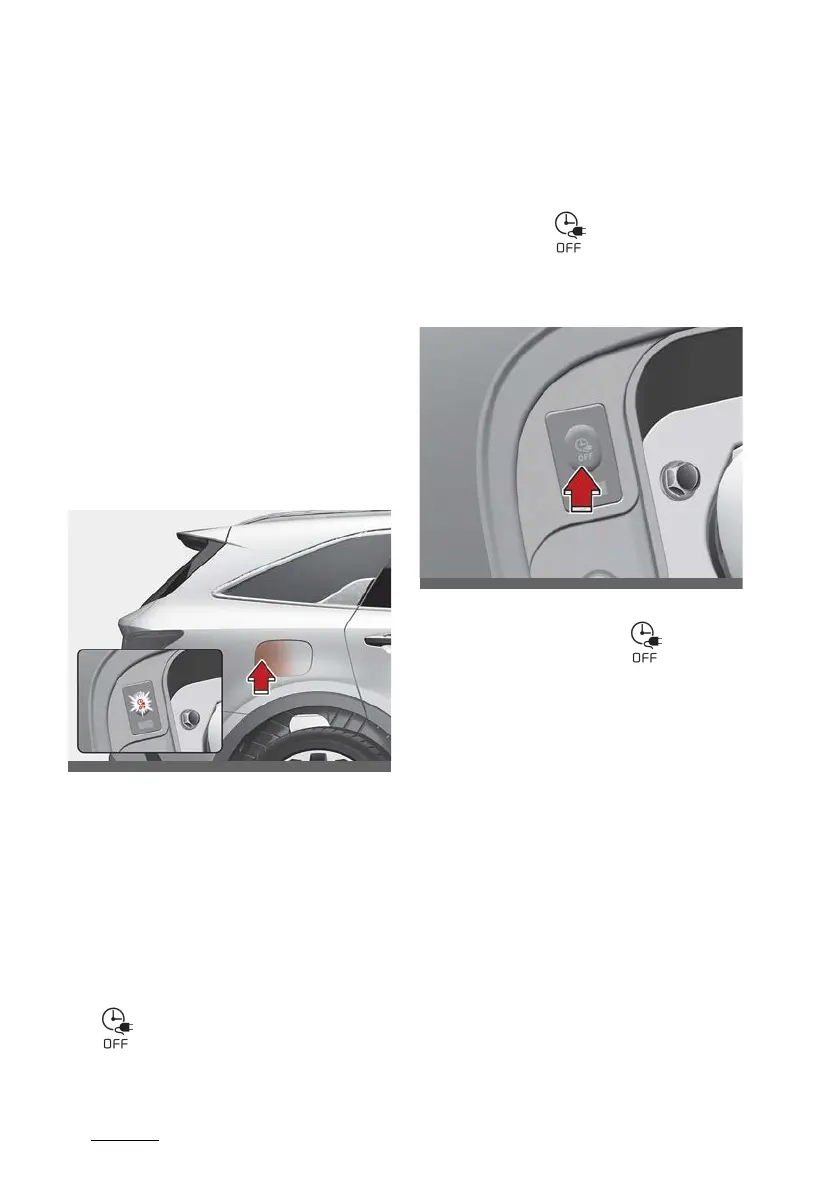
the scheduled charge release button
is appeared (for 3 minutes) to indicate
that scheduled charging is set.
僅 When scheduled charging is set,
charging is not initiated immediately
when the AC charger or portable
charging cable (ICCB: In-Cable Con
-
trol Box) is connected.
僅 If charging is required immediately,
turn off the scheduled charge using
the infotainment system and Kia Con
-
nect application, or press the vehicle's
scheduled charge release button
( ) more than 2 seconds.
僅 When the scheduled charge is set, the
charge start time is calculated by
itself. In some cases, charging may
start immediately after connecting the
charger.
僅 If you press the scheduled charging
deactivation ( ) button to immedi
-
ately charge the battery, charging
must be initiated 3 minutes after the
charging cable has been connected.
When you press the scheduled
charging deactivation ( ) button
for immediate charging, the sched
-
uled charge setting is not completely
deactivated. If you need to completely
deactivate the scheduled charge set
-
ting, use the infotainment system to
finalise the deactivation.
Refer to "AC charger" on page 1-10 or
"Trickle charger (portable charging
cable)" on page 1-12 for details about
connecting the AC charger and the
portable charger (ICCB: In-Cable Con
-
trol Box).



 To Next Page
 Loading...