3
3. Extend and retract
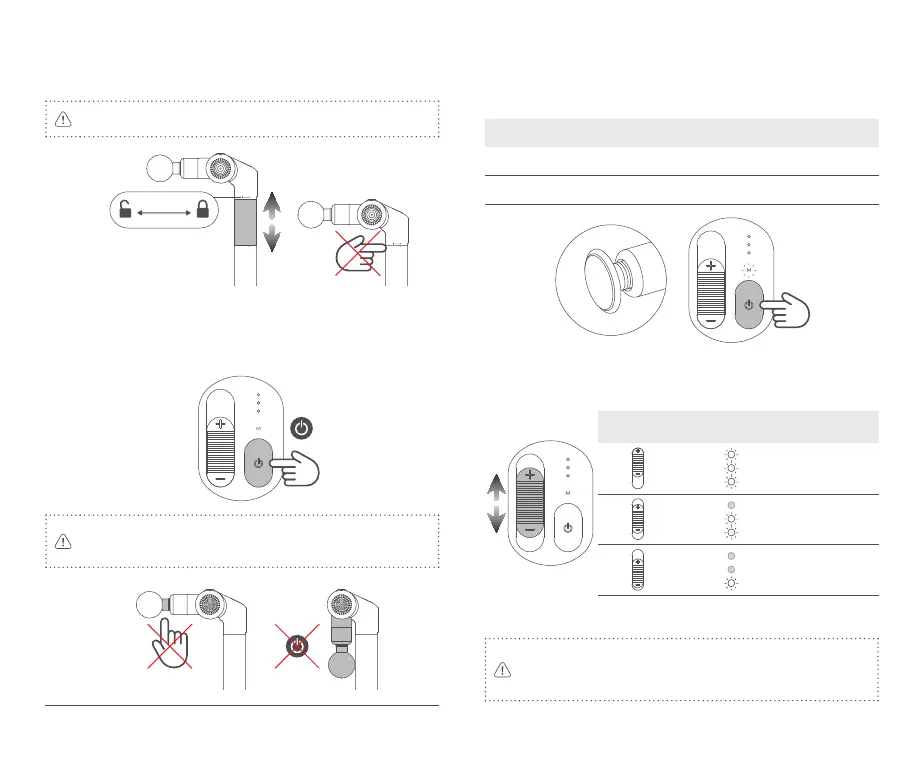
Rotate the handle in direction of icon to unlock, then pull/push it to
extend/retract, and lock it after the adjustment.
Do not hold the gaps when retract the handle, or it may hurt your
hand.
4. Power On / O
Power On: Long press the power button until hear the tone.
Power O: Long press the power button until hear the tone to power o.
The product will auto power o, if there is no operation within 3 minutes
in pause mode*.
Do not touch the middle and the back of the two massage heads while
the product is running to avoid injuries.
Do not power on the device when it is folded.
* Pause mode: Slide the speed control button down to the bottom, the revolution
speed will down to 0.
5. Hot compress
Install the heating head, and single tap the heating button when the
device is running to turn on this function.
This function is unavailable with other massage heads.
Hot compress Mode indicator Temperature
O (Default) Green Room temperature
On Yellow 40℃ ±3℃
6. Speed control
Slide the speed button to adjust revolution speed.
Revolution speed: 0*~3200rpm±10%
Figure
Revolution speed
indicator
Revolution
speed
High
Medium
Low
7. Locked motor protection
Please do not press the massage head too hard to block the motor
from rotating during use, as this can cause additional power
consumption and cause the device to shut down due to low battery
power, and can also reduce the service life of the product.
This product has locked motor protection function. If the rotation is
blocked for 10 seconds, it will stop running automatically.



 To Next Page