8
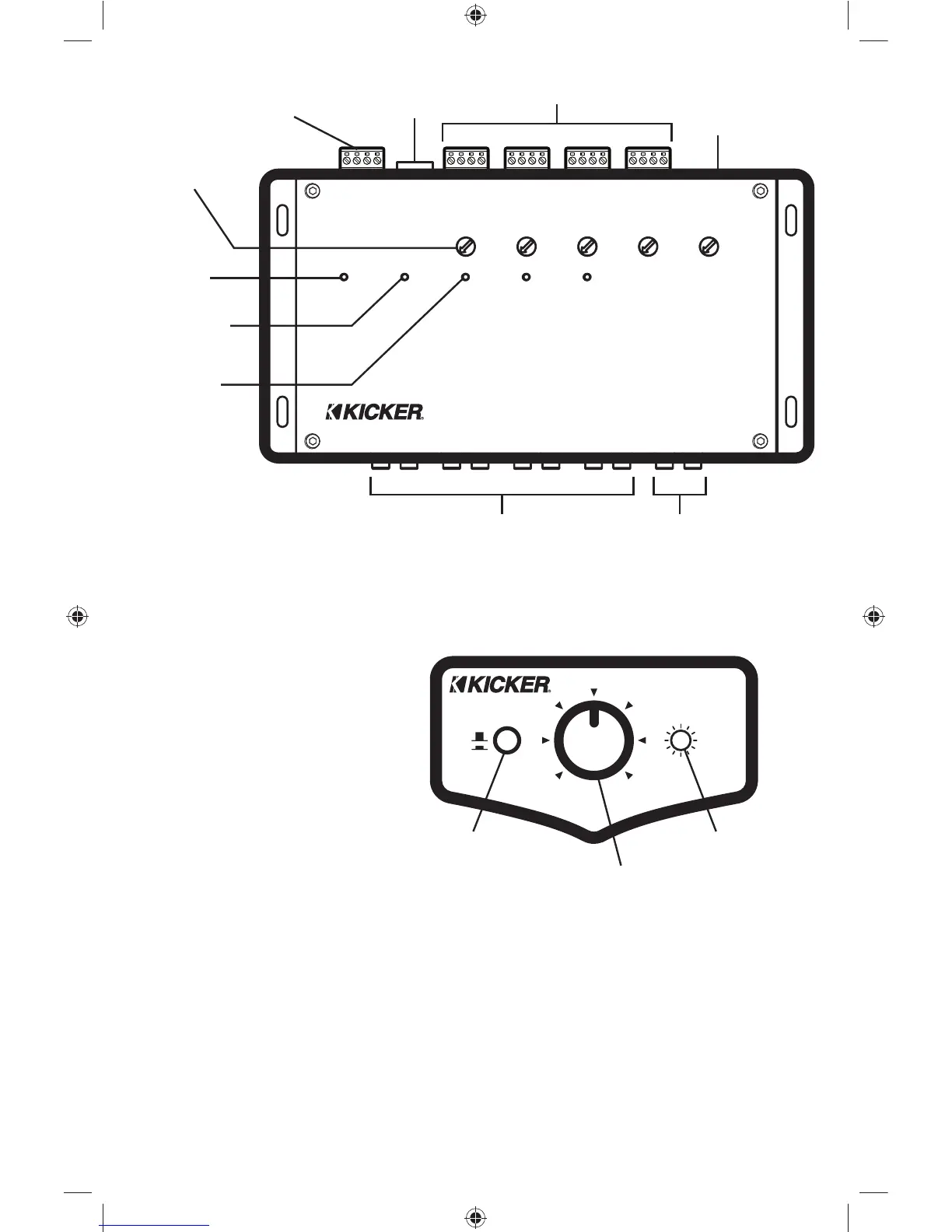
ZXSUM8
power/ground/
remote turn-on
input and output
level adjustments
low-level RCA outputs
power LED
maximum LED
channel sum
LEDs
2A fuse
low-level RCA AUX input
high-level inputs
remote input
POWER MAXIMUM CONNECTED
TO CHANNEL 1
CHANNEL 4 LEVEL
– + – +
RIGHT LEFT
CHANNEL 4 INPUT
CH4
R L
CH3
R L
CH2
R L
CH1
R L
AUX
R L
2A FUSE
GND
+12V
REMOTE IN
REMOTE OUT
CHANNEL 3 LEVEL
– + – +
RIGHT LEFT
CHANNEL 3 INPUT
CHANNEL 2 LEVEL
– + – +
RIGHT LEFT
CHANNEL 2 INPUT
CHANNEL 1 LEVEL
– + – +
RIGHT LEFT
CHANNEL 1 INPUT
CHANNEL 4
REMOTE
AUX LEVEL
CONNECTED
TO CHANNEL 1
CONNECTED
TO CHANNEL 1
Channel 3 Signal Sense: If no signal is present at the Channel 4 input, the signal connected to the Channel 3
input will be routed to both the Channel 3 and Channel 4 outputs.
ZXSUM8 Remote: The remote provides
level control of the output of Channel 4.
As shown in the installation diagrams, we
recommend always using Channel 4 as your
subwoofer channel so that you can control
the bass level with this remote. When the
AUX-IN switch is depressed the Aux-In LED
will illuminate, and the ZXSUM8 source will
be switched from the high-level inputs to the
low-level AUX input.
ZXSUM8
AUX-IN
OFF
ON
011
AUX-IN
CHANNEL 4
OUTPUT
Channel 4 remote level knob
Aux-In on/off switch Aux-In LED
2010 ZXSUM8 RevC.indd 82010 ZXSUM8 RevC.indd 8 12/28/2009 11:19:06 AM12/28/2009 11:19:06 AM



 To Next Page