1. When the unit is off, press the Power On/Off Button to turn
the unit on.
2. You can turn off the unit at any time by pressing the Power
On/Off Button.
Power On/Power Off
Use the included AUX Line-in Cable to connect an audio device
such as a smartphone, MP3 player, CD player, etc., to the
Boombox.
1. Connect the AUX Line-in Cable on the Boombox to the line
out or headphone jack of your audio device. Press the MP3
Mode Button.
2. Turn on your audio device and put it in play mode.
3. Press the MIC Button to sing along to the song played from
your MP3 player or other connected device.
4. MP3/Aux mode will automatically turn off in about 15 minutes
to save power.
5. Press the MP3 Mode Button to activate the mode again.
Using the AUX Line-in Cable
Move the Volume Knob on the side of the unit to adjust the
song volume. The mic volume is preset and does not adjust.
Volume Adjust
It is important to keep the unit as dry and clean as possible. You
may clean the cabinet with a cloth or sponge moistened with mild
soap and water. Do not attempt to use strong cleansers or
solvents, as they may cause damage.
Maintenance
1. You can select the pre-recorded song you want to sing along
to by pressing the Song Select Button to cycle to the
desired song.
2. Press the Play/Repeat Button to play the selected song.
3. Use the Microphone to sing along (press the MIC Button).
4. To repeat the same song once it finishes playing, just press
the Play/Repeat Button again.
Playing a Song
Pull UP on the mic to release it from the post on the back of the
unit. To return the mic, position it with the large hole over the post,
then press downwards on the mic to secure it.
Be relaxed and ready to sing! Press the button on the
microphone while singing or speaking. Release button to mute
microphone.
TIP: To avoid feedback (unpleasant squealing or howling sound),
do not point the mic towards the speaker.
Using the Microphone
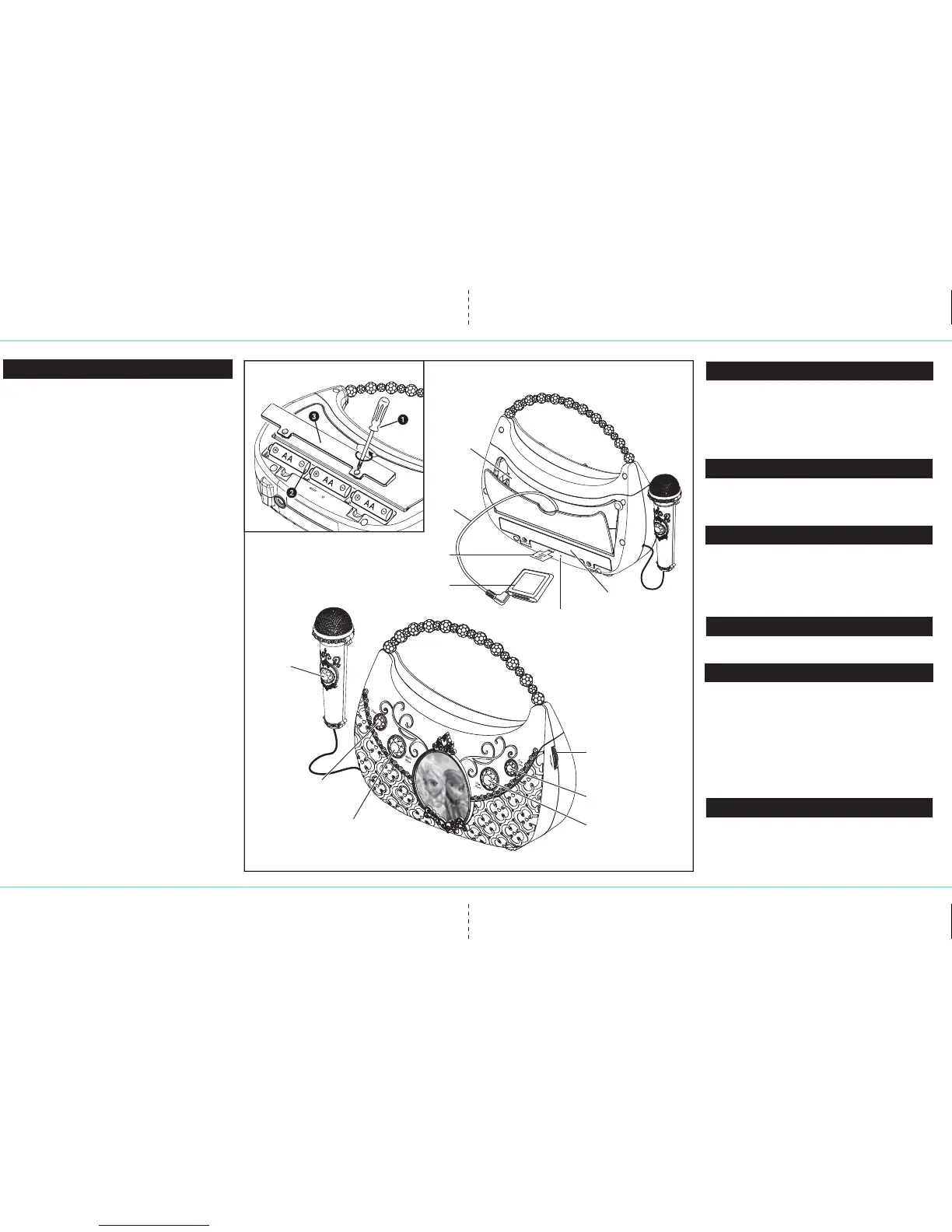
Battery Installation
Back View
Battery Compartment
MP3
Compartment
Demo Tab
Song Select Button
MIC Button
Play/Repeat Button
Volume Knob
MP3 (Aux) Mode Button
Power On/Off Button
Audio Device
(not included)
Installing the Batteries
1. Using a Phillips screwdriver, open the battery compartment door
located on the back of the unit.
2. Insert 3 new AA (R6) batteries in the battery compartment. Make
sure batteries match the + and – as indicated in the battery
compartment diagram.
3. Replace battery compartment door. Do not overtighten screw.
Battery Use Cautions and Tips for Safety & Best Performance
• Only use the recommended/supplied batteries or equivalent.
• Use alkaline batteries for longer life.
• Do not mix old and new batteries, and do not mix alkaline, carbon-zinc or
rechargeable nickel-cadmium batteries.
• Insert batteries with proper polarity (+/–) as indicated.
• Remove exhausted batteries from product.
• Recharge rechargeable batteries under adult supervision.
• Do not attempt to recharge non-rechargeable batteries.
• Do not open batteries or heat them beyond normal ambient temperatures.
• To prevent battery leakage or damage remove batteries from a product if it
will not be used for a month or longer.
• Use extreme caution handling leaking batteries (avoid direct contact with
eyes and skin). If battery leakage comes in contact with eyes,
IMMEDIATELY flush the eye with lukewarm and gently flowing water for at
least 30 minutes. If skin contact occurs, wash skin with clear water for at
least 15 minutes. Seek medical attention if any symptoms occur.
• Store in cool, dry, ventilated area away from hazardous or combustible
material.
• Do not dispose of batteries in the household trash or fire.
• Follow applicable laws and local regulations for the disposal and
transportation of batteries.
Remove Demo Tab
The Boombox has a demo tab for in-store demonstration purposes.
Make sure to remove this tab. To do so, gently pull on tab. Dispose
of tab properly.
Song Credits
Let It Go
Words and Music by Robert Lopez and Kristen Anderson-Lopez
© 2013 Wonderland Music Company, Inc. (BMI)
All Rights Reserved.
Performed by Demi Lovato
Courtesy of Walt Disney Records
In Summer
Words and Music by Robert Lopez and Kristen Anderson-Lopez
© 2013 Wonderland Music Company, Inc. (BMI)
All Rights Reserved.
Performed by Olaf
Courtesy of Walt Disney Records
For The First Time In Forever
Words and Music by Robert Lopez and Kristen Anderson-Lopez
© 2013 Wonderland Music Company, Inc. (BMI)
All Rights Reserved.
Performed by Anna
Courtesy of Walt Disney Records
Reset Button
FR-115.EM IB_Back side Size: 357 x 201 mm Color: Black May 12, 14.
AUX
Line-in
Cable


 To Previous Page
 Loading...