12
13
14
DONE
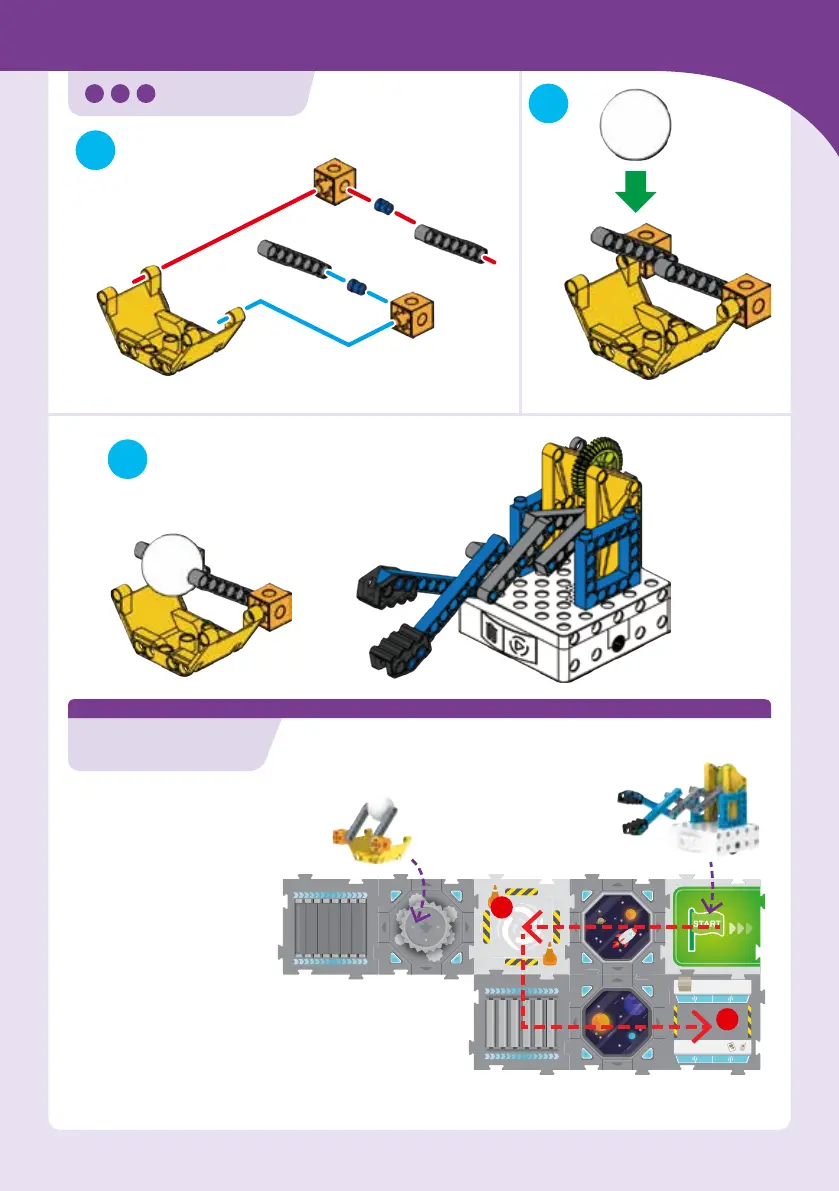
Set up the map cards as
shown. Place the ball in
the ball holder on the card
as shown.
Create a program with the
code cards to move the
claw robot from the Start
card to the event map card
A, where it will extend
its grabber claw and try
to grab the ball. With the
ball gripped in its claws
(if possible), program the
robot to move to map
card B.
A
B
Coding & Robotics: Challenge Pack 1
CLAW
CHALLENGE 2 GRAB THE BALL
MAP
Use the Start and event map cards and code cards from the base kit.
Disregard the arrows on the Start map card for this challenge.
Place the
ball in the
ball holder.
Start with the
grabber arm
pulled in (not
extended as
shown).
Ball holder


 To Next Page