8
Quick start
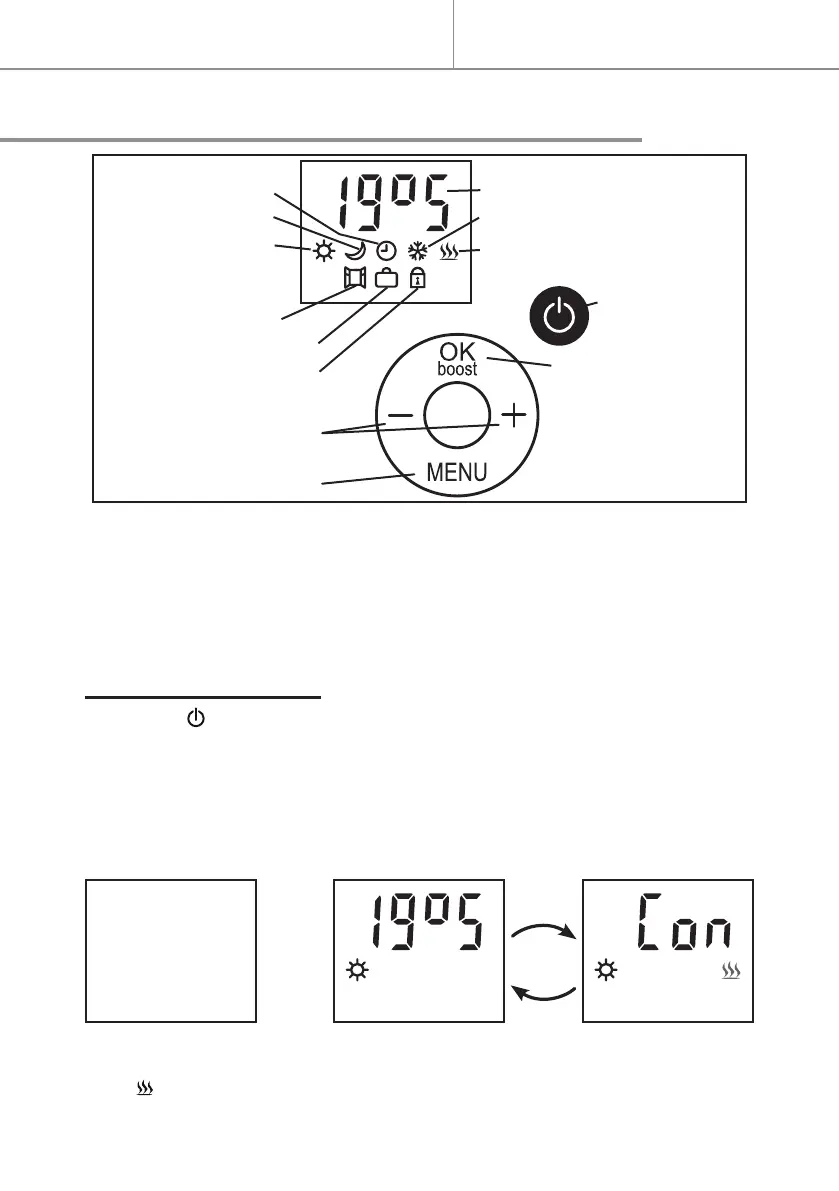
The controls
Setpoint temperature
Frost protection mode
Heating LED
ON/Standby
OK or Boost (3 sec.)
Programme mode
ECO mode
Comfort mode
Open window
Prolonged absence
Lock
Temperature settings
or Menu selection
Menu
Theiconandthevaluebeingadjustedash.Flashingstopswhentheset-
tingisvalidatedbypressingOK-boost,orafter30secondsofinaction(any
modicationtothesettingisthencancelled).
HEATING ON / STANDBY
- Press the button to switch the heat on or o (standby).
Twoshortbeepsthatincreaseinpitchsoundwhenswitchedonandthree
beepsthatdecreaseinpitchsoundwhenswitchedo.
When switched on,the setpoint temperature and currentmode are dis-
playedalternativelyevery3seconds;
Standby ON ON
The iconistheheatingLED.Itisdisplayedonandocyclically.


 To Next Page