8
PRODUCT ASSEMBLY
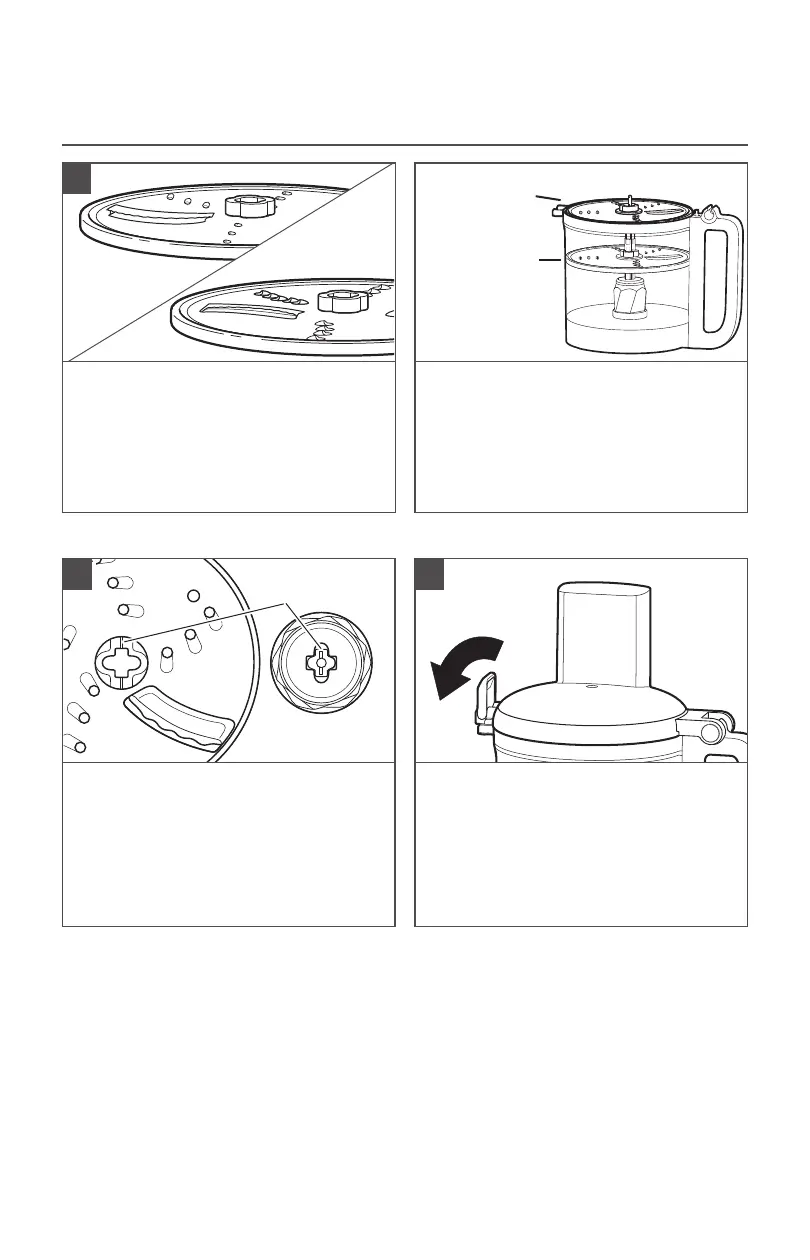
INSTALLING THE REVERSIBLE SLICING/SHREDDING DISC
To slice: Turn the Disc so that the raised
Slicing Blade is facing up.
To shred: Turn the Disc so that the small,
raised Shredding Blades are facing up.
The Disc can be placed in two different
positions: level with the top of the Bowl
for processing, and lower, inside of the
Bowl for storage.
NOTE: Make sure the Disc is level
with the top of the Bowl for best
performance.
Hold the Disc by its center hub and lower
it onto the Drive Adapter, aligning the
mark on the center hub of the Disc to the
matching mark on the Adapter. When
properly placed, the Disc should be level
with the top of the Bowl. If the Disc falls
to the storage position, lift it out, turn it
90°, and lower it again.
Install the Work Bowl Cover, and be sure
the Lid Latch is pushed down to the
locked position.
1
2 3
Process
Storage
Alignment
marks





 To Next Page