Thecontrolcanbeadjustedtoproperlychillmeatsorvegetables.
Theairinsidethepaniscooledtoavoid"spot"freezingandcan
besettokeepmeatsattheNationalLivestockandMeatBoard
recommendedstoragetemperaturesof28°to32°F(-2°to0°C).
Tostoremeat:
SetthecontroltooneofthethreeMEATsettingstostoremeatat
itsoptimalstoragetemperature.
Tostorevegetables:
SetthecontroltoVEGtostorevegetablesattheiroptimalstorage
temperatures.
NOTE:Iffoodstartstofreeze,movethecontroltotheright(less
cold),towardtheVEGsetting.Remembertowait24hours
betweenadjustments.
Youcancontroltheamountofhumidityinthemoisture-sealed
crisper.AdjustthecontroltoanysettingbetweenLOWandHIGH.
LOW(open)forbeststorageoffruitsandvegetableswithskins.
HIGH(closed)forbeststorageoffresh,leafyvegetables.
Coolairfromthefreezerisdirectedtotherefrigeratordoorbin
directlybeneaththevents.
NOTE:Thedairycompartmentandcanrackarenotassociated
withtheChilledDoorBinfeature.
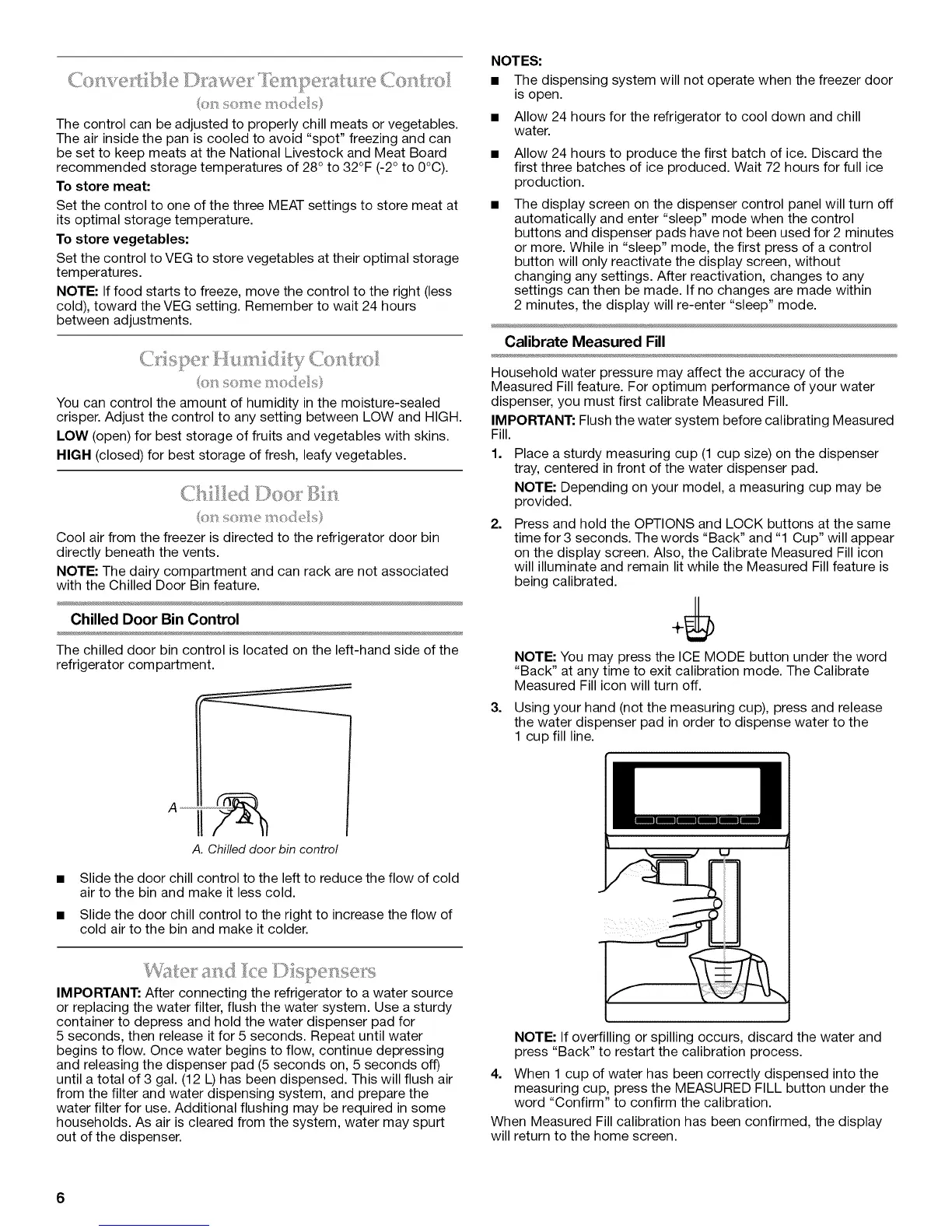
Chilled Door Bin Control
The chilled door bin control is located on the left-hand side of the
refrigerator compartment.
A. Chilled door bin control
Slide the door chill control to the left to reduce the flow of cold
air to the bin and make it less cold.
Slide the door chill control to the right to increase the flow of
cold air to the bin and make it colder.
NOTES:
• The dispensing system will not operate when the freezer door
is open.
• Allow 24 hours for the refrigerator to cool down and chill
water.
Allow 24 hours to produce the first batch of ice. Discard the
first three batches of ice produced. Wait 72 hours for full ice
production.
The display screen on the dispenser control panel will turn off
automatically and enter "sleep" mode when the control
buttons and dispenser pads have not been used for 2 minutes
or more. While in "sleep" mode, the first press of a control
button will only reactivate the display screen, without
changing any settings. After reactivation, changes to any
settings can then be made. If no changes are made within
2 minutes, the display will re-enter "sleep" mode.
Calibrate Measured Fill
Household water pressure may affect the accuracy of the
Measured Fill feature. For optimum performance of your water
dispenser, you must first calibrate Measured Fill.
IMPORTANT: Flush the water system before calibrating Measured
Fill.
1.
Place a sturdy measuring cup (1 cup size) on the dispenser
tray, centered in front of the water dispenser pad.
NOTE: Depending on your model, a measuring cup may be
provided.
2. Press and hold the OPTIONS and LOCK buttons at the same
time for 3 seconds. The words "Back" and "1 Cup" will appear
on the display screen. Also, the Calibrate Measured Fill icon
will illuminate and remain lit while the Measured Fill feature is
being calibrated.
NOTE: You may press the ICE MODE button under the word
"Back" at any time to exit calibration mode. The Calibrate
Measured Fill icon will turn off.
3. Using your hand (not the measuring cup), press and release
the water dispenser pad in order to dispense water to the
1 cup fill line.
IMPORTANT: After connecting the refrigerator to a water source
or replacing the water filter, flush the water system. Use a sturdy
container to depress and hold the water dispenser pad for
5 seconds, then release it for 5 seconds. Repeat until water
begins to flow. Once water begins to flow, continue depressing
and releasing the dispenser pad (5 seconds on, 5 seconds off)
until a total of 3 gal. (12 L) has been dispensed. This will flush air
from the filter and water dispensing system, and prepare the
water filter for use. Additional flushing may be required in some
households. As air is cleared from the system, water may spurt
out of the dispenser.
NOTE: If overfilling or spilling occurs, discard the water and
press "Back" to restart the calibration process.
4. When 1 cup of water has been correctly dispensed into the
measuring cup, press the MEASURED FILL button under the
word "Confirm" to confirm the calibration.
When Measured Fill calibration has been confirmed, the display
will return to the home screen.
6



 To Next Page