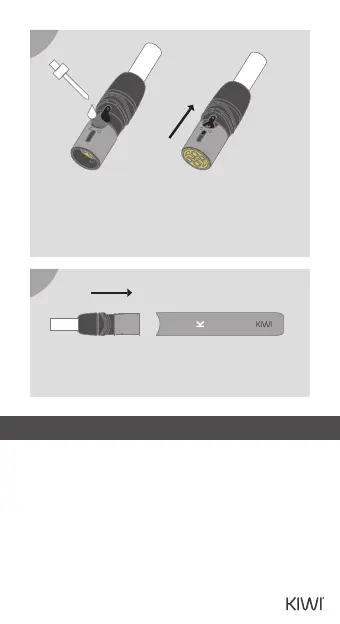
Insert the Pod into the Pen. The white light will
illuminate once, followed by a quick vibration
three times. Insert a Tip and enjoy.
03
Take the Pen out of the pack and place it into
the Powerbank (or connect it to a USB-C for
charging). The Pen will vibrate once, and the "K"
LED will ash three times. The current battery
level is indicated by the color of the LED: white
indicates 10% to 100% power, while red
indicates 0% to 10% power.
PEN CHARGE LEVEL
3. PEN DEVICE FUNCTIONS
Fill the tank with liquid, cover it with the silicone
cap, and pull the metal shield to the right
position. Leave the Pod for around 5 minutes to
ensure that the liquid fully enters the Pod.
2
3


 To Next Page