19
Programmed weekly heating mode
1. To enter the weekly heating mode press PROG and move the cursor over the clock icon at the bottom left
hand side of the LCD screen and press OK.
2. Now the cursor is flashing over the days of the week(left side of menu.
3. Use the UP and DOWN arrows to choose your day to program; 1 to 7.
4. Press the PROG key to confirm the day
5. Use the OK arrows to select the heating function between comfort, economy and frost free (you will see the
cursor on the right side of the menu scroll between the modes)
6. That is the first 30 minute period selected and it moves on to the next 30 minute period
7. Press the UP and DOWN arrow to choose the time.
8. Program each day of the week separately following the steps above.
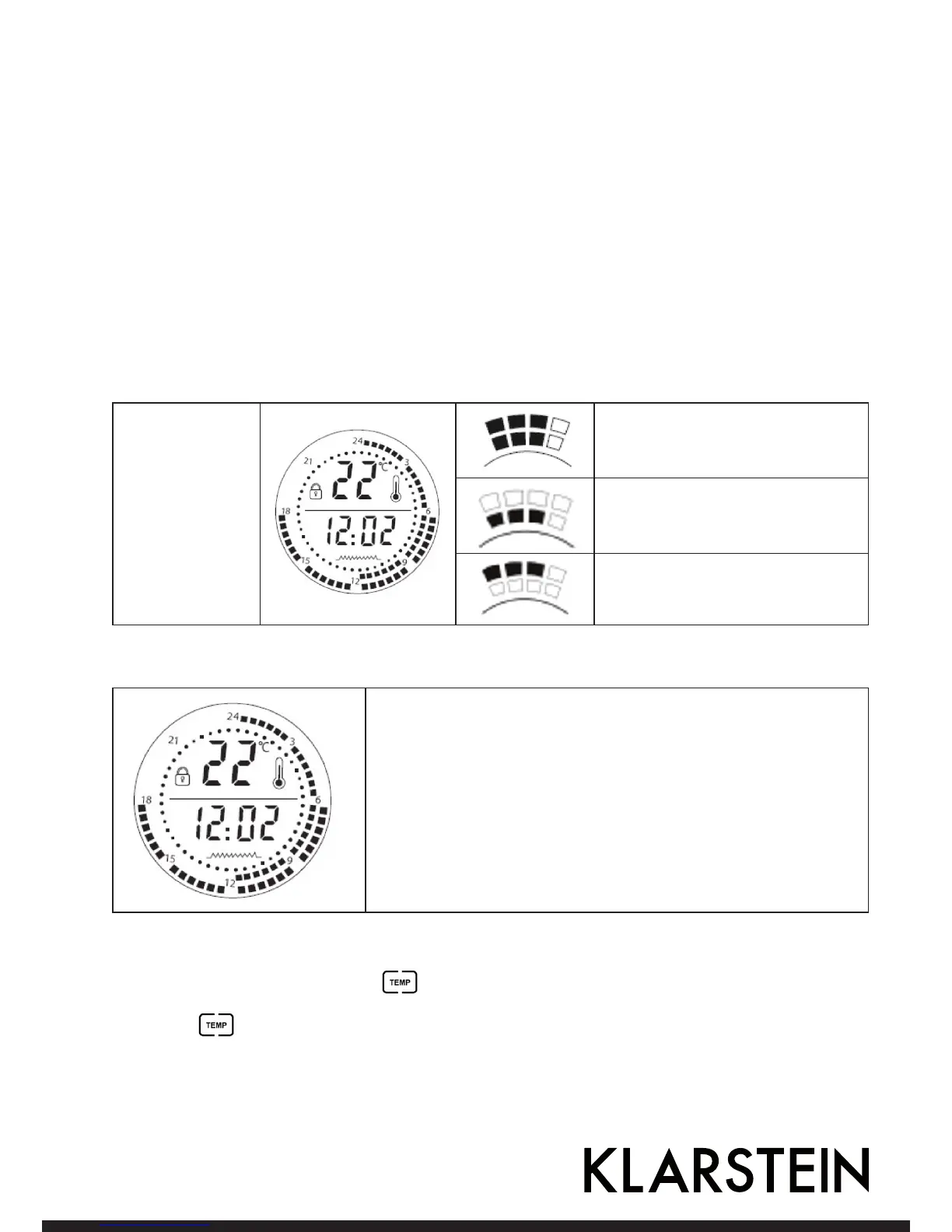
24-hour scale
24-hour scale:
Each square
represents 30
minutes
Squares on the outside and inisde
of the scale indicate Comfortable
function.
Squares on the inside of the scale
indicate Frost-free function.
Squares on the outside of the scale
indicate Economy function.
The drawing illustrates the following setting:
0 - 6am: Frost-free function
6 - 12pm: Comfortable function
12 - 18pm: Economy function.
Note:
1. The functions cann’t be set simultaneously.
2. Setting the I/0 switch to “0” position deletes all the settings from
the memory.
Setting temperature
1. To adjust the temperature press the
key. The temperature starts to flash on the LCD display.
2. Use up and down keys to select the desired temperature.
3. Press the key again to confirm.



 To Next Page