ENGLISH
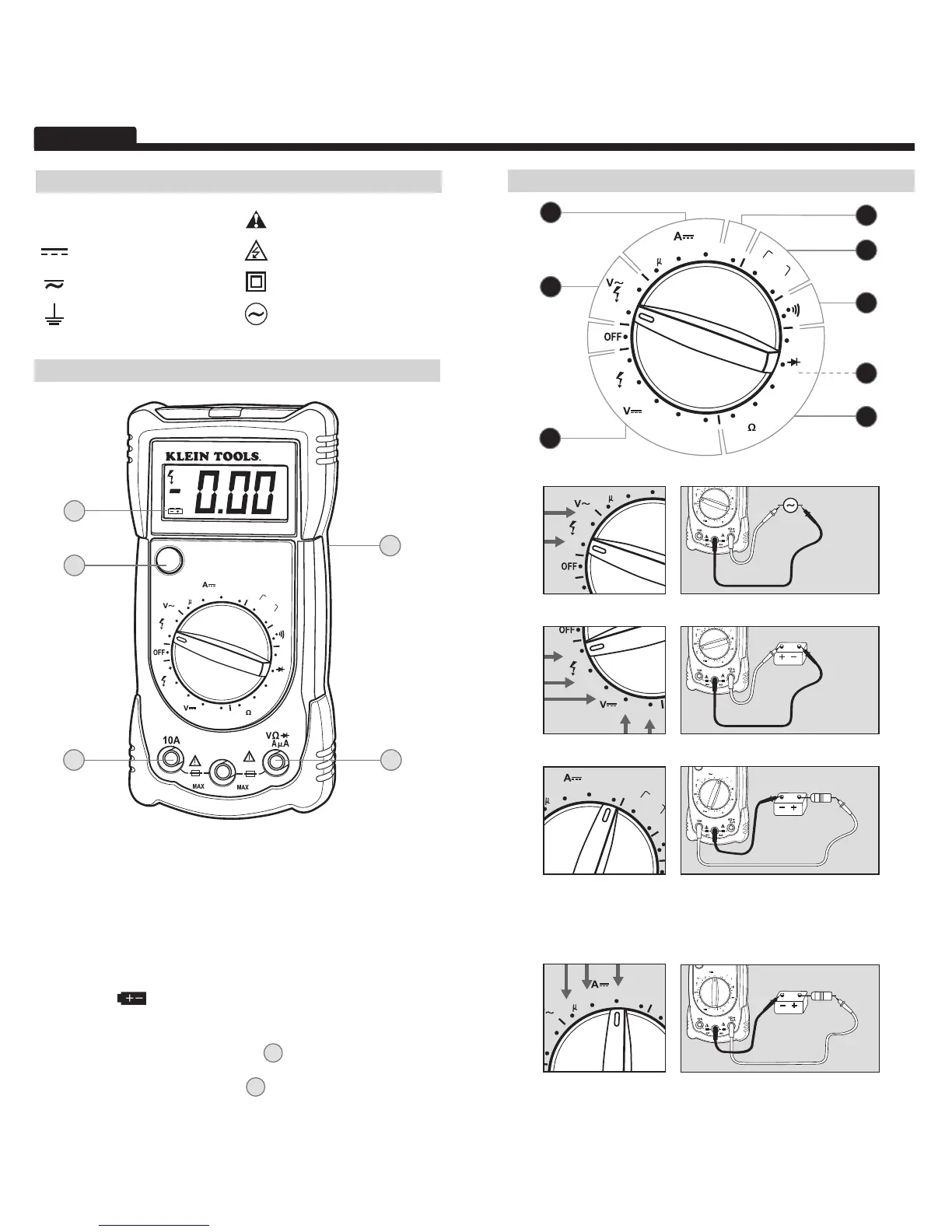
A.B. Use properly safety rated leads.
A. Do not attempt to measure more than 600V or 200mA.
B. Do not attempt to measure more than 10A.
C. Data Hold
• Press to hold the current input on the display.
• Press again to return to live reading.
D.E. Battery / Fuse Replacement
• When
indicator is displayed on the LCD, batteries must be
replaced.
• Remove rubber boot, back screw, and replace 9V battery.
• If more than 200mA is applied to
A
, replace with 250mA/250V
fast-blow fuse.
• If more than 10A is applied to
B
, replace with respective 10A /
500V fast-blow fuse.
COM
m
10A/250V
~
250mA/250V
~
600V MAX
MM100
HOLD
200m
2
20m
200m
20
600
600
200
10A
9V
1.5V
200
2M
200k
20k
200
2k
200
BATT.
B
C
E
On Back
D
A
FUNCTION INSTRUCTIONS
200
200
• Attach red lead to “mAμA” input.
• Current above 200mA will require fuse replacement.
4. DC Current (small): < 200mA
COM
m
10A/250V
~
250mA/250V
~
600V MAX
200m
2
20m
200m
20
600
600
200
10A
9V
1.5V
200
2M
200k
20k
200
2k
200
BATT.
FEATURE DETAILS
SYMBOLS
~
AC Alternating Current Warning or Caution
DC Direct Current Dangerous Levels
DC/AC Voltage or Current Double Insulated Class II
Ground AC Source
1. AC Voltage:
<
600V
• Start with this setting if current level is unknown.
• Attach red lead to “10A” input.
• Current above 10A will require fuse replacement.
2. DC Voltage: < 600V
3. DC Current (large): < 10A
200m
2
20m
200m
20
600
600
200
10A
9V
1.5V
200
2M
200k
20k
200
2k
200
BATT.
8
2
1
4
7


 To Next Page
 Loading...