User manual
René Koch AG 044 782 6000
Seestrasse 241
044 782 6001 Fax
8804 Au/Wädenswil
info@kochag.ch BA TC40 e 11.14
Programming the ring tones
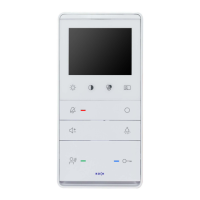
Switch on programming mode Press the Function button
○ (6) for approx. 8 sec. until you hear
a short beep
The red and green LEDs will flash on the monitor
Press Talk button (1) briefly
The red and green LEDs will flash on the monitor
Programming mode switched on
Ring tone for Entrance 1 (AS 0) Press the Unlock door repeatedly until you hear the ring tone
you require
Ring tone for a Landing call Press the Function button ○ repeatedly until you hear the ring
tone you require
Ring tone for Entrance 2 and
others (AS1-63) Press the Talk button repeatedly until you hear the ring tone you
require
Ring tone for an Internal call Press the Function button □ repeatedly until you hear the ring
tone you require
Switch off programming mode If there has been no activity for 8 sec, the programming mode
switches off automatically
A beep sounds; the red and green LEDs go out
Programming mode switched off
Subject to technical changes


 To Previous Page
 Loading...