EasyManua.ls Logo

Kodak SIX-20 - Page 6

Kodak SIX-20
26 pages
Print Icon
To Next Page IconTo Next Page
To Previous Page IconTo Previous Page
Loading...
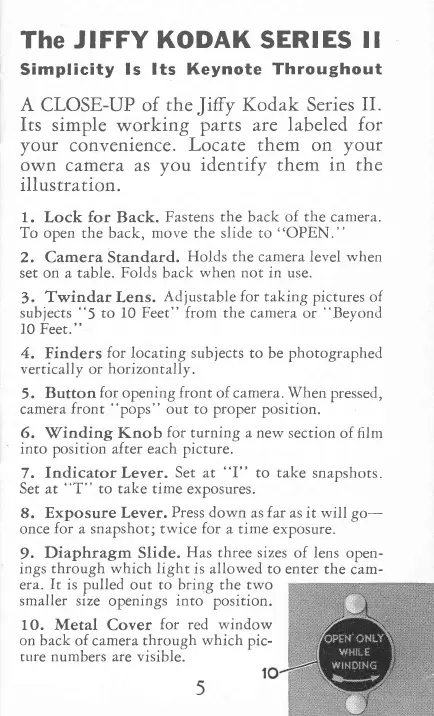
The JIFFY
KODAK
SERIES
ll
Simplicity
ls lts Keynote
Throughout
A
CLOSE-UP of
the
Jitry
Kodak Series
II.
Its
simple
working
parts are
labeled for
your
convenience
. Locate them on
your
own
camera as
you
identifv them
in the
illustration
.
'
1.
Lock
for
Back.
Fastens
the
back
of the
c^mera.
To open the
back,
move
the
slide to
"OPEN.
"
2. Camera Standard.
Holds the
camera
level when
set on a table.
Folds
back
when
not in use.
3.
Twindar Lens.
Adjustable
for
takine
pictures
of
subjects
"5
to
10 Feet" from the
cameta or
"Beyond
10 Feet."
4.
Finders
for
locating subjects
to
be
photographed
vertically
or
horizont
ally.
5.
Button
for
opening
front
of
camera.
When
pressed,
camera
front
"pops"
out
to
proper
position.
9.
Vinding
l(nob
for
turning a new
section of film
into
position
after
each picture.
7.
Indicator Lever.
Set
at
"I"
to take
snapshots.
Set
at
"T"
to take time
exposures.
8. Exposure
Lever.
Press
down
asfar as it
will
go-
once
fot
a snapshot; twice for
a
time
exposure.
9.
Diaphragm
Slide.
Has
three sizes
of
lens
open-
ings through
which light
is allowed to
enter the
cam-
era.
It
is pulled out to
bring
the two
smaller size
openings
into
position.
10. Metal
Cover
for red window
on
back
of
camera
through
which
pic-
trlre numbers are visible.

Related product manuals