14
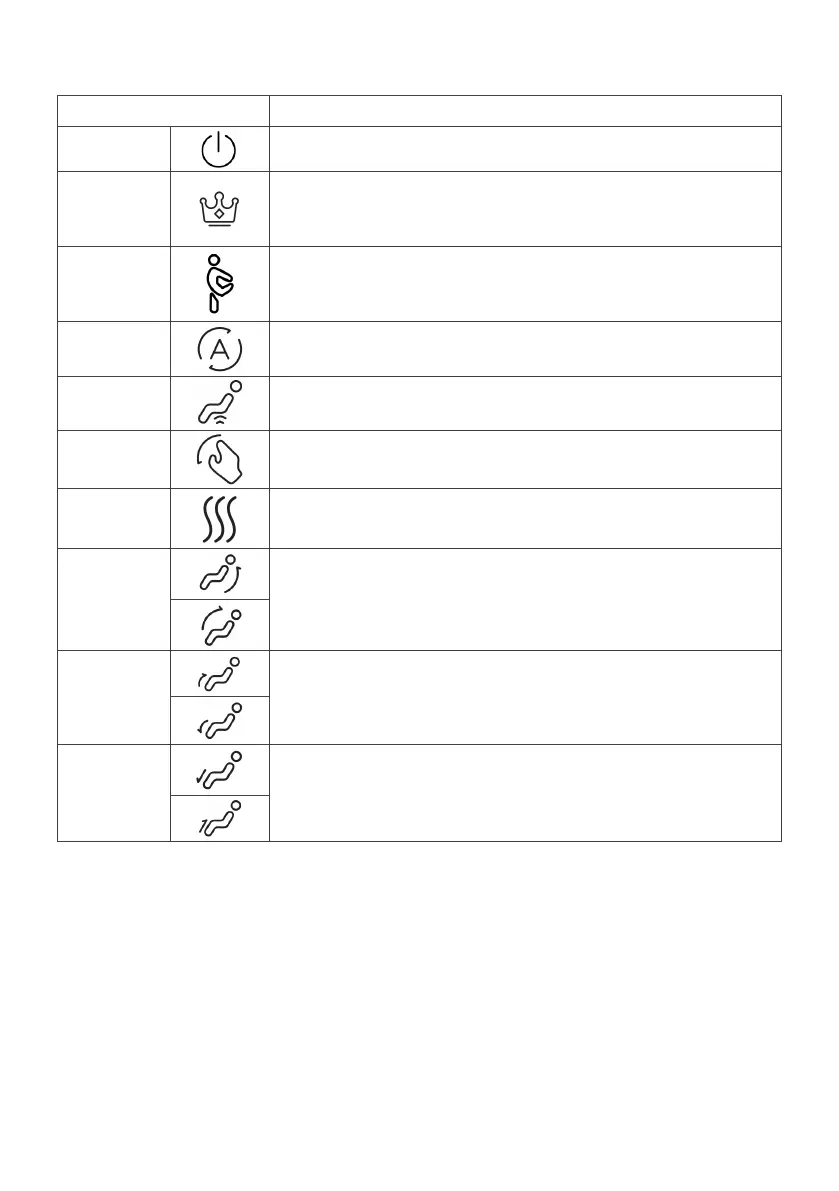
Control Panel Functions
Button Function
Power
Press to turn the massage chair on/off.
Master
Press to switch to Master mode. Master mode offers a more
intense and comprehensive full-body massage, targeting
various muscle groups.
Stretch
Press to switch to Stretch mode. This mode focuses on
stretching the muscles and joints, promoting flexibility and
relieving stiffness.
Auto
Press to switch between multiple auto modes. Select an
auto mode for targeted massage according to your needs.
Hip Mech
Press to turn the massage rollers on the hip on/off and
adjust the strength from levels 1 to 3.
Manual
Press to switch to manual massage. Select different
massage methods according to your needs.
Heating
Press to turn heat therapy on/off.
Back Up/
Back
Down
Press and hold to adjust the back rest up/down and release
to lock in the current angle of the back rest.
Leg Up/
Leg
Down
Press and hold to adjust the leg rest up/down and release to
lock in the current angle of the leg rest.
Extend
Up/
Extend
Down
Press and hold to adjust the footrest up/down and release
to lock in the current angle of the footrest.


 To Next Page