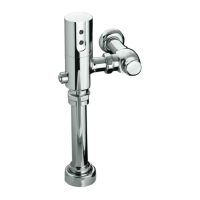
Remove the DC Sensor
Close the control stop valve (refer to the ″Control Stop Valve
Operation″ section).
Using a 3/32″ hex head wrench, remove the setscrew from the
valve cap.
Remove the cap by carefully lifting from the valve body.
Disconnect the DC sensor connector to the solenoid by grasping
each side of the connector pair and pulling apart. Do not separate
the connector pair by pulling on the wires.
Position the cap on its side and look inside.
Remove the wedge clip that holds the DC sensor in place inside
the cap.
Turn the cap over and slide the sensor into your hand.
NOTE: The batteries inside the sensor may be considered hazardous
waste. Discard the old sensor and/or batteries in accordance with
any applicable codes.
If replacing the DC sensor, discard the old DC sensor and
batteries.
Cap
Setscrew
DC Sensor
DC Sensor
Connector
Wedge Clip
1058866-5-D 8 Kohler Co.


 To Next Page
 Loading...