The KOIOS Electronic Kitchen Scale is a versatile and precise instrument designed for home use, offering a range of features for accurate measurement of ingredients.
Function Description
This electronic kitchen scale is primarily used for weighing food items and measuring liquids. It supports both weight and volume measurements, with specific modes for water and milk. The scale incorporates a high-precision strain gauge sensor to ensure accuracy. It also includes a Zero/Tare function, which allows users to reset the scale to zero after placing a container or an initial ingredient, enabling the measurement of subsequent ingredients without removing the previous ones. For convenience, the scale features an auto shut-off function to conserve battery life.
Important Technical Specifications
- Measuring Modes: WATER or MILK.
- Weight Unit System: g, kg, oz, lb:oz convertible.
- Volume Unit System: ml (water)/ml (milk) convertible.
- Battery: Built-in rechargeable 3.7V battery.
- Charging: Micro USB with a 5V charger (current ≤ 2A). Charging takes approximately 120 minutes for a full charge.
- Indicators: Low battery power and Overload indication.
- Sensor: High-precision strain gauge sensor.
- Functions: Zero/Tare function, Auto shut off.
Usage Features
Charging:
Before first use or after a long period of storage, the scale should be fully charged. The indicator light flashes during charging and turns off when fully charged. A full charge takes about 120 minutes. It is crucial to use a Micro USB with a 5V charger and a current of 2A or less; chargers with a voltage greater than 5V are not permitted. For prolonged storage, it is recommended to charge the appliance every 3 months.
LCD Display:
The LCD displays various information including:
- Battery indicator: Shows the current battery level.
- Tare/Zero Function indicator: "TARE" is displayed when the tare function is active for items ≥ 100g.
- Milk/Water indicators: Shows which liquid mode is selected.
- Weight units: g, kg, lb:oz.
- Volume unit: ml.
The LCD may vary slightly from the depicted image, which is indicative only.
Buttons:
- ON/OFF: Press to turn on, long press to turn off.
- UNIT: Used for unit conversion (weight or volume).
- TARE: Activates the Zero/Tare function. If an item is less than 100g, only "0" is displayed. If an item is 100g or more, both "0" and "TARE" are displayed.
Manual Shut Off:
To maximize battery life, it is recommended to manually turn off the scale by pressing the "ON/OFF" button again after use. If the display shows "0" or a reading, press and hold the "ON/OFF" button for 3 seconds to turn off the scale.
Auto Shut Off:
The scale will automatically shut off if the display shows "0" or the same weight reading for 4 minutes, helping to conserve battery.
Weighing Procedure:
- Place the scale on a solid, flat surface.
- If using a bowl, place it on the scale.
- Press "ON/OFF" to turn on the scale.
- Wait until the LCD displays "0" before starting to weigh. If needed, press the "UNIT" button to convert to the desired weight mode.
- Load the object to be weighed. The LCD will display the weight reading.
- For water or milk, press the "UNIT" button to select the volume mode and view the volume of the liquid.
Calibrating Procedure (Tare Function):
To measure precise weights without removing previous loads:
- Place the first load/bowl on the scale and get a weight reading.
- Briefly press the "TARE" button to reset the LCD reading to "0" before adding the next load/bowl. The scale is now tared.
- This operation can be repeated for multiple ingredients.
- After all objects are removed, the scale may show a negative weight. Press the "TARE" button to return the estimated value to zero.
Warning Indicators:
- Low Voltage Battery: Indicated by a "+" symbol and "Lo". The scale needs to be charged.
- Scale Failure: Indicated by "EEEE". This means the maximum capacity has been exceeded. Remove the item to prevent scale malfunction.
Maintenance Features
- Cleaning: Clean the scale with a slightly damp cloth. Do NOT immerse the scale in water or use caustic/abrasive cleaning agents.
- Immediate Cleaning: Clean all plastic parts immediately after direct contact with fats, spices, vinegar, and strongly flavored/colored foods. Avoid contact with acids and citrus juices.
- Placement: Always use the scale on an even, flat surface. Do NOT use it on carpet.
- Handling: Do NOT strike, shake, or drop the scale, as it is equipped with an accurate high-precision graduation sensor.
- Storage: Store the product in a cool, dry, and well-ventilated place. Extreme temperatures (too high or too low) can affect battery lifetime.
- Troubleshooting (Power On): If the scale does not turn on, check if it is sufficiently charged. Fully charge the appliance before first use or after a long period of non-use.
- Charger and Accessories: Use only the appropriate charger and approved accessories.
- Disposal: This product cannot be discarded as household garbage. It should be sent to collection points for electrical and electronic equipment.
- Intended Use: The scale is intended for home use only, not for commercial purposes.

 Need help?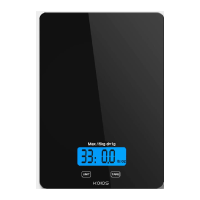

 To Next Page
 General