The Konftel C50800 Hybrid kit is a comprehensive collaboration solution designed to facilitate efficient meetings regardless of distance, offering crystal clear audio and sharp video. This system integrates a high-quality camera, a central hub, an audio conferencing unit, and a PoE injector, with options for expanding its capabilities through additional accessories. The Konftel C50800 Hybrid is built on Konftel's OmniSound® audio technology, ensuring superior sound quality for all participants.
Function Description:
The Konftel C50800 Hybrid kit provides a complete setup for video conferencing in various room sizes. It combines a professional conference camera, a central connectivity hub, and a powerful audio conferencing unit to create a seamless meeting experience. The system is designed for ease of installation and use, allowing users to quickly set up and conduct meetings. It supports both USB connectivity for laptops and direct screen connections via HDMI, offering flexibility in how the system integrates with existing meeting room infrastructure. The hybrid nature of the system allows for versatile connectivity options, catering to different meeting scenarios and user preferences.
Important Technical Specifications:
The Konftel C50800 Hybrid kit comprises several key components, each with its own specifications:
Optional Accessories:
- Konftel Daisy-chain Cables (Part no. 900102152): These cables allow for connecting a series of up to three Konftel 800 devices. This extends both the sound distribution and audio range, providing maximum coverage for larger rooms with more than 20 people.
- Konftel Smart Microphone (Part no. 900102144): This microphone expands the range of the Konftel 800, enabling it to handle larger conferences with up to 20 people in the room, ensuring everyone is heard clearly.
Usage Features:
The Konftel C50800 Hybrid is designed for straightforward installation and operation.
- Driver Installation: Before connecting the USB cable C from the Konftel OCC Hub to a laptop, it is crucial to ensure that the DisplayLink driver is installed on the laptop. The driver can be downloaded from displaylink.com/downloads. This step is essential for the system to function correctly with the laptop.
- USB Connection: Once the DisplayLink driver is installed, connect the USB cable C from the Konftel OCC Hub to the laptop. Initial configuration may take up to 60 seconds, but subsequent reconnections will be much faster, typically around 10 seconds.
- Direct Screen Connection (Optional): Users have the option to connect the screen directly to their computer, usually via an HDMI cable (not included). In this scenario, the DisplayLink driver is not required, offering an alternative setup for video output.
- Audio Expansion: For larger meeting spaces, the Konftel Daisy-chain Cables can be used to link multiple Konftel 800 units, significantly extending the audio pickup and distribution range.
- Microphone Expansion: The Konftel Smart Microphone can be added to enhance audio capture in larger rooms, accommodating more participants and ensuring clear communication.
- Remote Control: The Konftel Cam50 camera comes with a remote control, allowing users to easily adjust camera settings and angles during a meeting.
- Versatile Connectivity: The Konftel OCC Hub provides multiple USB ports for connecting various Konftel devices (Konftel 800, Konftel Ego, Konftel 55/300-series) and a laptop, making it a central point for all connections.
Maintenance Features:
While the manual primarily focuses on installation and usage, some aspects imply maintenance considerations:
- Software Updates: Although not explicitly detailed, devices like the Konftel Cam50 and Konftel 800, being part of a modern conferencing system, would typically receive firmware updates to ensure optimal performance, compatibility, and security. Users should regularly check the Konftel website for available updates.
- Driver Management: Keeping the DisplayLink driver updated on the laptop is important for consistent and reliable performance of the video conferencing system.
- Cable Management: The inclusion of Velcro® with the Konftel OCC Hub suggests an emphasis on neat and organized cable management, which helps prevent damage to cables and connections, contributing to the longevity of the system.
- Battery Replacement: The remote control for the Konftel Cam50 requires two AAA batteries, which will need to be replaced periodically.
- Safety Declarations: Each component includes a safety declaration, indicating that users should adhere to safety guidelines for proper handling and operation, which contributes to the device's lifespan and user safety.
- Cleaning: While not specified, general electronic device cleaning practices (e.g., wiping surfaces with a soft, dry cloth) would apply to maintain the aesthetic and functional integrity of the components.
Konftel's commitment to cutting-edge technology, particularly its OmniSound® audio, ensures that the C50800 Hybrid kit delivers a high-quality experience. The modular design, with optional accessories, allows the system to be tailored to specific room sizes and meeting requirements, making it a flexible and scalable solution for modern collaboration.

 Need help?
 General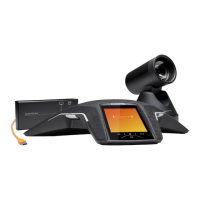

 To Next Page