EasyManua.ls Logo

Konftel Cam20 - User Manual

Konftel Cam20
9 pages
Print Icon
To Next Page IconTo Next Page
Loading...
KONFTEL.COM
Konftel Cam20
USER GUIDE

Other manuals for Konftel Cam20

Question and Answer IconNeed help?

Do you have a question about the Konftel Cam20 and is the answer not in the manual?

Summary

Safety Precautions

Installation and Disassembly Guidelines

Covers safe installation practices and prohibits unauthorized user disassembly of the device.

Operational and Environmental Warnings

Warns about electromagnetic fields, avoiding water/moisture, and not opening the casing.

CE Declaration

States conformity with EU directives and provides a link for the complete declaration.

Packing List

Included Components

Lists all items included in the Konftel Cam20 package, such as the camera, remote, batteries, and guides.

Installation

Connection Diagram

Illustrates connecting the Konftel Cam20 to a display and computer via HDMI and USB cables.

Remote Control

Button Functions and Operation

Explains the purpose and operation of each button on the remote control for camera functions like setup, zoom, and focus.

Service and Warranty

Support and Warranty Details

Outlines the two-year warranty, service options, and contact information for Konftel support.

Overview

The Konftel Cam20 is a conference camera designed to facilitate remote collaboration with high-quality video. This user guide provides essential information for its safe installation, operation, and maintenance, ensuring an optimal user experience.

Function Description:

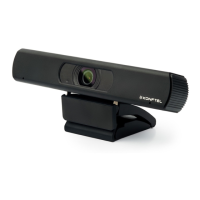
The Konftel Cam20 is a dedicated conference camera that captures video for virtual meetings. It is equipped with a lens that provides a clear image, suitable for various meeting environments. The camera is designed to be connected to a computer via a USB cable, allowing it to function as a webcam for video conferencing applications. Additionally, it features an HDMI output, enabling direct connection to a display for video output. The device is controlled via a remote control, offering a range of functionalities to adjust camera settings and position.

Usage Features:

The Konftel Cam20 offers several features to enhance the user's meeting experience:

  • Installation and Connectivity: The camera can be easily set up by connecting it to a computer via a USB 3.0 cable. For video output to a display, an HDMI cable (not included) can be used. The camera's stand allows for stable placement on a monitor or a flat surface.
  • Remote Control Operation: The included remote control is the primary interface for managing the camera.
    • Camera Select Buttons (10): These buttons allow users to select which camera to operate if multiple Konftel cameras are present.
    • Position Buttons (2): Used in conjunction with the "Set Preset Button" to store or recall specific camera positions.
    • Set Preset Button (4): This button, when pressed with a numeric button (0-9), allows users to save a current camera position as a preset.
    • Clear Preset Buttons (13): Used with a numeric button (0-9) to erase a previously saved preset position.
    • Pan-Tilt Control Buttons (5, 14): These arrow buttons enable users to pan (move horizontally) and tilt (move vertically) the camera. The "HOME" button (5) returns the camera to its original, centered position.
    • Set Pan Left/Right (8): This feature allows users to set the direction of the pan. By simultaneously pressing "L/R SET" + 1 "STD", the pan direction is set to the standard L/R Set. Pressing "L/R SET" + 2 "REV" reverses the pan direction.
    • Zoom Buttons (7): The "+" and "-" buttons control the zoom function. Users can perform slow zoom (in or out) or fast zoom (in or out) to adjust the field of view.
    • Focus Buttons (9): These buttons manage the camera's focus.
      • AUTO: Automatically adjusts the focus to the center of the object.
      • MANUAL: Allows for manual focus adjustment. "FAR" focuses on distant objects, while "NEAR" focuses on closer objects.
    • BLC (Backlight Compensation) ON/OFF Button (16): This button enables or disables backlight compensation, which is effective only in auto exposure mode. If a light source behind the subject makes the subject appear dark, activating this function can improve visibility. Pressing it again disables the function.
    • Menu Button (15): Used to enter or exit the camera's menu for advanced settings.
    • Back Button (6): Returns to the previous screen or setting in the menu.
    • Standby Button (1): Intended to put the camera into standby mode, though the manual notes this feature is not supported.
    • * Button (3) and # Button (11): These buttons are used in conjunction with other buttons for specific functions, such as setting camera IR addresses.
    • Set Camera IR Address Buttons (12): By pressing "*"+"#"+"F1" through "F4", users can set the camera's IR address, which is useful when operating multiple cameras with a single remote control.
    • PTZ Reset Button (17): Not supported by this device.
  • Image Quality: The Konftel Cam20 is designed to deliver a sharp video image, which is crucial for effective meetings. The camera's technology focuses on providing crystal clear visuals.
  • User-Friendly Design: The camera is designed for ease of use, from its simple installation process to its intuitive remote control.

Maintenance Features:

The Konftel Cam20 is designed with user safety and product longevity in mind, with specific guidelines for maintenance and care:

  • Careful Installation: It is crucial to place the product stably and securely to prevent damage. The camera should not come into contact with any liquid, gas, or solid material that could cause corrosion to its shell. This precaution helps maintain the camera's physical integrity and operational performance.
  • Unauthorized Disassembly: The Konftel Cam20 contains no user-serviceable parts. Attempting to disassemble the device will void the warranty. This emphasizes that any internal repairs or maintenance should only be performed by authorized personnel.
  • Environmental Protection: The device should not be exposed to water or moisture, as this can lead to internal damage and malfunction.
  • Casing Integrity: Users are explicitly warned not to open the casing of the Konftel Cam20. This reinforces the point about unauthorized disassembly and protects the internal components from damage.
  • Electromagnetic Fields: Users are advised that electromagnetic fields at specific frequencies may affect the image quality. While not a direct maintenance task, it is a consideration for placement to ensure optimal video performance.
  • Warranty and Support: Konftel provides a two-year warranty on its conference devices. For service after the warranty period, users are directed to contact their reseller for a cost estimate. For any questions regarding warranty or service, users can contact the Konftel support center. This ensures that professional assistance is available for any issues that may arise, contributing to the long-term usability of the device.

In summary, the Konftel Cam20 is a robust conference camera offering essential features for high-quality video conferencing, with a strong emphasis on user safety and professional support for maintenance.

Konftel Cam20 Specifications

General IconGeneral
Megapixel- MP
PTZ controlYes
Digital zoom8 x
Privacy typePrivacy shutter
Focus adjustmentAuto
Vertical field of view105 °
Horizontal field of view120 °
Number of camera presets255
Cables includedUSB
USB cable length5 m
USB 3.2 Gen 1 (3.1 Gen 1) Type-B ports quantity1
Mounting typeStand/Wall mounting
Product colorBlack
LED indicatorsStatus
Maximum frame rate30 fps
Supported video modes2160p
Video formats supportedH.264, M-JPEG, NV12, YUY2
Maximum video resolution- pixels
Windows operating systems supportedWindows 10, Windows 7, Windows 8
Operating temperature (T-T)-10 - 40 °C
CertificationEMC: 2014/30/EU, EMC Regulations 2016, LVD: 2014/35/EU, Electrical Equipment (Safety) Regulations 2016, WEEE: 2012/19/EC, RoHS: 2011/65/EU, REACH: EC 1907/2006
Power consumption (max)3 W
Remote control battery typeAAA
Harmonized System (HS) code85258900
Quantity per master (outer) case20 pc(s)
Package depth240 mm
Package width110 mm
Package height120 mm
Package weight760 g
Warranty period2 year(s)
Sustainability certificatesLow Voltage Directive (LVD), REACH, RoHS, WEEE
Number of microphones2
Weight and Dimensions IconWeight and Dimensions
Depth34 mm
Width194 mm
Height42 mm
Weight340 g

Related product manuals