EasyManua.ls Logo

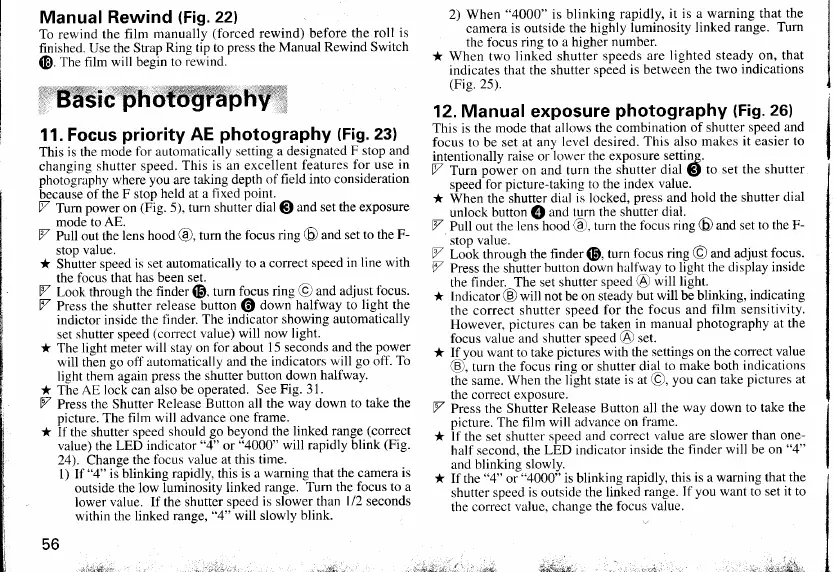
Konica Minolta HEXAR RF - Basic photography; Focus priority AE photography; Manual exposure photography

Konica Minolta HEXAR RF
29 pages
Print Icon
To Next Page IconTo Next Page
To Previous Page IconTo Previous Page
Loading...
Manual Rewind
Gig.22l
To rewind the
film
manually
(forced
rewind) before
the roll
is
finished.
Use the Strap
Ring tip to
press
the Manual
Rewind Switch
@.
fne film
will
begin
to
rewind.
*Bff3icffiottrffiryfi'b
11. Focus
priority
AE
photography
(Fig.23)
This is the
mode
for automatically
setting a designated
F stop and
changing
shutter speed.
This is an excellent
features
for use
in
photography where
you
are
taking depth
of field into consideration
because ol
the F stop
held at a
fixed
point.
V
Tumpower
on
tFig.
5
r,
turn shutter
dial
@
and
set the exposure
mode to AE.
7
pultout
the
lens hood
@,
turn the
focus ring
@
and set
to the F-
stoo value.
* Shutter
soeed
is set automaticallv
to a correct
speed in
line with
the focus that
has been set.
Z Look through the
finder
@.
turn
focus ring
@
and adjust
focus.
7 Press the shutter
release button
@
down
halfway to
light the
indictor inside
the flnder.
The indicator showing
automatically
set
shutter speed
(correct
value) will now light.
* The light meter
will stay on
for
about
15 seconds
and the
power
will then
go
off
automatically and
the indicators
will
go
off.
To
light them again
press
the shutter
button down
halfway.
* The
AE lock can also be
operated. See
Fig. 31.
Z
Press the
Shutter
Release Button all the
way down to
take the
oicture.
The film
will advance one
frame.
* If the shutter
speed should
go
beyond the
linked range
(correct
value) the
LED indicator
"4"
or
"4000"
will rapidly blink
(Fig.
24). Change the
focus
value at this time.
l) lf
"4"
is blinking
rapidly, this is a
warning that the camera
is
outside
the low luminosity
linked
range. Turn the
focus to a
lower
value. If the shutter
speed
is
slower
than
l/2
seconds
within the
linked range.
"4"
witl slowly
blink.
56
2) When
"4000"
is blinking
rapidly,
it is a warning that
the
camera
is outside the
highly
luminosity linked
range. Turn
the fbcus rins to
a hisher
number.
* When two
link-ed shutier speeds
are
lighted steady on, that
indicates that
the shutter
speed is between
the two
indications
(Fie.25).
12. Manual exposure
photography
(Fig.
26)
This is the
mode that allows
the combination
of shutter speed
and
focus to be
set at any
level desired.
This also makes
it easier to
intentionallv
raise or
louer lhe exposure setting.
V Turn
po*e,
on and turn
the shutter dial
@
to set the
shutter
speedfor
picture-taking to the index
value.
* When
the shutter dial
is locked,
press
and hold the
shutter dial
unlock
button
@
and
turn the shutter
dial.
V
putl
out the
lenihood
@,
turn the fbcus
ring
@
and set
to the F-
stoo value.
V
Lo;k through
the finder
@,
turn
focus ring
@
and adjust
focus.
Y Press the shutter
hutton down
halfl'ay to light the
display inside
the
finder.^The set shutter
speed
($)
will light.
* Indicator
(9)
will
not
be
on steady but
will be blinking,
indicating
the correct
shutter
speed for the
focus and
film sensitivity.
However,
pictures
can be
taken in
manual
photography
at the
focus
value and shutter speed
(1)
set.
*
rlyou
want to take
pictures
with the
settings on the correct
value
€),
turn
the focus
ring
or
shutter dial.to
make both
indications
the
same.
When the light state
is at
(9,
you
can
take
pictures at
the
correct exposure.
V Press the Shuiter
Release
Button all the
way down to take
the
oicture.
The film will
advance on
frame.
* if the set shutter
soeed and correct
value are slower
than one-
half
second. the
LilD indicator
inside the
finder will be on
"4"
and
blinking slowly.
* If the
"4"
or
"4000"
is blinking
rapidly, this
is
a
warning that
the
shutter
speed
is
outside
the linked
range.
If you want to set
it
to
the correct
value, change
the focus
value.
,nr" :;J;..r *.
"t.lt
www.orphancameras.com

Related product manuals