EasyManua.ls Logo

Konnwei KW310 - User Manual

Konnwei KW310
16 pages
Print Icon
To Next Page IconTo Next Page
Loading...
1
User Manual
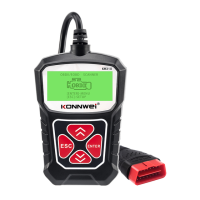
KONNWEI KW310 CAN OBDII+EOBD Code Reader
Specifications
1) Display: Back lit, 128 x 64 pixel display with contrast adjustment
2) Operating Temperature: 0 to 60°C (32 to 140 F°)
3) Storage Temperature: -20 to 70°C (-4 to 158 F°)
4) External Power: 8.0 to 18.0 V power provided via vehicle battery
Accessories Included
OBD II cable Provides power to tool and communicates between tool and vehicle.
Selects the desired language:
English, French, German, Dutch, Spanish, Russian, Portuguese.
Question and Answer IconNeed help?

Do you have a question about the Konnwei KW310 and is the answer not in the manual?

Summary

General Information: On-Board Diagnostics (OBD) II

Location of the Data Link Connector (DLC)

Explains the location and identification of the Data Link Connector (DLC) on a vehicle.

Diagnostic Trouble Codes (DTCs)

Defines Diagnostic Trouble Codes (DTCs), their structure, and purpose in identifying vehicle faults.

OBDII Monitor Readiness Status

Details the status of vehicle monitors and how they indicate completion of diagnostic tests.

OBD II Definitions

Provides definitions for key OBD II terms like PCM and MIL for better understanding.

Vehicle Coverage

Specifies which vehicles are compatible with the OBD II standard and the KONNWEI KW310 scanner.

Product Troubleshooting

Vehicle Linking Error

Guides on resolving communication errors between the scan tool and the vehicle's ECU.

Operating Error

Provides steps to reset the scan tool when it freezes or encounters operating errors.

OBDII Diagnostics

Reading Codes

Erasing Codes

Live Data

Viewing Freeze Frame Data

Explains how to view stored vehicle operating parameters captured when a fault occurred.

Retrieving I;M Readiness Status

Details how to check the status of emission system monitors for state inspection compliance.

Oxygen Monitor Test

Describes the function for viewing oxygen sensor monitor test results and its limitations.

On-Board Monitor Test

Explains how to retrieve and display test results for emission-related power train components.

Component Test

Covers the function for initializing a leak test for the vehicle's EVAP system.

Modules Present

Details how to view module IDs and communication protocols for OBD2 modules in the vehicle.

Warranty and Service Limited One Year Warranty

Service Procedures

Safety Precautions and Warnings

Overview

The KONNWEI KW310 CAN OBDII+EOBD Code Reader is a diagnostic scan tool designed to interface with a vehicle's On-Board Diagnostics II (OBD II) system. This device allows users to read and erase Diagnostic Trouble Codes (DTCs), view live data, check I/M Readiness Status, and access other vehicle information.

Function Description:

The primary function of the KONNWEI KW310 is to monitor and diagnose issues related to a vehicle's emission control systems and key engine components. It supports both OBDII and EOBD protocols, including the Control Area Network (CAN). The tool can identify whether the Malfunction Indicator Light (MIL) is on or off, retrieve stored DTCs, and display the readiness monitor status.

When a problem is detected by the vehicle's on-board computer, the OBD II system typically illuminates a warning lamp (MIL) on the instrument panel, often displaying "Check Engine" or "Service Engine Soon." The KW310 allows users to access the stored information about these malfunctions, which helps in accurately identifying and fixing the problem.

The device supports several diagnostic functions:

  • Reading Codes: It can read both "Stored Codes" (also known as "hard codes" or "permanent codes") which cause the MIL to illuminate, and "Pending Codes" (also referred to as "maturing codes" or "continuous monitor codes"). Pending codes indicate problems detected during the current or last driving cycle but are not yet considered serious enough to trigger the MIL.
  • Erasing Codes: This function allows the scan tool to delete DTCs from the vehicle's on-board computer. Erasing codes also clears "Freeze Frame" data and manufacturer-specific enhanced data, and resets the I/M Readiness Monitor Status for all vehicle monitors to "Not Ready" or "Not Complete." It's important to ensure the system has been thoroughly checked by a technician before erasing codes.
  • Live Data: The tool can display live or real-time Parameter Identification (PID) data from the vehicle's computer module(s). This includes parameters such as engine RPM, vehicle speed, air flow, engine load, fuel pressure, fuel trim value, engine coolant temperature, and ignition timing advance.
  • Record Data: This feature allows for recording vehicle module's PID data to help diagnose intermittent vehicle problems. A recording typically includes 5 frames of live data before a trigger event and several frames after.
  • Playback Data: Users can view previously stored PID data, including data recorded immediately after a recording session.
  • Viewing Freeze Frame Data: When an emissions-related fault occurs, the OBD II system records a snapshot of the vehicle's operating parameters at that moment. This "Freeze Frame Data" helps in identifying the problem by showing the conditions under which the fault occurred.
  • Retrieving I/M Readiness Status: This function checks the operations of the Emission System on OBD2 compliant vehicles, which is useful before a vehicle inspection for state emissions programs. It can show the status of monitors since DTCs were last cleared ("DTCs Cleared") or since the beginning of the current drive cycle ("This Drive Cycle"). The status indicates whether a monitor has completed its diagnostic testing ("OK"), has not completed testing ("INC"), or is not supported by the vehicle ("N/A").
  • Oxygen Monitor Test: This function retrieves and displays O2 sensor monitor test results for the most recently performed tests. These tests are automatic and occur when engine operating conditions are within specified limits.
  • On-Board Monitor Test: Useful after servicing or erasing a vehicle's control module memory, this test retrieves and displays results for emission-related powertrain components and systems that are not continuously monitored.
  • Component Test: This function allows for the initialization of a leak test for the vehicle's EVAP system. The scan tool commands the vehicle's on-board computer to start the test.
  • Modules Present: This function allows viewing of the module IDs and communication protocols for OBD2 modules in the vehicle.
  • Vehicle Information: The tool can retrieve Vehicle Identification No. (VIN), Calibration ID(s), Calibration Verification Nos. (CVNs), and In-use Performance Tracking on 2000 and newer vehicles that support Mode 9.

Important Technical Specifications:

  • Display: Backlit, 128 x 64 pixel display with contrast adjustment.
  • Operating Temperature: 0 to 60°C (32 to 140°F).
  • Storage Temperature: -20 to 70°C (-4 to 158°F).
  • External Power: 8.0 to 18.0 V power provided via the vehicle battery.
  • Vehicle Coverage: Designed to work with all OBD II compliant vehicles, including those equipped with CAN, manufactured in 1996 and newer (cars and light trucks) in the United States, as well as some 1994 and 1995 models if OBD II compliant. It supports Domestic, Asian, and European vehicles.
  • Language Support: English, French, German, Dutch, Spanish, Russian, Portuguese.

Usage Features:

  • Connectivity: The tool connects to the vehicle's 16-pin Data Link Connector (DLC) via an included OBD II cable. The DLC is typically located under or around the driver's side of the instrument panel.
  • Navigation: Uses UP/DOWN scroll buttons to navigate menus and an ENTER button to confirm selections. An ESC button is used to return to previous screens.
  • Powering On: The tool is powered by the vehicle's battery once connected to the DLC.
  • Troubleshooting: The manual provides guidance for common issues such as "Vehicle Linking Error" (communication failure with the ECU) and "Operating Error" (scan tool freezes or slow ECU response). It advises checking ignition status, secure cable connection, OBD2 compliance, and vehicle battery voltage (at least 8.0 volts).
  • Safety Precautions: Emphasizes performing automotive testing in a safe environment, wearing eye protection, keeping clear of moving/hot engine parts, ensuring good ventilation, blocking drive wheels, using caution around ignition components, engaging parking brake, having a fire extinguisher nearby, and avoiding connecting/disconnecting equipment with ignition on or engine running.

Maintenance Features:

  • Cleaning: The code reader should be kept dry, clean, and free from oil, water, or grease. A mild detergent on a clean cloth can be used to clean the outside of the device when necessary.
  • Warranty: Konnwei provides a one-year limited warranty from the date of original purchase, covering defects in materials and workmanship. The warranty is limited to repair or replacement of the code reader at no charge, with proof of purchase. It does not cover damages caused by improper use, accident, flood, lightning, or unauthorized alterations/repairs. Konnwei is not liable for incidental or consequential damages.
  • Service Procedures: For questions or repairs, users are advised to contact their local store, distributor, or visit the Konnwei website.

Konnwei KW310 Specifications

General IconGeneral
BrandKonnwei
ModelKW310
CategoryBarcode Reader
LanguageEnglish