The KONQUEST KDT-1201 is an oral, armpit, and rectal thermometer designed for quick and accurate temperature measurement.
Function Description:
The thermometer is used to measure body temperature in three primary locations: orally (under the tongue), in the armpit (axillary), and rectally. It features an LCD display to show temperature readings and a power button for operation. The device is designed to provide a quick measurement, with a signaling tone (beep) indicating the minimum measurement time has been reached. The temperature reading will appear on the LCD simultaneously with the alarm. The measurement continues even after the buzzer notification, but the displayed temperature will not change once the thermometer is removed from its testing position.
Important Technical Specifications:
- Battery Type: 1.5V DC button type LR41, SR41, UCC392, or equivalent.
- Battery Installation: Battery should be installed with the "+" polarity facing up.
- Temperature Range (Display):
- If measured temperature is less than 90°F (32°C), the LCD will display "Lo".
- If measured temperature is higher than 109.9°F (42.9°C), the LCD will display "Hi".
- Normal Temperature Ranges (Approximate):
- Oral: 96.3°F to 99.1°F (35.7°C to 37.3°C)
- Rectal: 97.2°F to 99.9°F (36.2°C to 37.7°C)
- Armpit: 95.4°F to 98.1°F (35.2°C to 36.7°C)
Usage Features:
- Power On: Press the On/Off button. A tone will sound, and the screen will show "188.8.M" followed by the last recorded temperature. After a self-test temperature display, the thermometer enters testing mode.
- Positioning:
- Oral Use: Place the probe under the tongue as indicated by the "V" position shown in Figure 4. Close the mouth and breathe evenly through the nose to prevent influence from inhaled/exhaled air.
- Rectal Use: Lubricate the silver probe tip with petroleum jelly for easy insertion. Gently insert the sensor approximately 1 cm (less than 1/2 inch) into the rectum.
- Armpit Use: Wipe the armpit dry. Place the probe in the armpit and keep the arm pressed firmly at the side. Note that this method may provide inaccurate readings and should not be used if precise measurements are required.
- Measurement Completion: The degree sign flashes throughout the testing process. When flashing stops, an alarm will beep for approximately 10 seconds, and the measured reading will appear on the LCD.
- Power Off: To prolong battery life, press the On/Off button to turn the unit off after testing. If no action is taken, the unit will automatically shut off after approximately 10 minutes.
- Storage: Store the thermometer in its protective case.
Maintenance Features:
- Battery Replacement:
- Replace the battery when the " " symbol appears in the lower right corner of the LCD display.
- Pull off the battery cover (Figure 1).
- Gently pull out the plastic circuit board with the battery chamber approximately 1 cm (slightly less than 1/2 inch) (Figure 2).
- Use a pointed object (e.g., a pen) to remove the old battery. Discard the battery lawfully.
- Replace with a new 1.5V DC button type LR41, SR41, UCC392, or equivalent, ensuring the "+" polarity faces up (Figure 3).
- Slide the battery chamber back into place and reattach the cover.
- Cleaning and Disinfection:
- Wipe the thermometer with a soft, clean cloth.
- For stubborn stains, wipe with a cloth dampened with water or a neutral detergent solution, wring thoroughly, and then wipe dry with a soft cloth.
- For disinfection, 70% Ethanol or Isopropyl alcohol can be used.
- Precautions:
- Do not use benzene, thinner, gasoline, or other strong solvents to clean the thermometer.
- Do not attempt to disinfect the sensing section (tip) by immersing it in alcohol or hot water (water over 122°F / 50°C).
- Do not use ultrasonic washing to clean the thermometer.
It is recommended to read the instruction manual thoroughly before use.

 Need help?
 General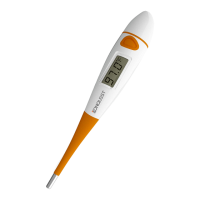

 To Next Page
