CHARGING
How do I charge my Kore 2.0?
You can charge your Kore 2.0 with the included USB charging dongle. Plug the charger into either a USB port or into a wall with a USB wall
adapter. Ensure you only use the included charging dongle, as other chargers may cause damage to the battery.
How long does it take to fully charge Kore 2.0?
Depending on the type of USB port, fully charging your Kore 2.0 can take anywhere from a couple of hours to 2 days.
Do I need to fully charge my Kore 2.0?
You need to fully charge your Kore 2.0, and ensure it remains plugged in, while doing any software updates.
SHIPPING & DELIVERY
What is the delivery time?
Most orders take 3-7 days from the day the item is shipped. Due to COVID-19 and many global supply chain interruptions, as well as local
delivery delays, delivery times may take longer than usual. Once your order has shipped you will receive an email with your tracking details.
Please note that it can take up to 48 hours for the tracking number to show activity.
Do you deliver to my country?
Unfortunately, due to shipping restrictions, we can only ship to the countries shown on the dropdown list on our checkout page.
RETURNS & REFUNDS
How do I return my order?
If you are not 100% satisfied with your product, you may return it back to us for a full refund of the cost of the product.
If you are looking to return your product, please reach out to us through our contact form and we will provide you with return instructions. For
more details please visit our Terms & Conditions in the footer of the checkout page.
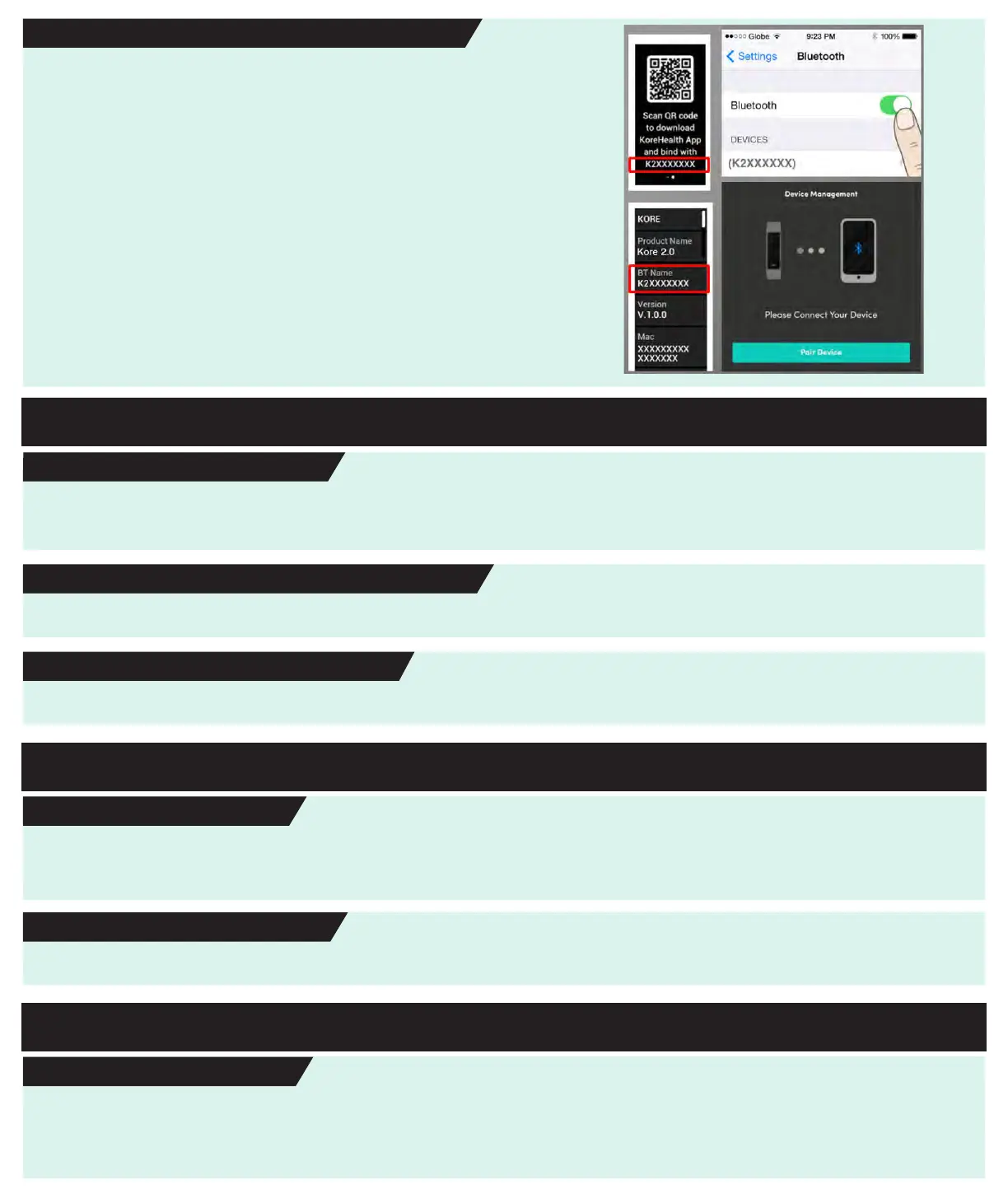
How do I pair Kore 2.0 with my smartphone?
Pairing Kore 2.0 with your smartphone gives you access to an array of
helpful features, and increases data storage.
To pair your Kore 2.0 with your smartphone, ensure that the Bluetooth
setting on your smartphone is turned on, and that it is no more than 10
feet away from your Kore 2.0.
Open the KoreHealth app on your smartphone. Navigate to the
“Devices” page and select the name corresponding to your Kore 2.0’s
unique serial number. It should be “K2” followed by a series of
numbers.
Select “Pair Device”.
Your Kore 2.0 smartwatch is now paired to your smartphone and the
KoreHealth app.


 To Next Page
 Loading...