

EasyManua.ls Logo

kronings HEAT 1500+ - User Manual

kronings HEAT 1500+
24 pages
Go to English
Print Icon
To Next Page IconTo Next Page
Loading...
Manual
HEAT 1500+
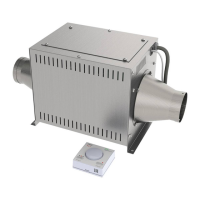
HEAT er en komplet varmeenhed, med varmelegemer, ventilator,
chassis og styringsenhed.
HEAT er meget enkel at montere i en campingvogn, autocamper,
eller i en lystbåd.
HEAT er udstyret med varmelegemer i 3 trin, 500W, 1000W og
1500W.
Alle funktionerne styres af det enkle og elegante styringspanel.
Installation:
HEAT er en blæser varme enhed. Den er specielt udviklet til at kunne
blive indsat i blæserslangerne i campingvogne og autocampere.
Man finder et passende sted at placere HEAT. Det kan være i et
magasin, i et skab eller måske bag gasovnen.
Den eller de luftslanger som HEAT skal opvarme, overskæres med en
kniv. HEAT placeres ind i mellem de overskårne slanger, monteres i
gulvet med 4 træskruer og slangerne tilpasses så de passer til ind-
Question and Answer IconNeed help?

Do you have a question about the kronings HEAT 1500+ and is the answer not in the manual?

Summary

Installation

Unit Placement and Tube Insertion

Guidance on finding a suitable location and inserting the HEAT unit into air tubes.

Connections and Control Panel Mounting

Details on connecting power, mounting the control panel, and ensuring proper sensor placement.

How to Use

Control Panel Interface

Overview of pushbuttons, turning knob, and LEDs for operating the unit.

Fan Speed Indicators

Explanation of the three LEDs indicating fan speed levels (1, 2, 3).

Heat Level Indicators

Explanation of the three LEDs indicating heat output levels (500W, 1000W, 1500W).

Temperature Regulation Indicator

Describes the LED that indicates if the room temperature is below the set point, controlling the heating cycle.

Adjusting Light Level

Instructions on how to adjust the light level on the control panel using the turning knob and buttons.

Memory Function

Activating Memory Function

Details how to activate the memory function for setting startup heat and fan levels.

Erasing Memory Function

Explains the procedure to erase the memorized startup settings and reset to default.

Errors and Safety

Security Systems Overview

Describes the three security systems that prevent overheating, including thermostat functions.

Manual Reset Procedure

Instructions for manually resetting the third security system thermostat after it has tripped.

Cooperation with TRUMA Gas Oven

TRUMA Gas Oven Integration

Guidance on how the HEAT unit can work alongside a TRUMA gas oven and potential interactions.
kronings HEAT 1500+ Specifications

General IconGeneral
Brandkronings
ModelHEAT 1500+
CategoryHeater
LanguageEnglish