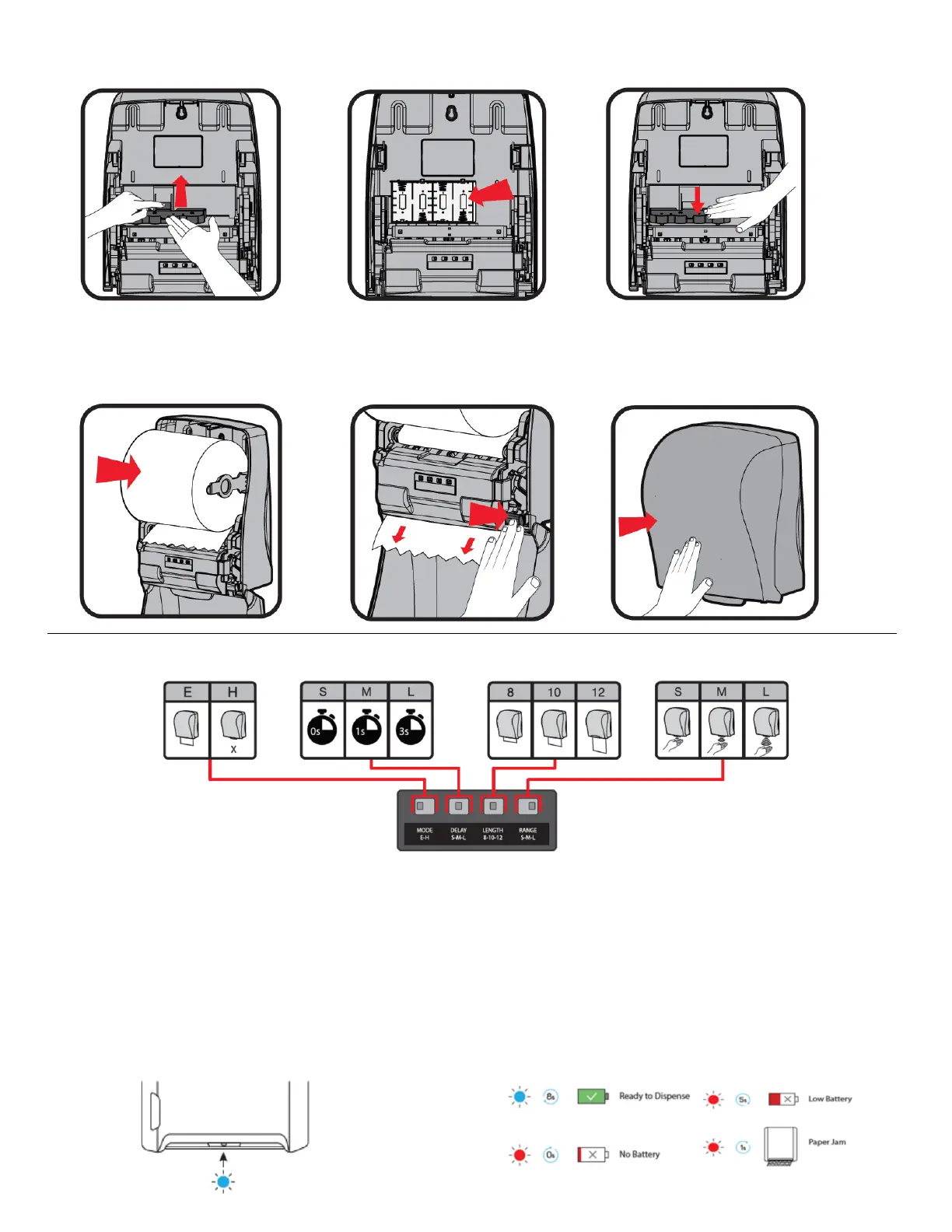
Installing or Removing Batteries - Use Size D alkaline LR20 batteries only
Remove Battery Holder from Dispenser
Insert or remove batteries
NOTE - Removal of batteries is the opposite of installation.
Install Battery Holder to Dispenser
Loading paper
Insert new roll into the dispenser
with the core plug on the left
Press and hold the load button to
feed paper until it exits the front.
Close the dispenser door, the
dispenser is now ready for use.
Settings and Indicators
MODE - This is the paper dispensing mode.
E = Exposed – Paper is hanging from dispenser
H = Hidden – Paper is dispensed from hand wave
LENGTH* – This is the dispenses towel length.
8 = 8” Sheet length (20 cm)
10 = 10” Sheet length (25 cm)
12 = 12” Sheet length (30 cm)
DELAY* – This is the delay between towel dispenses.
S = Short delay – 0
M = Medium delay – 1 Second
L = Long delay – 3 Second
RANGE* – This is the sensor detection range.
S = Short range – 4” (10cm) range
M = Medium range – 6” (15 cm) range
L = Long range – 8” (20 cm) range
LED Location
LED Operations
© 2021, ® and TM Registered Trademark of Kruger Products L.P.



 To Previous Page
 Loading...