2
KSR Amplification / Rhodes Amplification, LLC Cincinnati, Ohio http://ksramps.com
Switches
Bypass Mode
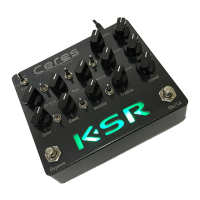
The upper-left 3-way switch selects the pedal's Bypass Mode. Basically, whenever the pedal is "bypassed",
one of these three modes is active:
1. The center position is True Bypass, works just like any pedal that uses a switch or relay to bypass the
signal through the pedal from the input to the output. This is what you'd use with a loop switcher or
pedalboard with other pedals handling buffering / clean tones. The KSR logo is unlit for this mode.
2. Down is Buffered Bypass -- this runs the signal through the pedal's buffer, but does not alter the tone
in any way. This is useful for driving other pedals on a pedal board into the front of a clean amp. The
KSR logo lights yellow for this mode.
3. Up is Clean Bypass. This is what you'd use to drive a power amp directly. This is the only mode that
enables the top row Tone and Level knobs. The KSR logo lights green for this mode.
Bright
Bright is a 2-position switch that works just like a bright switch on an amp. It is more effective the lower the
Gain setting. Up is on, Down is off.
Feel
Feel is a 3-position switch that primarily adjusts the low-end response of the given channel. Center is the
tightest. Up adds more low-end/punch. Down has the most thump and bass/low-mid presence.
Mode
Mode is a 3-position switch that allows you to change the overall gain style of the given channel. Up is Crunch,
similar to our Ares/Orthos Crunch 3-gain stage tone. Down is Lead, similar to our Colossus Lead channel 4-
gain stage tone. This is also the same sound our other amp Lead channels are based on, such as the Orthos
and Ares Lead. Center adds even more gain, similar to our 5-gain stage Artemis purple/red modes.
Note that Mode also affects the overall brightness and aggression -- e.g. Mode Up (Crunch) with Gain cranked
up will be smoother and “rounder” than Mode Down (normal Lead) with a bit less Gain. In general, the
overall tone will always benefit from EQ adjustments as you dial in the Gain and Mode settings.
Knobs
Overview
Each distortion channel has 5 knobs -- Gain, Bass, Middle, Treble, and Level. The Clean channel has 2 knobs –
Tone and Level.
Gain
The Gain control has a very wide usable range. It even works cranked, and doesn't get mushy and “flubby”.
Experiment with the whole range, and note how the EQ could benefit from adjustment, depending on your
Gain setting.
Bass / Middle / Treble
These EQ controls work and react just like a tube amp. They all will interact with each other to some degree,
so play with a lot of settings here to maximize your potential sounds. Try familiar EQ settings, and experiment
with unusual settings.


 To Next Page
 Loading...