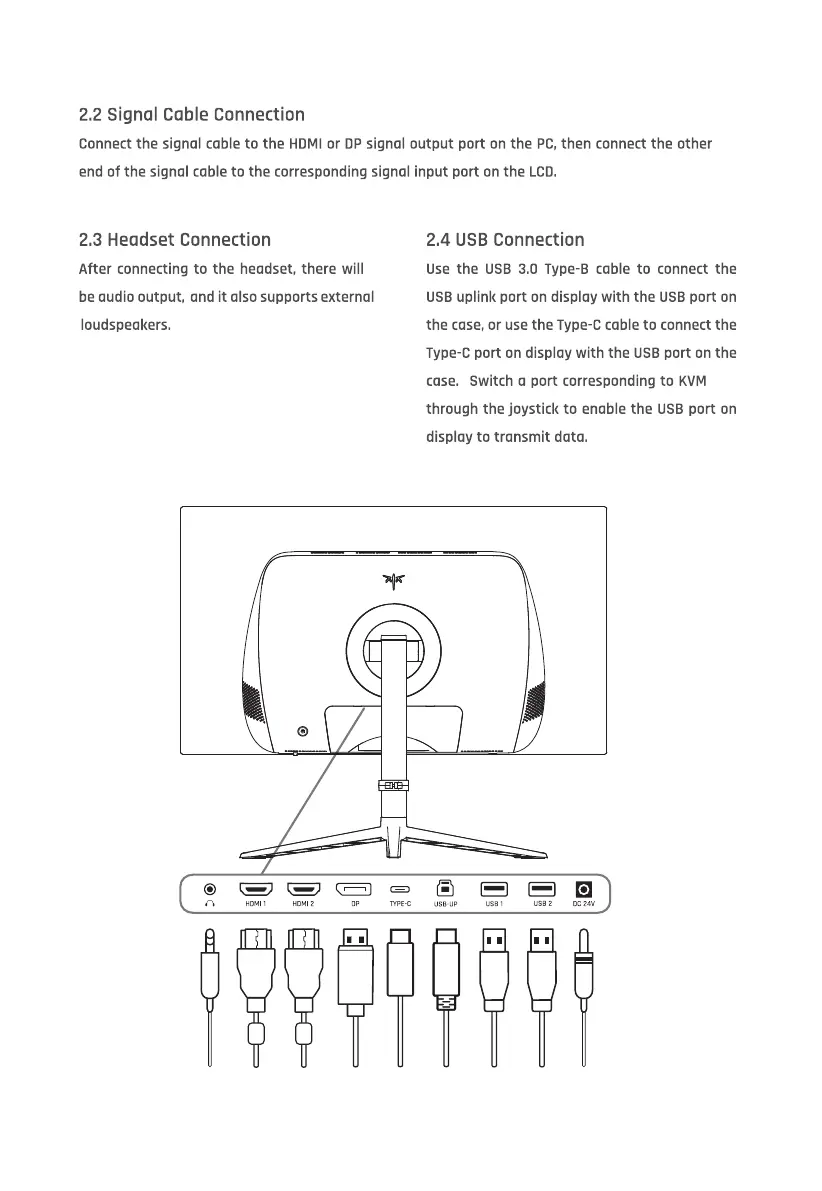
2.2 Signal Cable Connection
Connect the signal cable to the HDMI or DP signal output port on the PC,then connect the other
end of the signal cable to the corresponding signal input port on the LCD.
2.3 Headset Connection
After connecting to the headset, there will
be audio output, and it also supports external
loudspeakers.
HDMI 1
2.4 USB Connection
Use the USB 3.0 Type-B cable to connect the
USB uplink port on display with the USB port on
the case, or use the Type-C coble to connect the
Type-C port on display with the USB port on the
case. Switch a port corresponding to KVM
through the joystick to enable the USB port on
display to transmit dato.
TYPE-C usa•ug oc atv



 To Next Page