CONTROL PADS ON THE DEHU IDIFIER
NOTE: The control panel of the unit you purcha ed may be slightly different according to the
models.
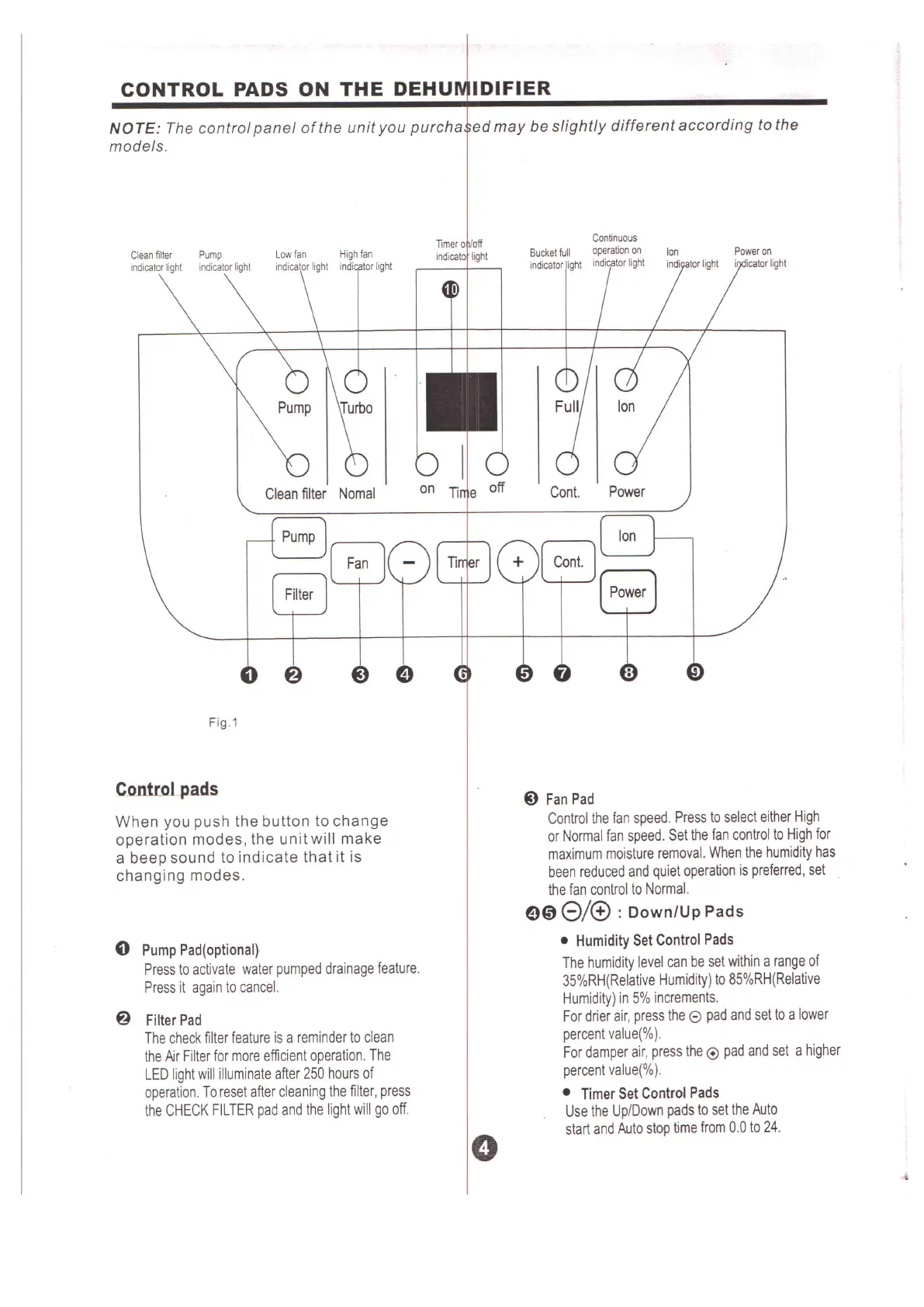
Cleanfilter Pump Lowfan Highfan
indicatorlight indicatorlight indicator light indi tor light
Clean filter Nomal
Fig.1
When you push the button to change
operation modes, the unit will make
a beep sound to indicate that it is
changing modes.
o
Pump Pad(optional)
Press to activate water pumped drainage feature.
Press it again to cancel.
@
Filter Pad
The check filter feature is a reminder to clean
the Air Filter for more efficient operation. The
LED light will illuminate after 250 hours of
operation. To reset after cleaning the filter, press
the CHECK FILTER pad and the light will go off.
e
Bucketfull
indicatorlight
Poweron
i icatorlight
Cont.
Power
Ion
o
ti
@
Fan Pad
Control the fan speed. Press to select either High
or Normal fan speed. Set the fan control to High for
maximum moisture removal. When the humidity has
been reduced and quiet operation is preferred, set
the fan control to Normal.
908/® :
Down/Up Pads
• Humidity Set Control Pads
The humidity level can be set within a range of
35%RH(Relative Humidity) to 85%RH(Relative
Humidity) in 5% increments.
For drier air, press the
e
pad and set to a lower
percent value(%).
For damper air, press the
e
pad and set a higher
percent value(%).
• Timer Set Control Pads
Use the UplDown pads to set the Auto
start and Auto stop time from 0.0 to 24.


 To Next Page