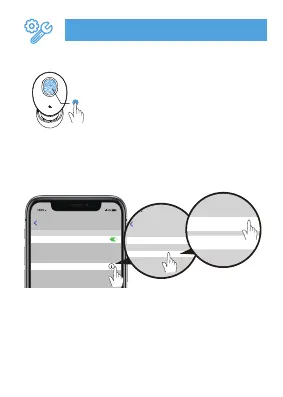
2.Please delete all paired records on the
phone and re-search【S8 Pro】after
clear the pairing and reconnect.
Settings
Bluetooth
S8 Pro
Bluetooth
Now discoverable as”Qi iPhone”.
MYDEVICES
To pair Apple Watch with your iPhone, go to the
Watch app.
Bluetooth
Forget This Device
S8 Pro
Device Type
1. Please turn off the Bluetooth
of the mobile phone and the
earbud light will flash red / blue.
Quickly press the power button
of the earbud four times.
4x
L&R Earbud
Restore factory setting


 To Previous Page