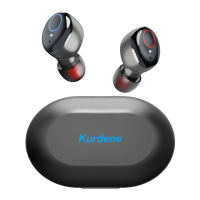
Indicator Light
Ear Cap
Charging Contact Pin
Charging Case
Indicator Light
Haptic Button
MIC
S8
User Manual
EN
AC
Thanks for using our wireless electronic
products. For a good user experience, please
read the manual carefully before using the
products. Notice: To avoid unnecessary
troubles, please do not disassemble these
products by yourself and use the standard
charger to charge.
Product Overview
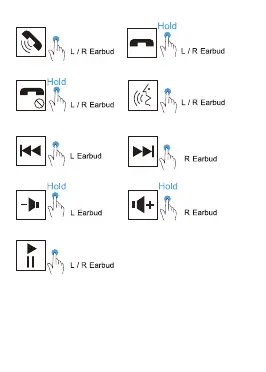
Button control
Warm notice
Choose the ear cap that suits you.
MFB Power Switch
1x
1x
2x
2x
3x
Accept
Decline
Reject
Previous
track
Next track
Volume- Volume+
Play / Pause
Voice assistant
Settings
Bluetooth
S8
Bluetooth
Now discoverable as”Qi iPhone”.
MYDEVICES
To pair Apple Watch with your iPhone, go to the
Watch app.
1
5 7
2
6 8
demonstration
Error
3
4
First time using
Make sure that the ear
caps face down and put
the earbuds into the ear
in the angle shown as
the picture on the right.
After putting on the
earbuds, gently
rotating the earbuds
to a comfortable and
secure position shown
as picture 3 on the right.
Now the earbuds are
put on correctly!
Do not wear the earbuds
like the way shown as
the picture on the right
1.Tear off the insulating film.
2.Put the earbuds into the charging case to charge.
4.The indicator of one earbud will go off and
another will flash red and blue light alternately.
(In pairing mode)
Red /Blue
Flash
3.Take out from case
,
the indicator will turn to Red
and Blue alternately.
Indicator off
For any single earbud, when it is in standalone
mode, you can’t use it to play the previous song
or decrease the volume.
Take-out from case.
OR
press and hold for 5 seconds.
When back into case.
OR
no connection for 5 minutes.
ON
OFF
5.Turn on the Bluetooth function on your phone
and search for【S8】and connect it.
Warm notice
△ If indicators of both earbuds keep flashing red
and blue, Click either earbud's power
switch twice.
Then the indicator of one earbud
will flash red and
blue alternately, another will go off. (in pairing mode)
△ If you want to switch the Bluetooth connection
to another device, please disable the Bluetooth
function in the previously connected device OR
delete the pairing name of "S8" from the original
device. Then the pairing name of "S8"can be
searched in new device and connected successfully.
Warm notice: If the earbuds are not turned on
or there is no sound come out, please put them
back in the charging case again to make sure that
they are in the charging state before taking them
out for use (red/blue light flash alternately)


 To Next Page
 Loading...