© Kurth Electronic GmbH, All Rights Reserved
2
KE8000
www.kurthelectronic.de
Optical Power Meter
dBm
nm
ON
OFF
REF
dbm
Warning
The laser could injure your eyes, never look directly at the laser out-
put or the connected optical bre. Do not install bres while the light
source is active and make sure that your eyes are protected at all
times.
Preparation
Insert two AA alkaline batteries into the battery compartment on the back of
the device. To do this, remove the drop protection.
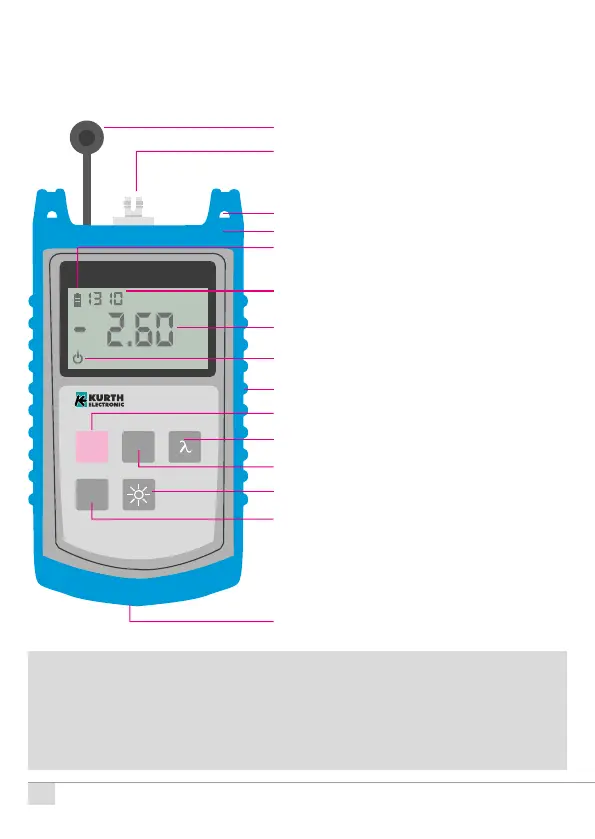
Dust cover
Level meter detector port:
SC/PC, FC/PC, ST/PC interchangeable
and 2.5 mm universal ferrule
Hole for carrying strap
Removable drop protection
Battery indicator
Wavelength display
Power / Attenuation display
Auto-o display
Service port (without function)
ON / OFF key (Switch on / o)
Reference level setting
Wavelength selection key
Absolute power level in dBm or μW
Backlight
Back side:
Battery compartment – before changing
the battery (2 x AA Alkaline), remove the
rubber drop protection


 To Next Page