Kurz Instruments, Inc. 831-646-5911
2411 Garden Road www.kurzinstruments.com
Monterey, CA 93940
360208-F 454FTB, 504FTB, 534FTB 19
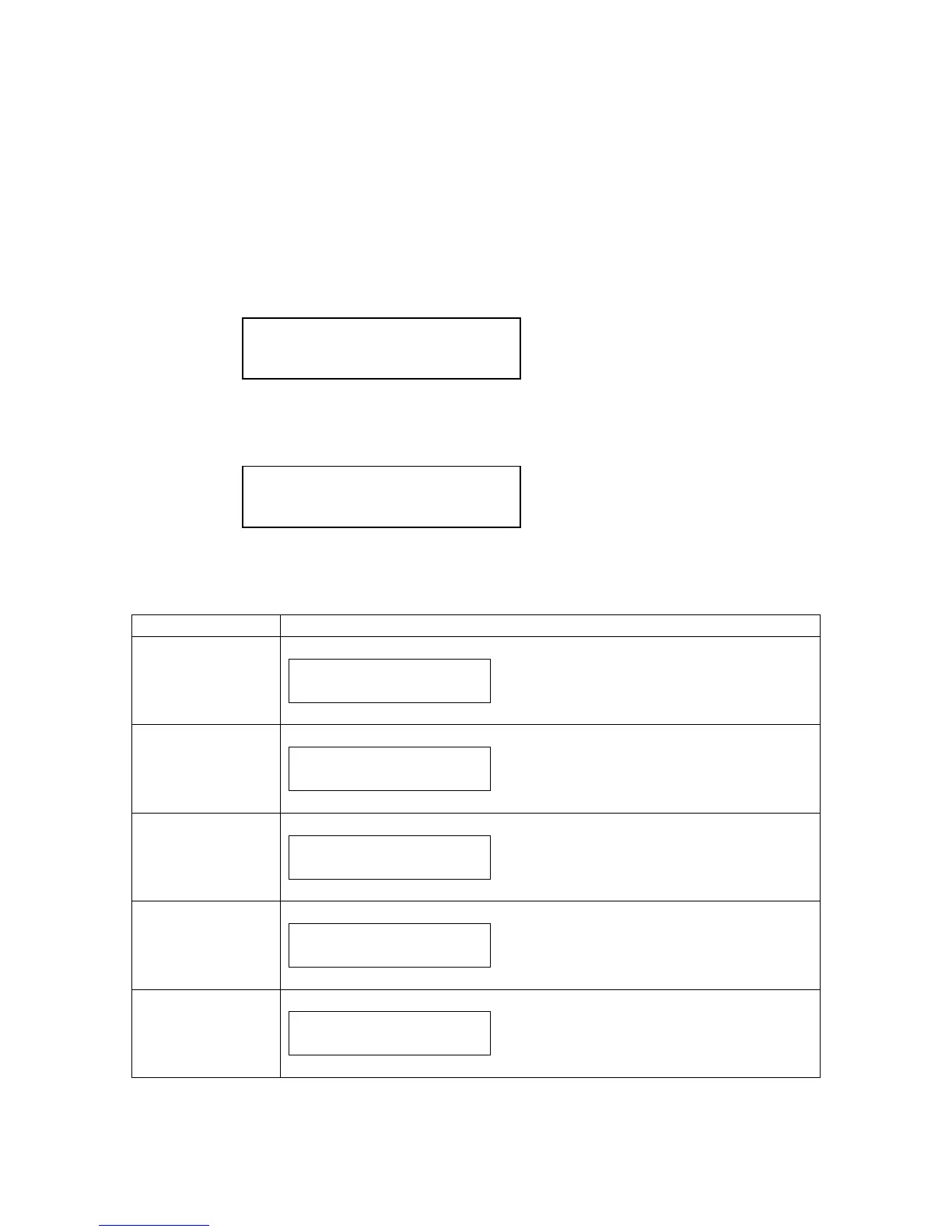
The next screens setup the Run Mode display of the flow meter. The Run Mode screens
can be configured to display as scrolling screens displaying one process variable per
screen. Or the display can be a static screen displaying up to 2 process variables; one on
each line of the 2 line LCD display.
Use the ^ or v keys to select between STATIC and SCROLLED and press E to accept the
selection.
RUN MODE DISPLAY
>STATIC ^v
If STATIC format is selected for the Run Mode Display, the meter will prompt for the
process variables to display
STATIC VARS
>FLOW+TEMP ^v
Use the ^ or v keys to select the desired display option and press E to accept the
selection. The following display options are available
FLOW ONLY
FLOW+TOT
FLTOT 1.838E+07
FLOW+VEL
FLOW 0.0000 SCFM
VEL 0.00000 SFPM
TAG+FLOW
TAG NAT. GAS
FLOW 0.0000 SCFM
FLOW+TEMP
TEMP 82.003 DEGF
Line 2 is blank
Totalized flow displays on line 2
Velocity displays on line 2
Tag Name displays on line 1
Flow displays on line 2
Temperature displays on line 2


 To Next Page