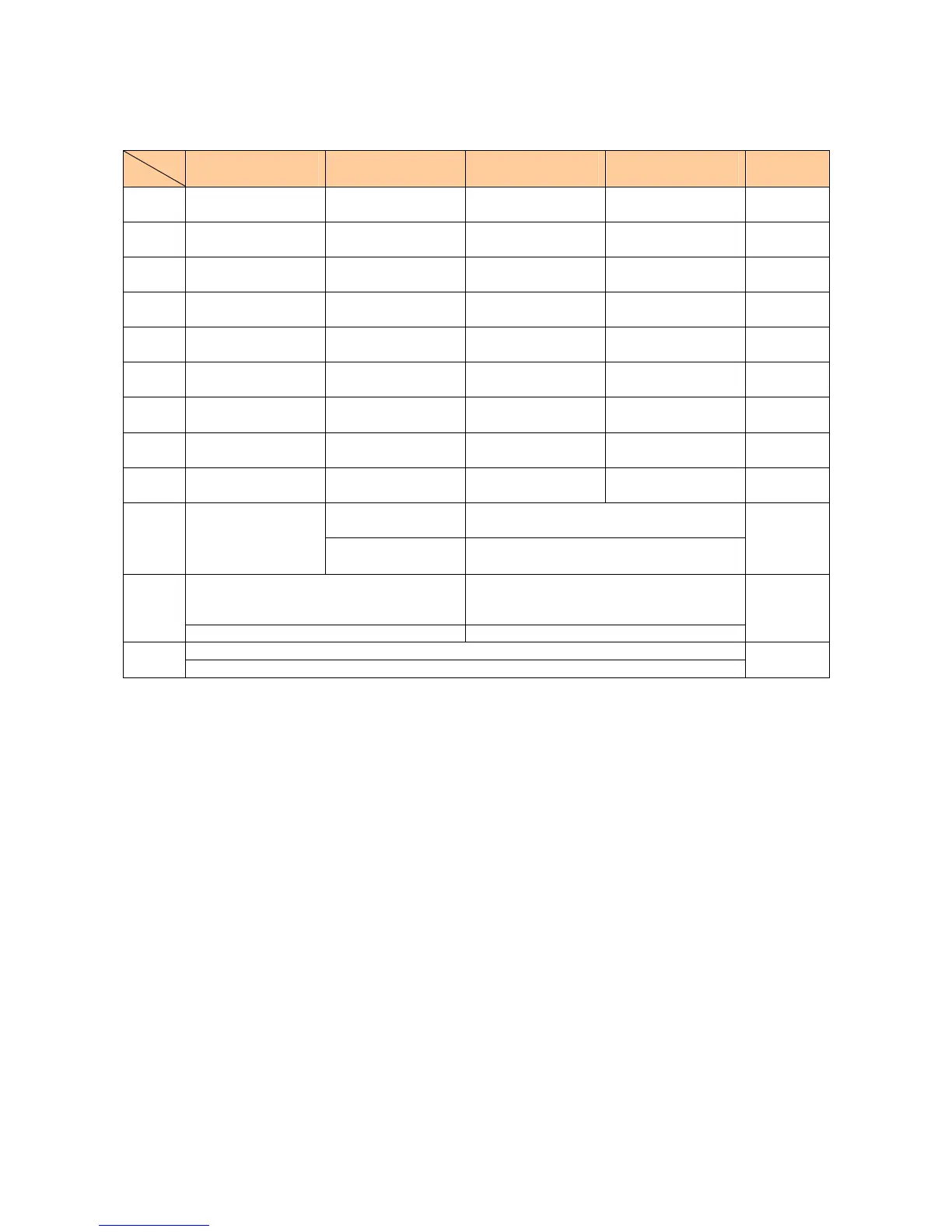
[Assignment of characters and key functions]
Characters are assigned to each key as shown below. Press a key repeatedly to cycle through characters
assigned to that key.
Entry
mode
key
Kanji・Hiragana
漢字
Katakana
カナ・カタカナ
Alphanumeric
AB・ABCD
Alphanumeric
ab・abcd
Number
12・1234
1
あいうえおぁぃぅぇぉ アイウエオァィゥェォ . @ - _ / : ~ 1 . @ - _ / : ~ 1 1
2
かきくけこ カキクケコ ABC2 abc2 2
3
さしすせそ サシスセソ DEF3 def3 3
4
たちつてとっ タチツテトッ GHI4 ghi4 4
5
なにぬねの ナニヌネノ JKL5 jkl5 5
6
はひふへほ ハヒフヘホ MNO6 mno6 6
7
まみむめも マミムメモ PQRS7 pqrs7 7
8
やゆよゃゅょ ヤユヨャュョ TUV8 tuv8 8
9
らりるれろ ラリルレロ WXYZ9 wxyz9 9
[ カナ] ワヲンヮ、。ー
-・.!?(space)0
[AB] [ab] 0(space)! ?
・ , ’ ”_ .-
0
わをんゎ、。-・~!?
(space)
[ カタカナ] ワヲン、。ー
-・.!?(space)0
[ABCD] [abcd]
0(space) ! " #$%& ' ( )* + , - . / : ;
<=>?@[¥]^_` { | }
~
0
(before confirm)゛ (Voiced Sound symbol)
゜(Semi-voiced Sound symbol)
Switches lowercase/uppercase
(before confirm)
Switches lowercase/uppercase
*
(after confirm) 、。-・~!?(スペース) (after confirm) . , - ! ?
.
(before confirm)Reverse toggle of entered characters
#
(after confirm)line change
line change
Remarks:
■ “~”can be inputted only when inputting full-sized characters. It changes to“
~
”when inputting
half-sized characters.
■ It is not likely to be able to change line on the input of part of character screen.
■ Inputting voiced sound symbol/semi-voiced sound symbol or switching uppercase/lowercase can be
done by pressing
#after inputting the character.
(A list of
Pictographs, Face marks, and Characters is displayed if you press it after the inputted character is
set.)
< Example >つ→っ→づ→つ ハ→バ→パ→ハ a→A→a
- 4 -







 To Next Page