KYSONA
MSOO Gaming Mouse
User Manual
ThankyouforchoosingtheKYSONAmouse,pleasereadthismanual
beforeusingit for thebestexperience.
Package Content
M600GamingMouse
user Manual
USB Receiver
Type-c Cable
ProductFunctionKeys
Left
Button
Forward
Button
Backward
Button
BT Mode
Right
Button
Scroll
Wheel
Charging
Indicator
DPI
Button
Charging Port
Mode Switch
Pair Button
LJSB Receiver
pressandholdthe pairbuttonfor 3
secondsto enterpairingmode.The
indicatorlightwill flashrapidly
Mouse Parameter
Name: M600
Type:WirelessGamingMouse
Dimensions & weight
Product Dimensions: 118•62x40mm
ProductNetWeight:55g
DPI/PoUingRate
DPI: 50-26000 DPI
PollingRate:125/250/500/1000Hz(default)
Charging
InterfaceType: Tpye-C
Capacity: 500mAh
Programmable Button
Number: 6
Connection
ConnectionWay: Wired/2,4G/BT
EffectiveConnectionDistance: 10M
118mm
Solution
Sensor: PAW3395
LODsetting
LODGear: Imm/2mm(default)
Cable
Type:paracord
Cable Length: 1.6m
System Support
Windows 8/10/11/MacOS
Set-up Guide
2.4GMode(WirelessGaming)
Slidethe modeswitch to •2.4G.•
Theindicator light Will turn red
Takethe USBdongle from the hidden
slotandinsertit intothe USBportOf
your device.
Wired Mode
o
Slide the modeswitch to •Off.
Themodeindicatortight turnOff.
Pressandholdthepairbuttonfor3
secondsto enterpairingmode
Theindicatorlight flashr—y.
o
Themousewill automaticallypairWith
your computer,andthe indicatorlight
Will turn Off.
Connectthemouseto yourcomputer
usingtheprovidedcable,plugandplay
Slide the ModeSwitchto •BT.•press
the pair buttonto selectthe BTchannel
Themodeindicatorlightwitlturngreen
for BT 5.2 channel or blue for BT 5.4
channel.
o
M600-5.2
Input
M600-5.4
Input
GOto theETsettingsOfyourdevice
and find •WOO-5.2 or M600-5.4•to
pair and connect.
DPI Switch
600
21.00
32M
5000
26000
o
Iftheconnectionwasbuiltup.theBTindcator
lightwilla•.nomaticallyturnoff
YouCanchangeyourDPIWithapressOf
the DPIcyclebuttonat the bottomOfthe
ThefactoryDPIsettingsaresetat800,
1600(default),2400,3200,5000,26000,or
youcanfine-tuneyourownsensitivity
settingusing PCdriver.
Purple
Customize M600 via PC Driver
KysonadriverallowsforcustomizationOfbuttonfunctions,macros,DPI.LOD.battery
management.reportrate.andothermousesettings
Driver Download and Install
Pleasedownloadandinstallthedriverfr•omtheKYSONAofficialwebsite.Hereisthe
link to download the driver
• https.//support.kysona.com/m600
Note
•Driversettingsonlysupport2_4GandWiredmode.andcannotbeusedinBTmode(if
thedriverisopenedinBTmode,itwillprompt•devicenotrecognized")
• Thedriveris onlyfor notfor Mac
Battery Life andSleep Mode
Witha500mAhrechargeablelithiumbattery,themousecanlastforupto80hoursata
singlechargeunder1000Hzpollingrate.Andthebatterycanbefullychargedinabout2
hours.
MovingthemousewakesitupfromLevel1sleepmode(inactiveforIsto35s)orLevel2
sleepmode(inactivefor35sto10mins)PressingakeywakesthemouseupfromLevel3
sleepmode(inactiveformorethan10mins)
Compatibility
BTmodeiscompatiblewithMacOSWindows8.10.and11,but isnotsupportedon
systems Older than Windows 7.
Video Tutorial
https//v.kysonaxom/msm


 To Next Page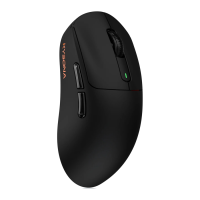


 General