1
Smart Pulse Manual
Vascular Health / Stress Check-up
Medicore Co., Ltd.
1. What is the Smart Pulse?
- The Smart Pulse is a portable self-measurement device. The measurement is easily done at home or at the office. The measurement results
are available after connecting the Smart Pulse to your smart phone or tablet. The Smart Pulse is used to detect the risk of adult diseases in
the early stages by checking the functioning of the autonomic nervous system, the status of their stress, the aging of their blood vessels, and
their blood circulation by analyzing small changes in their heartbeats.
2. Product components
① Main body (Module) : 1
② User Manual: 1
③ USB Cable: 1
3. Recommended specifications and operating system
- Android ver. 4.4.2 and above. / iPhone 4S & iPad 3 and above.
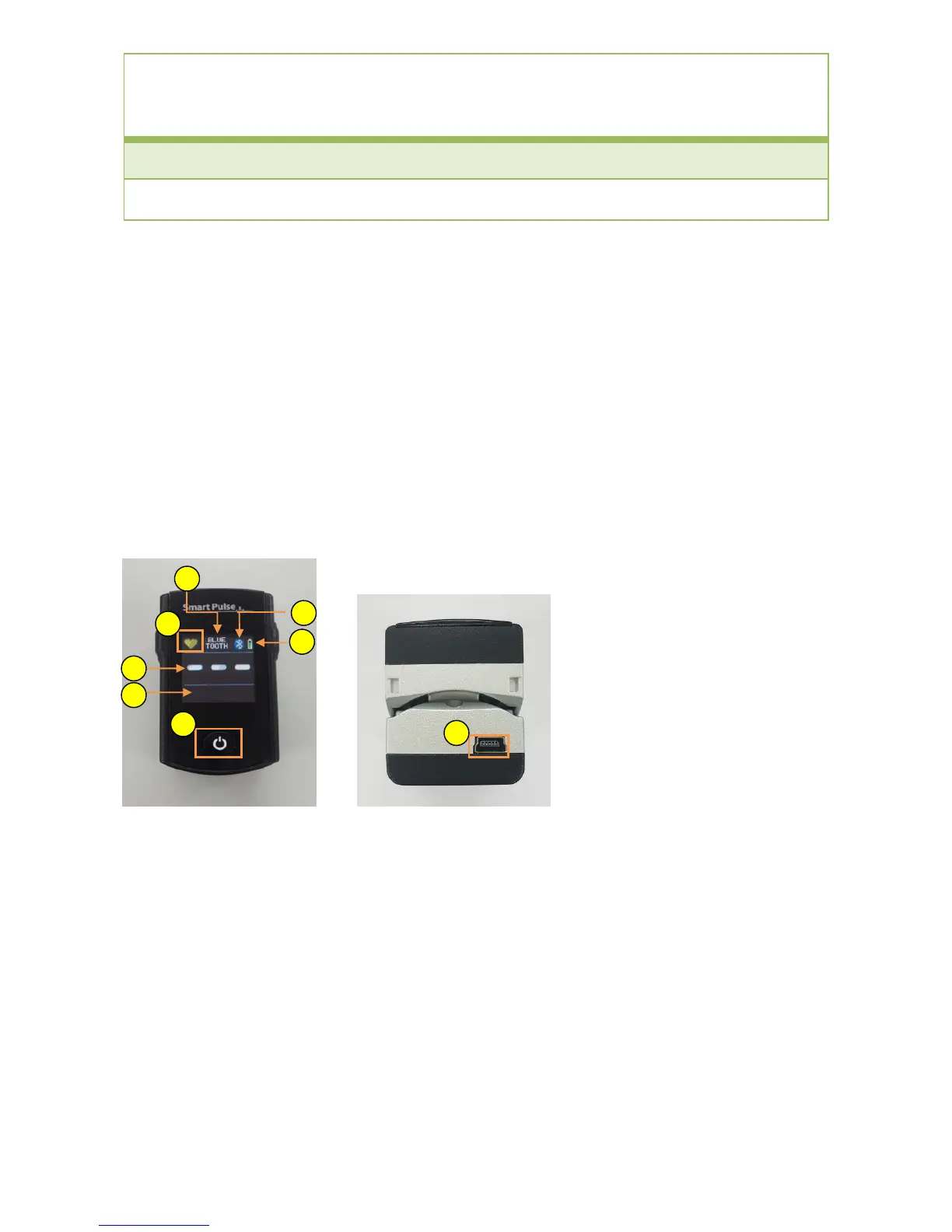
4. Name of each part
① Pulse Status Display: While measuring the pulse, red light will be flickering but while waiting, the light will be yellow.
② Measuring Mode Selection Display:
*BLUETOOTH – Shows the Bluetooth Connection
*DIRECT – Shows the USB Connection
③ Bluetooth Icon: Shows the Bluetooth Connection
④ Battery Display: Shows the level of charge in the battery.
⑤ Pulse Rate Display: Shows the pulse rate per minute during the measurement.
⑥ Pulse Display: Shows the pulse that is being measured in a graph.
⑦ Power Button: When the power button is held down, the power will be turned on/off.
⑧ USB Cable connection: When the USB Cable is connected, it will be charged automatically. The charging may be unable if the computer
is set on sleep mode.
5. How to install the application
① Run the “Google Play Store” (for Android) or “App Store” (for iOS) in your mobile device.
② Search for the keyword “smartpulse” and install the application.
1
2
3
4
5
6
7
8



 To Next Page
 Loading...