EN – User Guide
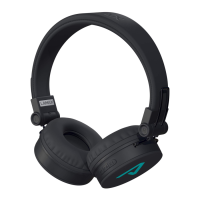
Muse2
Controls
On Hold
for 2 seconds
O Hold
for 2 seconds
Pairing Hold
for 4 seconds
Play / Pause Press
Next / Previous Track Hold / hold
VOL + / VOL – Press / press
Answer / End Call Press
Reject Call Hold for 3 seconds
Redial the last call Press twice
Activate Mobile
Assistant
Press three times
Turning On
Press
for 2 seconds to turn on the headphones. This is
accompanied by an audible notication and the blue LED
lights up.
Pairing
1. To enter the pairing mode, hold the
button for 4 se-
conds. This is indicated by the LED alternately ashing red
and blue.
2. On your device, turn Bluetooth on and locate and select
LAMAX Muse2 in the list of available Bluetooth devices.
After successfully pairing, there is an audible notication.
If you have trouble pairing, remove your headphones from
the list of paired devices in your smartphone. Turn o the
headphones and then hold the
button for 4 seconds.
The headphones turn on and automatically go into pairing
mode. Pair the headphones again as in Step 2 above.
Turning O
Press and hold the
for 2 seconds to turn o the head-
phones.
Charging
To charge, connect the micro USB cable to the headphones
and the other end to the 5V USB charger. The LED lights up
red when charging and will turn o when fully charged.
Parameters
Wireless technology Bluetooth 5.0
Bluetooth range up to 10 metres
Supported codecs SBC
Battery capacity 500 mAh
Headphone charging time 3 hours
Playback time up to 35 hours
Weight 222 g
Subject to printing errors.
The latest version of the user guide can be
downloaded here:
https://www.lamax-electronics.com/downloads/lamax-
muse2/manual
CZ – Uživatelská příručka
Mu se2
Ovládání
Zapnout Podržte 2 sekundy
Vypnout Podržte 2 sekundy
Párování Podržte 4 sekundy
Hrát / Pauza Stiskněte
Následující /
Předchozí skladba
Podržte / podržte
VOL+ / VOL – Stiskněte / stiskněte
Přijmout / Ukončit hovor Stiskněte
Odmítnout hovor Podržte 3 sekundy
Vytočení posledního
kontaktu
2× stiskněte
Aktivace mobilního
asistenta
3× stiskněte
Zapnutí
Sluchátka zapnete podržením tlačítka
2 sekundy. Zapnutí
doprovází zvuková notikace a modře svítící indikační dio-
da.
Párování
1. Pro vstup do párovacího režimu podržte na vypnutých
sluchátkách tlačítko
po dobu 4 sekund. Poté začne in-
dikační dioda střídavě blikat červeně a modře.
2. Zapněte ve Vašem zařízení Bluetooth a v seznamu do-
stupných Bluetooth zařízení vyhledejte LAMAX Muse2. Po
úspěšném spárování se ozve zvuková notikace.
Při problémech s párováním odeberte sluchátka ze sezna-
mu spárovaných zařízení ve Vašem telefonu. Vypněte slu-
chátka a poté podržte tlačítko
4 sekundy, sluchátka se
zapnou a přepnou do párovacího režimu, následně můžete
sluchátka spárovat podle bodu 2.
Vypnutí
Sluchátka vypnete podržením tlačítko
2 sekundy.
Nabíjení
Pro nabití připojte micro USB kabel do sluchátek, druhý
konec kabelu připojte do USB nabíječky s napětím 5 V. Při
nabíjení svítí LED červeně, po plném nabití zhasne.
Parametry
Bezdrátová technologie Bluetooth 5.0
Dosah bluetooth až 10 metrů
Podporované kodeky SBC
Kapacita baterie 500 mAh
Doba nabíjení sluchátek 3 hodiny
Doba přehrávání až 35 hodin
Váha 222 g
Tiskové chyby vyhrazeny.
Aktuální verze uživatelské příručky ke stažení zde:
https://www.lamax-electronics.com/downloads/lamax-
muse2/manual
DE – Bedienungsanleitung
Muse2
Steuerung
Einschalten
2 Sekunden gedrückt halten
Ausschalten
2 Sekunden gedrückt halten
Verbindung
4 Sekunden gedrückt halten
Play / Pause drücken
Nächstes /
Vorheriges Lied
gedrückt halten /
gedrückt halten
VOL+ / VOL – drücken / drücken
Anruf annehmen /
Beenden
drücken
Anruf ablehnen 3 Sekunde gedrückt halten
Letzten Anruf
wiederholen
2× drücken
Aktivierung des
mobilen Assistenten
3× drücken
Einschalten
Durch gedrücktes Halten der Taste
für 2 Sekunden schal-
ten Sie die Kopfhörer ein. Dies wird durch einen Ton und die
blau leuchtende Diode angezeigt.
Verbindung
1. Um dem Pairing-Modus zu aktivieren, halten Sie die
Taste für 4 Sekunden. Das wird durch rot und blau blin-
kende LED Leuchte angezeigt.
2. Schalten Sie auf Ihrem Gerät Bluetooth ein und wählen
Sie in der Liste der verfügbaren Bluetooth Geräte LAMAX
Muse2. Nach der erfolgreichen Verbindung ertönt ein
Bestätigungston.
Bei Problemen mit der Verbindung, entfernen Sie die
Kopfhörer aus der Liste der verbundenen Geräte in Ihrem
Telefon. Schalten Sie die Kopfhörer aus und halten Sie die
Taste 4 Sekunden gedrückt, die Kopfhörer schalten sich
ein und gehen in den Paarungsmodus, danach können Sie
die Kopfhörer, so wie in Punkt 2 beschrieben, mit dem Gerät
verbinden.
Ausschalten
Durch gedrücktes Halten der Taste
für 2 Sekunden schal-
ten Sie die Kopfhörer aus.
Laden
Um die Kopfhörer aufzuladen stecken Sie das Micro USB Ka-
bel in die Kopfhörer und verbinden Sie es mit dem 5V USB
Ladegerät. Die LED-Anzeige leuchtet beim Auaden rot. Bei
voller Auadung schaltet sich die LED-Leuchte aus.
Parameter
Funktechnologie Bluetooth 5.0
Bluetooth Reichweite bis 10 Meter
Unterstützte Codecs SBC
Batteriekapazität 500 mAh
Ladedauer der Kopfhörer 3 Stunden
Akkulaufzeit bis 35 Stunden
Gewicht 222 g
Druckfehler vorbehalten.
Die aktuelle Version der Bedienungsanleitung kann hier
heruntergeladen werden:
https://www.lamax-electronics.com/downloads/lamax-
muse2/manual
SK – Užívateľská príručka
Muse2
Ovládanie
Zapnúť Podržte
2 sekundy
Vypnúť Podržte
2 sekundy
Párovánie Podržte
4 sekundy
Hrať / Pauza Stlačte
Nasledujúca /
Predchádzajúca skladba
Podržte / podržte
VOL+ / VOL – Stlačte / stlačte
Prijať / Ukončiť hovor Stlačte
Odmietnuť hovor Podržte 3 sekundy
Vytočenie posledného hovoru 2× stlačte
Aktivácia mobilného asistenta 3× stlačte
Zapnutie
Slúchadlá zapnete podržaním
2 sekundy. Zapnutie
sprevádza zvuková notikácia a modro svietiaca indikačná
dióda.
Párovanie
1. Pre vstup do párovacieho režimu podržte tlačidlo
po
dobu 4 sekúnd. Potom začne indikačná dióda striedavo
blikať červeno a modro.
2. Zapnite vo Vašom zariadení Bluetooth a v zozname do-
stupných Bluetooth zariadení vyhľadajte LAMAX Muse2.
Po úspešnom spárovaní sa ozve zvuková notikácia.
Pri problémoch s párovaním odoberte slúchadlá zo zozna-
mu spárovaných zariadení vo Vašom telefóne. Vypnite slú-
chadlá a potom podržte
tlačidlo 4 sekundy, slúchadlá sa
zapnú a prepnú do párovacieho módu, následne môžete
slúchadlá spárovať podľa bodu 2.
Vypnutie
Slúchadlá vypnete podržaním
2 sekundy.
Nabíjanie
Pre nabitie pripojte micro USB kábel do slúchadiel, druhý
koniec kábla pripojte do USB nabíjačky s napätím 5 V. Pri na-
bíjané svieti LED červenou farbou, po plnom nabití zhasne.
Parametre
Bezdrôtová technológia Bluetooth 5.0
Dosah Bluetooth až 10 metrov
Podporované kodeky SBC
Kapacita batérie 500 mAh
Doba nabíjania slúchadiel 3 hodiny
Doba prehrávania až 35 hodín
Váha 222 g
Tlačové chyby vyhradené.
Aktuálna verzia užívateľskej príručky na stiahnutie tu:
https://www.lamax-electronics.com/downloads/lamax-
muse2/manual


 Need help?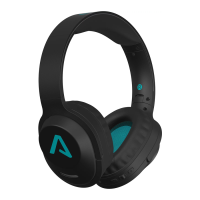

 General