9
IT
GUIDA INTRODUTTIVA
Come cominciare
Accendere il disposivo. Collegare LaMetric
TIME a una presa di corrente tramite il cavo
USB e un adaatore. Premere il pulsante
On/Off per avviare LaMetric TIME.
Scaricare l'app per smartphone. Visitare
go.lametric.com dallo smartphone per
scaricare l'app per iOS o Android.
Registrare e configurare il disposivo.
Completare la registrazione, collegarsi a
LaMetric TIME tramite la rete Wi-Fi e
configurarla con l'app per smartphone.
Spegnimento
Per spegnere il disposivo, premere e tenere
premuto il pulsante On/Off per 3 secondi circa.
Quando appare il messaggio "OFF?", fare clic sul
pulsante azione.
Riprisno impostazioni predefinite di fabbrica
Se si desidera cancellare tue le impostazioni o
registrare LaMetric TIME su un altro account, si
possono riprisnare le impostazioni di fabbrica del
disposivo. Per farlo spegnere il disposivo, poi
tenere premu nello stesso tempo i pulsan
On/Off e Volume su. Quando apparirà il messaggio
"RESET", fare clic sul pulsante azione.
Su go.lametric.com si può trovare la versione
completa della Guida utente.
1
2
3
KURZANLEITUNG
Erste Schrie
Schalten Sie das Gerät ein. Verbinden Sie
LaMetric TIME über ein USB-Kabel und einen
Stromadapter mit einer Stromquelle. Drücken
Sie die Ein-/Aus-Taste, um LaMetric TIME in
Betrieb zu nehmen.
Laden Sie die Smartphone-App herunter.
Besuchen Sie auf Ihrem Smartphone die
Website go.lametric.com, um die iOS- oder
Android-App herunterzuladen.
Registrieren und konfigurieren Sie das Gerät.
Beenden Sie den Registrierungsvorgang,
verbinden Sie LaMetric TIME mit Ihrem WiFi-
Netzwerk und konfigurieren Sie es über die
Smartphone-App.
1
2
3
DE
Ausschalten
Schalten Sie das Gerät aus, indem Sie die Ein-/Aus-
Taste 3 Sek. lang gedrückt halten. Klicken Sie auf
die Akonstaste sobald die Nachricht „OFF?“
erscheint.
Zurücksetzen auf die Werkseinstellungen
Wenn Sie alle Einstellungen überschreiben oder
LaMetric TIME mit einem anderen Konto
registrieren möchten, können Sie das Gerät auf
seine Werkseinstellungen zurücksetzen. Schalten Sie
es dafür aus, halten Sie die Tasten Ein/Aus und
Lautstärke erhöhen gleichzeig gedrückt. Klicken Sie
auf die Akonstaste, sobald die Nachricht „RESET“
erscheint.
Die vollständige Version der Bedienungsanleitung
finden Sie auf go.lametric.com.
FR
GUIDE DE DÉMARRAGE RAPIDE
Démarrer
Allumez l'appareil. Branchez LaMetric TIME à
une prise électrique grâce au câble USB et à
l'adaptateur secteur. Appuyez sur le bouton
Marche/Arrêt pour allumer votre LaMetric
TIME.
Téléchargez l'applicaon sur votre
smartphone. Rendez-vous sur
go.lametric.com depuis votre smartphone
pour télécharger l'applicaon pour iOS ou
Android.
Enregistrez-vous et configurez l'appareil.
Terminez le processus d'enregistrement,
connectez LaMetric TIME à votre réseau Wi-Fi
et configurez-le avec l’applicaon mobile.
Éteindre LaMetric
Pour éteindre l'appareil, maintenez le bouton
Marche/Arrêt enfoncé pendant environ 3 secondes.
Quand le mot “OFF?” apparaît, appuyez sur le
bouton d'acon.
Restaurer les paramètres d'usine
Pour effacer tous les paramètres ou enregistrer
LaMetric TIME avec un autre compte, vous pouvez
restaurer les paramètres d'usine de votre
appareil. Pour cela, éteignez-le puis maintenez
enfoncés simultanément les boutons Marche/Arrêt
et Volume + Lorsque le mot “RESET” apparaît,
appuyez sur le bouton d'acon.
Vous pouvez consulter la version complète du guide
d'ulisaon sur go.lametric.com.
1
2
3
QUICK START GUIDE
Geng started
Turn on the device. Connect LaMetric TIME to
a power outlet via USB cable and power
adapter. Press the On/Off buon to start up
your LaMetric TIME.
Download smartphone app. Visit
go.lametric.com from your smartphone to
download iOS or Android app.
Register and configure the device. Complete
registraon process, connect LaMerc
TIME to your Wi-Fi network and configure it
through the smartphone app.
1
2
3
EN
Switching off
To power off the device, press and hold the On/Off
buon for about 3 sec. When “OFF?” message
appears, click the acon buon.
Reseng to factory defaults
If you want to wipe all sengs or register LaMetric
TIME to another account, you may reset device
to its default factory sengs. To do this, switch it
off, press and hold the On/Off and Volume up
buons simultaneously. When “RESET”
message appears, click the acon buon.
You can find the full version of the User Guide at
go.lametric.com.
1.
2.
3.
4.
5.
6.
7.
8.9.
10.
11.
12.
Sensor de luz ambiental
Pantalla
Botón izquierdo de navegación
Botón de acción
Botón derecho de navegación
Conector Micro-USB
Salida de audio
Altavoz
Bajar el volumen
Subir el volumen
Encendido/Apagado
ES
PT
1.
2.
3.
4.
5.
6.
7.
8.9.
10.
11.
12.
Sensor de Luz Ambiente
Ecrã
Botão esquerdo de navegação
Botão de ação
Botão de navegação direito
Conector Micro-USB
Saída de áudio
Alto falante
Diminuir o Volume
Aumentar o Volume
Ligar/Desligar
Omgevingslichtsensor
Scherm
Linker navigatieknop
Actieknop
Rechter navigatieknop
Micro-USB connector
Audio uit
Luidspreker
Volume zachter
Volume harder
Aan/Uit knop
NL
1.
2.
3.
4.
5.
6.
7.
8.9.
10.
11.
12.
Czujnik oświetlenia otoczenia
Ekran
Przycisk W lewo
Przycisk Wykonaj
Przycisk W prawo
Gniazdo Micro-USB
Wyjście dźwięku
Głośnik
Ścisz
Podgłoś
Przycisk WŁ/WYŁ
PL
1.
2.
3.
4.
5.
6.
7.
8.9.
10.
11.
12.
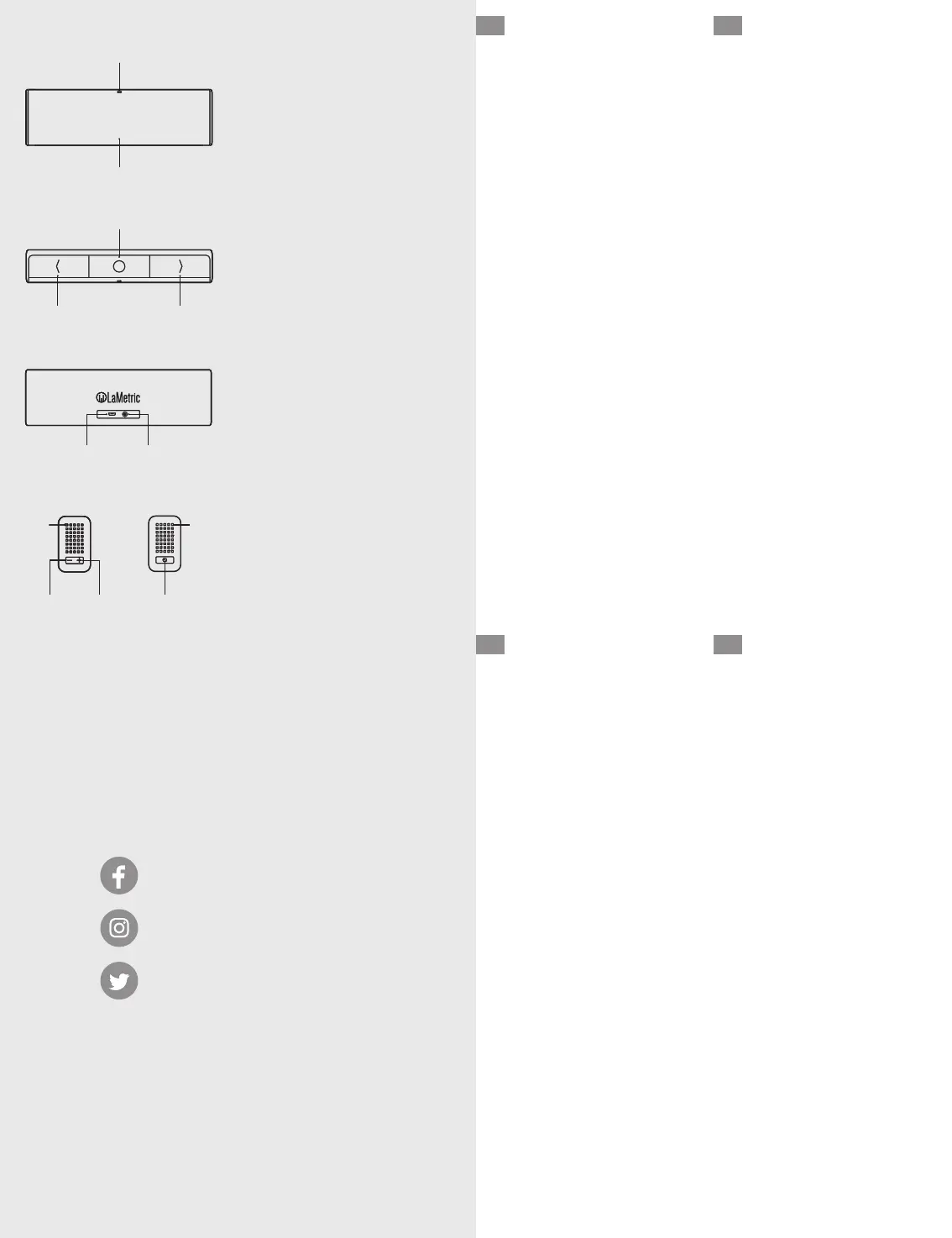
Ambient Light Sensor
Screen
Left navigation button
Action button
Right navigation button
Micro-USB connector
Audio out
Speaker
Volume down
Volume up
On/Off
EN
1.
2.
3.
4.
5.
6.
7.
8.9.
10.
11.
12.
1.
2.
3.
4.
5.
6.
7.
8.9.
10.
11.
12.
FR
Détecteur de lumière ambiante
Écran
Bouton de navigation gauche
Bouton d’action
Bouton de navigation droit
Port micro-USB
Sortie audio
Haut-parleur
Volume -
Volume +
Marche/Arrêt
Umgebungslichtsensor
Bildschirm
Linke Navigationstaste
Aktionstaste
Rechte Navigationstaste
Micro-USB-Anschluss
3.5mm Audio Ausgang
Lautsprecher
Lautstärke verringern
Lautstärke erhöhen
Ein/Aus
DE
1.
2.
3.
4.
5.
6.
7.
8.9.
10.
11.
12.
Sensore di luci ambientali
Schermo
Pulsante di navigazione sinistro
Pulsante azione
Pulsante di navigazione destro
Connettore Micro-USB
Uscita audio
Altoparlante
Volume giù
Volume su
On/Off
IT
1.
2.
3.
4.
5.
6.
7.
8.9.
10.
11.
12.
照度センサー
画面
左ナビゲーションボタン
アクション ボタン
右ナビゲーションボタン
マイクロ USB接続口
オーディオ接続口
スピーカー
音量を下げる
音量を上げる
オン/オフ
JP 1.
2.
3.
4.
5.
6.
7.
8.9.
10.
11.
12.
Датчик внешнего освещения
Экран
Левая кнопка навигации
Кнопка действия
Правая кнопка навигации
Micro-USB connector
Аудиовыход
Динамик
Кнопка уменьшения громкости
Кнопка увеличения громкости
Включить/Выключить
RU 1.
2.
3.
4.
5.
6.
7.
8.9.
10.
11.
12.
3
4
5
6
7
12
10
11
1
8
2
CUSTOMER
SUPPORT
support@lametric.com
www.lametric.com


 To Previous Page
 Loading...

