USER MANUAL EN
www.laney.co.uk
6
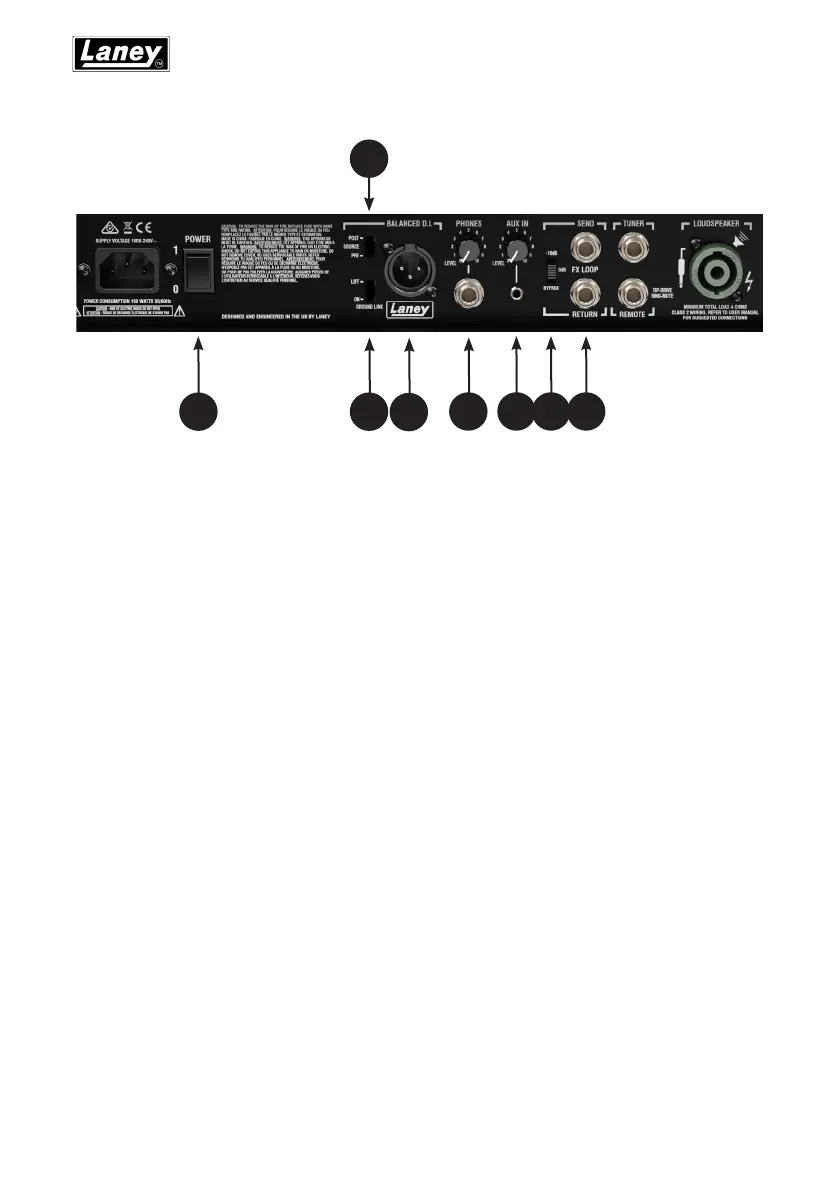
11 - POWER SWITCH - Switches the power to the AMP.
12 - GROUND LIFT – Provided to avoid any hum problems there may be when connecting
the balanced D.I to external equipment such as mixing desks etc.
13 - SOURCE SWITCH - Selects the signal sent to the Balanced D.I. out. Can be set to PRE,
only sending the input signal to the AMP, or POST sending the signal after the Preamp,
EQ and TILT sections.
14 - XLR-Balanced D.I. Out – This is a balanced signal output for sending to external
devices such as mixing desking, PA etc.
15 - PHONES SOCKET with Level Control – Connect headphones for monitoring or
silent practice.
16 - AUX IN with Level Control – Provided for connecting an external sound source.
Useful for jamming along with audio tracks.
17 - EFFECTS LOOP LEVEL - Selects the level at which the effects loops operates at. When
using effects start with 0dB as the setting, but if your effects are HOT or start
distorting set the switch to -10dB. When not using the EFFECTS loop is not in use, set
the switch to bypass.
18 - FX LOOP SEND & RETURN - These sockets are used for connecting an external effects
device to your amplier. Use the send jack to connect to the input of your external
device and use the return jack to connect the output of the external device to your
amplier.
DB500H FEATURES
11
13
14 15 16 17 1812


 To Next Page