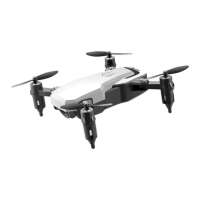
This document provides a user manual for the Lansenxi LS11 Foldable WiFi FPV Drone, featuring a 4K HD Dual Camera and Remote Control. It outlines the drone's functionality, operational procedures, and maintenance instructions.
Function Description
The Lansenxi LS11 is a foldable WiFi FPV drone equipped with a 4K HD dual camera system, allowing for high-definition video recording and photography from both front and bottom perspectives. The drone supports First Person View (FPV) functionality, enabling users to experience real-time video transmission from the drone's camera to a connected smartphone. This feature enhances the immersive flying experience and aids in precise navigation. The drone is controlled via a 2.4GHz remote controller, which can also be paired with a smartphone for extended control options and FPV viewing. Its foldable design makes it highly portable and convenient for transport and storage. The drone is powered by a rechargeable battery, offering a substantial flight time, while the remote controller operates on standard AA batteries. The inclusion of a dual camera system provides versatility in capturing different angles and perspectives during flight, making it suitable for various aerial photography and videography applications.
Usage Features
The drone offers a range of usage features designed to enhance the flying experience for both beginners and experienced pilots. The remote controller includes dedicated buttons for essential functions such as On/Off, Switch, High-speed gear, Hands-free mode, Throttle control, Take-off, and Landing.
- Power and Control: The "On/Off" button manages the drone's power, while the "Switch" button likely toggles between different control modes or settings.
- Speed Control: The "High-speed gear" button allows users to adjust the drone's flying speed, offering two distinct levels: a low level (30%) for stable and controlled flight, and a high level (100%) for faster and more dynamic maneuvers. This adaptability caters to different skill levels and flying environments.
- Hands-free Mode: The "Hands-free mode" simplifies operation, potentially by enabling automated flight patterns or stable hovering, reducing the need for constant manual input.
- Take-off and Landing: Dedicated "Take-off" and "Landing" buttons streamline the most critical phases of flight, ensuring smooth and controlled ascent and descent with a single press.
- Directional Control: The remote controller features two analog sticks for comprehensive flight control. The left analog stick governs the drone's vertical movement (rising and falling) and its rotational movement (turning left and right). The right analog stick manages the drone's horizontal movement, allowing it to move forward, backward, and sideways (flying to the right and left).
- Fine-tuning: The remote controller also includes several fine-tuning buttons to adjust the drone's stability and trim during flight. These include "Rolling button," "Right fine-tuning," "Left fine-tuning," "Direction control," "Forward fine-tuning," and "Back fine-tuning." These controls enable precise adjustments to counteract drift and maintain a steady flight path, ensuring optimal performance and control.
- FPV and Smartphone Integration: The drone's WiFi FPV capability allows for real-time video streaming to a connected smartphone. This integration provides an immersive flying experience and facilitates precise camera control and shot composition. The smartphone can be securely mounted on the remote controller, offering a convenient display for the FPV feed.
- Foldable Design: The drone's foldable arms make it compact and easy to carry, enhancing its portability for outdoor adventures and travel. This design also protects the propellers during transport.
- Dual Camera System: With 4K HD cameras on both the front and bottom, the drone offers versatile imaging options. Users can switch between cameras to capture different perspectives, whether it's a wide-angle aerial view or a detailed shot of the ground below.
Maintenance Features
Proper maintenance is crucial for ensuring the longevity and optimal performance of the Lansenxi LS11 drone. The manual provides clear instructions for battery installation and charging, which are key aspects of drone maintenance.
- Remote Controller Battery Installation: To power the remote controller, users need to open the battery cover located on the back of the device. Three 1.5V AA batteries should be inserted according to the polarity indicators inside the battery box. It is important to use fresh batteries and replace them when the controller's power is low to ensure reliable communication with the drone.
- Drone Battery Charging: The drone's battery is rechargeable, and the charging process is straightforward.
- Connect USB Cable: Insert the provided USB charging cable into a USB port on a computer or a compatible power adapter (not included). An indicator light on the USB cable will illuminate, signifying that it is ready for charging.
- Connect Battery: Remove the rechargeable battery from the drone. Connect the battery plug to the USB charging cable.
- Monitor Charging Status: While charging, the indicator light on the battery will be illuminated. Once the battery is fully charged, this indicator light will turn off, signaling that the charging process is complete. It is important to follow these steps to prevent overcharging and to ensure the battery's health and safety.
- General Care: Although not explicitly detailed in the provided text, general drone maintenance typically includes:
- Propeller Inspection: Regularly check propellers for any damage, cracks, or bends. Damaged propellers can affect flight stability and efficiency and should be replaced promptly.
- Motor Cleaning: Keep the motors free from dust, dirt, and debris, which can impede their function and lead to overheating.
- Body Cleaning: Wipe down the drone's body with a soft, dry cloth to remove any dirt or smudges. Avoid using harsh chemicals that could damage the drone's finish or electronic components.
- Storage: When not in use, store the drone and its components in a cool, dry place, away from direct sunlight and extreme temperatures. The foldable design aids in compact and safe storage.
- Firmware Updates: Periodically check for any available firmware updates for the drone and remote controller, as these can improve performance, add new features, and fix bugs.
By adhering to these usage and maintenance guidelines, users can maximize their enjoyment and extend the lifespan of their Lansenxi LS11 drone.

 Need help?
 General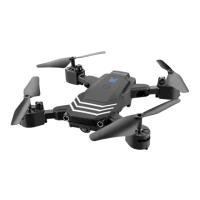

 To Next Page