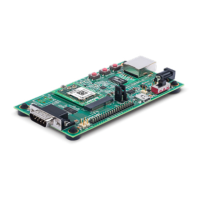
The Lantronix xPico 240 is a compact and versatile embedded Wi-Fi gateway designed for secure and reliable device connectivity. This quick start guide outlines the initial setup and configuration of the xPico 240, highlighting its key features and components.
Function Description:
The xPico 240 serves as a Wi-Fi gateway, enabling devices to connect to a network wirelessly. It facilitates secure communication and data transfer, making it suitable for various IoT and industrial applications. The device supports both client and Soft AP modes, allowing it to either connect to an existing Wi-Fi network or create its own for other devices to join. Its primary function is to bridge serial and Ethernet devices to Wi-Fi, providing remote access and management capabilities.
Important Technical Specifications:
The xPico 240 evaluation board, model XPC240300EK, includes several interfaces for connectivity and control.
- Power Input: The device operates on a 5V DC power supply, which is provided with regional adapters. A dedicated 5V DC Power Input jack is available on the board.
- Ethernet: It features a 10/100 Ethernet RJ45 port, supporting standard wired network connections.
- Serial Port: A DB9 RS232 Serial Port is included for serial communication, enabling connection to legacy devices or for command-line interface (CLI) access.
- USB Port: A USB Host/Device port is available, allowing for flexible connectivity options, such as connecting USB peripherals or using the xPico 240 as a USB device.
- Wireless Connectivity: The xPico 240 supports Wi-Fi, with specific models (e.g., XPC240300EK) including u.fl to RP-SMA adapter cables and antennas for robust wireless performance. The wireless module is capable of operating in both client and Soft AP modes.
- LED Indicators: The board is equipped with several LEDs to indicate device status:
- Power LED: Indicates if the device is powered on.
- LED1 Status: Provides general status information for the xPico 240 module.
- LED2 Ethernet Speed: Indicates the speed of the Ethernet connection.
- LED3 Ethernet Activity: Shows activity on the Ethernet port.
- Control Buttons: The board includes Reset, Defaults, and Wake buttons for device management and troubleshooting.
- Power On/Off Switch: A physical switch allows for easy power control of the evaluation board.
- Peripheral I/O Header: This header provides access to various input/output pins for custom applications and integration with other hardware.
- 3.3V Header: A 3.3V header is available for providing power to external components or for debugging purposes.
Usage Features:
The xPico 240 is designed for ease of use, with both a web-based management console and a command-line interface.
- Hardware Installation:
- Attach antennas (for XPC240300EK models).
- Connect the included 5V DC power adapter to the evaluation board.
- Move the ON/OFF power switch to the ON position.
- Web Management Console:
- Connect to Soft AP: The xPico 240 creates a unique Wi-Fi Soft AP with an SSID derived from the last 6 digits of its serial number (e.g., "xPico 240 XXX-XXX"). The default password for this Soft AP is "PASSWORD" (case sensitive).
- Access Web UI: Once connected to the Soft AP, open a web browser and navigate to
192.168.0.1. The default USER ID is "admin" and the default PASSWORD is "PASSWORD" (both case sensitive).
- Quick Connect: The "Quick Connect" menu in the web UI guides users through configuring the xPico 240 to connect to an existing Wi-Fi network. It displays a list of available wireless networks, allowing the user to select and configure the device's wireless client interface.
- Full Configuration: The Web Management Interface (UI) provides comprehensive options for configuring the unit. Context-sensitive help is available within the UI.
- Command Line Interface (CLI): For advanced users, the xPico 240 can also be configured via the CLI, accessible through the serial port.
- Security Features: The device emphasizes security, prompting users to change default passwords for both the Soft AP SSID and the administrator account. This is done through the "Network" menu (ap0 Link Configuration) for the AP password and the "User" menu for the admin password.
Maintenance Features:
- Firmware Updates: Lantronix provides the latest firmware downloads on its support website, ensuring the device can be kept up-to-date with new features and security patches.
- Technical Support: Comprehensive technical support resources are available on the Lantronix website, including documentation (like the xPico 200 Series User Guide) and a support portal for queries.
- Reset Functionality: The "Reset" button on the evaluation board allows for a quick restart of the device, while the "Defaults" button can restore the device to its factory settings, aiding in troubleshooting or re-configuration.
The xPico 240 is offered in different models, such as XPC2403 and XPC2404, which may have slight variations in their capabilities or included components, but the core functionality and setup process remain consistent. The evaluation board (XPC240300EK) provides a complete environment for developing and testing applications with the xPico 240 module.

 Need help?
 General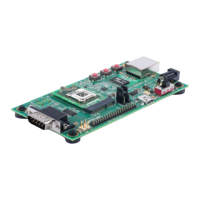

 To Next Page