This document describes the LASER STB-8000-026 Set Top Box HD Media Player, a device designed to receive and play digital television broadcasts and multimedia content.
Function Description
The STB-8000-026 functions primarily as a Digital Set Top Box (STB) for receiving DVB-T (Digital Video Broadcasting – Terrestrial) signals, allowing users to watch free-to-air (FTA) and scrambled channels. It also acts as an HD Media Player, capable of playing various multimedia files from connected USB devices.
Key functions include:
- Digital TV Reception: Tunes into DVB-T channels, supporting both standard and high-definition broadcasts.
- Media Playback: Plays music, photos, and movies from USB storage devices.
- Recording (PVR): Allows users to record live TV programs to a connected USB device.
- Time Shifting: Enables pausing and rewinding live TV broadcasts.
- Electronic Program Guide (EPG): Provides an on-screen TV guide with program schedules up to seven days in advance.
Usage Features
The device is designed for ease of use with a comprehensive remote control and an intuitive on-screen display (OSD) menu system.
Setup and Installation
- Power Connection: Connect the STB to a main power outlet.
- Antenna Connection: Connect a DVB-T antenna to the "ANT In" socket.
- TV Connection: Connect the STB to a television using either:
- Composite (AV) Cable (supplied): For older CRT TVs or displays with standard AV input. This uses yellow (video), white (left audio), and red (right audio) RCA connectors.
- HDMI Cable (not supplied): The preferred method for full HD digital signal transmission to TVs with an HDMI input.
- Audio Connection: Stereo Left and Right audio channels can be connected to an external amplifier/receiver if desired.
- First Time Installation Guide: Upon first power-on or after a factory reset, an on-screen installation guide prompts the user to set OSD language, country, and initiate a channel search.
- OSD Language: Select the desired language for the on-screen display.
- Country: Select the country of residence to ensure correct regional settings.
- Channel Search: Automatically scans for available DVB-T channels (FTA and scrambled) in the area. Manual search is also available for specific frequency channels.
Basic Operation
- Channel Selection: Navigate channels using UP/DOWN buttons, or directly enter channel numbers via the numeric keypad. A channel list can be displayed by pressing the OK button.
- Volume Control: Adjust volume using VOL+/- buttons. MUTE button toggles audio output.
- Channel Information: Pressing the INFO button displays current channel, program, and signal strength details.
- Main Menu: Access system settings and features via the MENU button. Navigation is done using LEFT/RIGHT/UP/DOWN buttons and confirmed with OK.
Program Management
- Program Edit: Edit channel preferences (lock, skip, favourite, move, delete) by entering a password ("000000" by default).
- Move: Reorder channels.
- Skip: Mark channels to be skipped during normal browsing.
- Lock: Password-protect channels.
- Delete: Remove unwanted channels.
- Favourite: Add channels to a favourite list, categorized by the user.
- Rename: Change channel names.
- EPG & Scheduling:
- EPG Access: Press the EPG button to view the electronic program guide.
- Program Information: Displays details for programs up to seven days in advance.
- Reminders/Recording: Set reminders to view programs or schedule recordings.
- Booking Options: Configure channel type (TV/Radio), channel number, name, start/end date/time, repeat options (once, daily, weekly), and mode (view/record).
- Sort: Organize channels by Logical Channel Number (LCN), Original Network ID (ONID), or Service ID.
- LCN: Enable or disable Logical Channel Numbering.
Picture and Display Settings
- Aspect Ratio: Adjust display to 16:9 Wide Screen, Auto, 4:3 Full, or 4:3 Pan & Scan to suit the TV and content.
- Resolution: Select output resolution (576i, 576p, 720p, 1080i, 1080p@50Hz) for HDMI output.
- TV Format: Set the colour system (PAL, NTSC) used by the TV.
Channel Search
- Auto Search: Performs a full scan for all TV and Radio channels, deleting previously scanned channels.
- Manual Search: Scans for new channels without deleting existing ones, allowing selection of specific frequency channels.
- Antenna Power: Option to turn ON power for external active antennas.
- Search Mode: Choose between FTA (Free-To-Air) only or FTA + Scrambled channels.
Time Settings
- Time Offset: Set automatically based on country region or manually adjust GMT offset.
- Time Zone: Manually set GMT offset when Time Offset is set to manual.
- Sleep: Configure the STB to automatically turn off after a set period (1-12 hours) of inactivity.
Option Settings
- OSD Language: Change the language of the on-screen display.
- Subtitle Language: Set the preferred language for subtitles (if transmitted).
- Audio Language: Set the preferred audio language for TV channels (if transmitted).
- Digital Audio: Configure digital audio output (PCM, RAW, or OFF) for external audio equipment.
- Audio Description: Enable audio description for visually impaired users (if broadcast).
System Settings
- Parental Guidance: Set parental control levels for programs with lock-out functions or multiple ratings, requiring a password to access restricted content.
- Set Password: Change the password for locked programs and parental controls (default is "000000").
- Information: View device model, hardware, and software version numbers.
- Recall List: Turn on/off the recall list function.
- USB Menu: Access multimedia playback and PVR configuration options when a USB device is connected.
- Multimedia Playback:
- Music: Play audio files from USB.
- Photo: View image files from USB, including slide shows.
- Movie: Play video files from USB, with options for full-screen viewing.
- Photo Configure:
- Slide Time: Set duration for displaying each picture in a slide show.
- Slide Show: Choose fixed or random effects for slide shows.
- Aspect Ratio: Keep original picture format or discard to fit the screen.
- Movie Configuration:
- Subtitle Specific: Adjust subtitle size (Small, Normal, Big).
- Subtitle BG: Set background colour for subtitles (Transparent, Gray, Yellow/Green, White).
- Subtitle Font Colour: Set font colour for subtitles (White, Black, Red, Blue, Green).
- Note: Requires subtitle files in the same directory as movie files.
- PVR Configuration:
- Record Device: Displays information about the connected USB device (file system, total space, free space).
- Format: Allows formatting of the attached USB device to FAT32 or NTFS. Caution: Formatting will erase all data.
Recording and Time Shifting
- Simple Program Recording: Press REC to start recording the current program and STOP to end. Recorded files are accessible via the PVR menu.
- Time Shifting Live TV: Pause live TV using PLAY/PAUSE. Resume playback or use REV/FWD buttons to navigate within the time-shifted buffer (up to 1 hour). Press YELLOW to jump to a specific time, and STOP to end time shifting.
- Note: Both recording and time shifting require a connected USB drive with sufficient storage space (approx. 4GB per hour for HD programs).
Maintenance Features
The manual highlights several important safety and maintenance guidelines to ensure the longevity and proper functioning of the device.
Safety and Care
- General Care: Read all instructions, retain manuals, and use the product as described. Clean surfaces with a water-dampened soft cloth.
- Environment: Use in well-ventilated areas, away from excess vibration, liquids, extreme heat, cold, humidity, dust, or sand.
- Power Disconnection: Disconnect from mains power and antenna during lightning storms.
- Stability: Place on stable surfaces and ensure cables are secure to prevent falls.
- No User Serviceable Parts: Do not attempt to dismantle or repair the product, as this voids the warranty and may cause electric shock.
- Cable Handling: Pull from the plug, not the cord, when disconnecting power or data cables.
- Interference: Avoid placing near other electronic devices that may cause interference.
- Copyright: Respect copyright requirements when recording images or video.
Battery Management (Remote Control)
- Installation: Insert 2 AAA batteries, matching polarities.
- Mixing Batteries: Do not mix old and new batteries.
- Storage: Remove batteries if the remote will not be used for long periods.
Troubleshooting
The manual includes a troubleshooting section to help users resolve common issues:
- No Picture/No Signal: Check power, antenna connection, and cable connections.
- No Sound: Check audio cable connections and ensure the device is not muted.
- Picture but No Sound: Verify audio cable connections.
- Remote Not Responding: Check/replace batteries.
- Picture Breaking Up: Check antenna connection for signal strength.
- USB Device Not Detected: Ensure the USB device is powered correctly (if applicable) and reconnected.
- Movie Playback Out of Sync: May indicate a faulty file or a file too large for the STB; consider re-encoding at a lower resolution/data rate.
Factory Reset
- Restore Factory Defaults: This option, found in the System menu, will remove all saved channel information, settings, and scheduled recordings. It requires a password to proceed. Use with care.
USB Device Compatibility
- USB Flash Drives: Generally plug-and-play.
- 2.5" (Notebook) Hard Drives: Recommended to be connected via a powered USB hub due to potential power requirements. Only single-partition drives should be used.
- Formatting: USB drives must be formatted in FAT32 or NTFS before recording.
This comprehensive set of features and guidelines ensures that the LASER STB-8000-026 provides a robust and user-friendly experience for digital TV reception and multimedia playback.

 Need help?
 General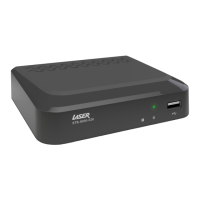

 To Next Page
