2
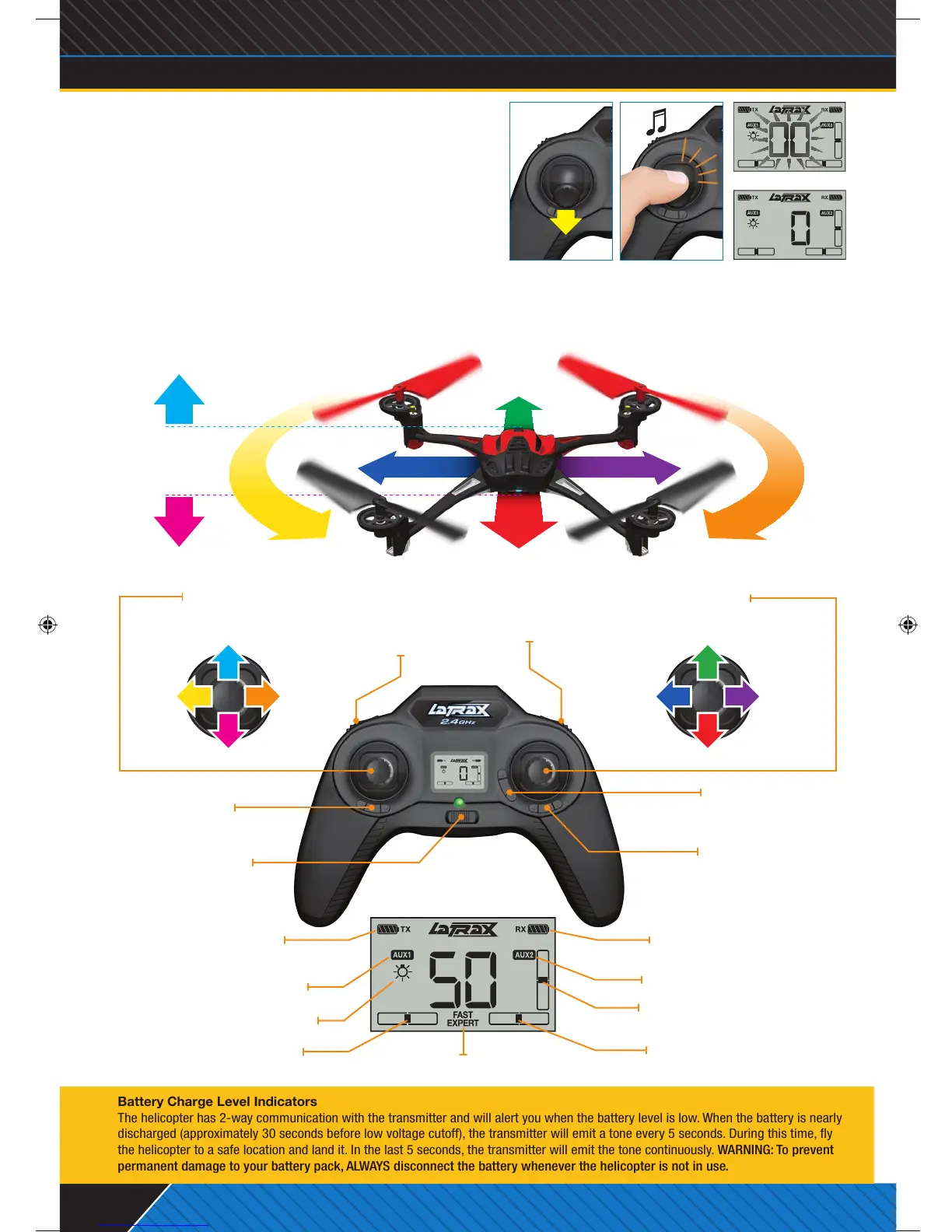
AUX1 Button
Default Setting:
Initiate Trick Sequence
(Fast Mode only)
Aileron Trim
(Sideways Flight)
Rudder Trim
(Rotation)
Elevator Trim
(Forward Flight)
Power Switch
Throttle Stick
Push in and release to arm/disarm
Flight Stick
Push in and release to change ight mode
AUX2 Button
Default Setting:
Lights On/Off
5. ARM YOUR HELICOPTER FOR FLIGHT
Place the model on a level surface with the blue LED facing
you (nose out). Move the throttle stick to the full down position
(throttle off). The helicopter will not arm unless the throttle
stick is in the down position (A). Push in and release the
throttle stick to arm your model for ight. The transmitter will
emit a fast-rising double tone indicating that the helicopter is
armed and ready to y (B). Note: When the throttle stick is
left idle for 5 seconds or the helicopter detects an impact,
the helicopter will automatically disarm.
6. FLY YOUR HELICOPTER
Gently push the throttle stick forward until the model begins to lift off. Reduce throttle to maintain a hover when the
model is at least 3 feet (1 meter) off the ground. This height will keep the model away from ground turbulence for
more stable ight. Use gradual inputs until you become familiar with the controls.
Battery Charge Level Indicators
The helicopter has 2-way communication with the transmitter and will alert you when the battery level is low. When the battery is nearly
discharged (approximately 30 seconds before low voltage cutoff), the transmitter will emit a tone every 5 seconds. During this time, y
the helicopter to a safe location and land it. In the last 5 seconds, the transmitter will emit the tone continuously. WARNING: To prevent
permanent damage to your battery pack, ALWAYS disconnect the battery whenever the helicopter is not in use.
• Gain Altitude
• Reduce Altitude
• Fly Sideways
Right
• Fly Forward
• Rotate Left • Rotate Right
• Fly Sideways
Left
• Fly Backward
Throttle off
A.
Rotate
Right
Fly
Sideways
Right
Rotate
Left
Fly
Sideways
Left
Reduce Altitude Fly Backward
Gain Altitude Fly Forward
©2014 LaTrax. No part of this manual may be reproduced or distributed in print or electronic media without the express written permission of LaTrax. The product may vary from the images contained within.
KC1828-R02-Alias-Quickstart-140430.indd 2 4/30/14 5:38 PM



 To Next Page
 Loading...
