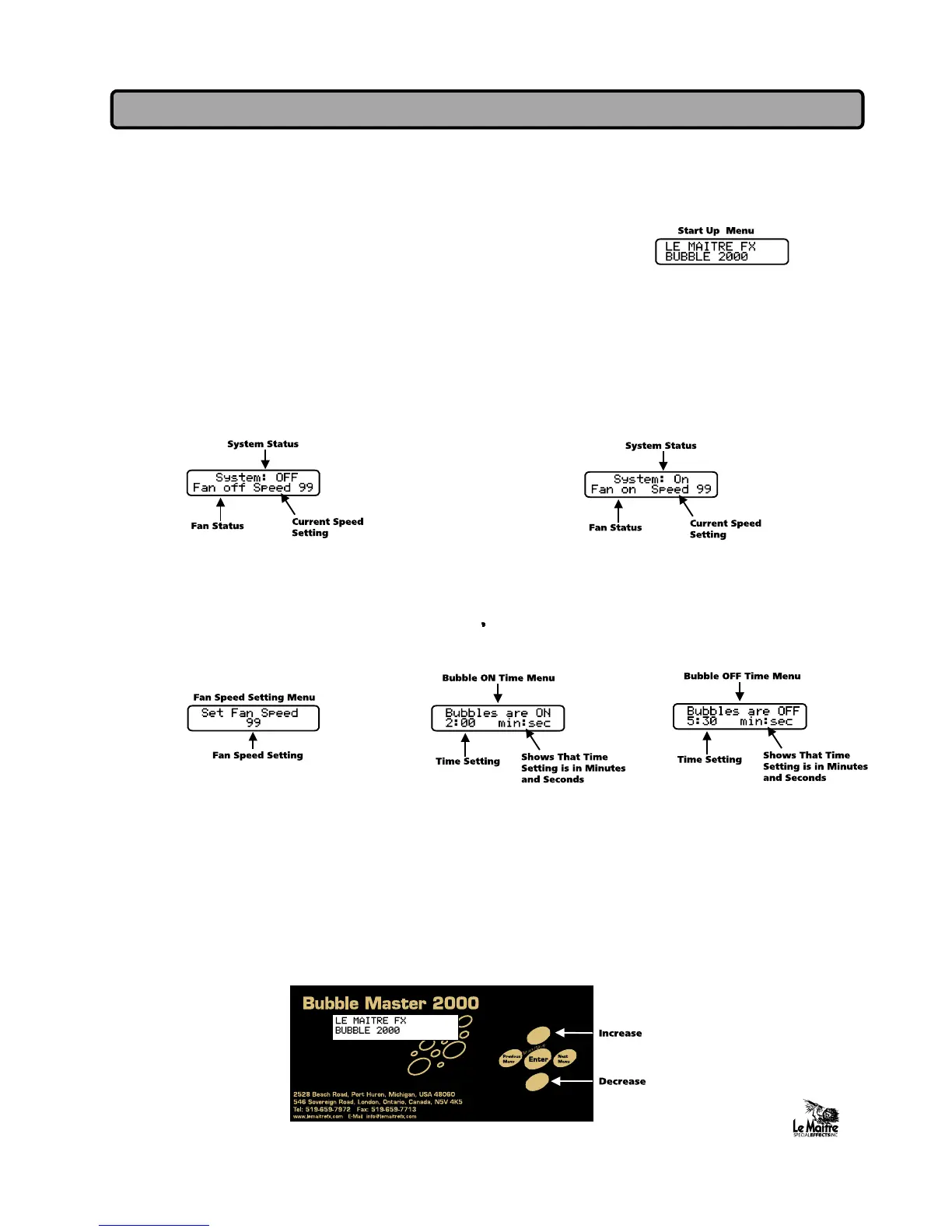
1. Power up unit by connecting to suitable power supply
2. Upon power up the display will read" LE MAITRE FX BUB-
BLE 2000" for 2-5 seconds .
3. The Main Menu will be displayed. The Main Menu will indicate System Status (ON or
OFF), Fan Status (ON or OFF), and the current Speed Setting (0 to 99).
4. Pressing the START/STOP/ENTER keypad at the Main Menu will change the setting to
System Status ON or OFF.
5. To select the Fan Speed Menu, Bubble On Menu, Bubble Off Menu, or Main Menu
press the Previous Menu or Next Menu keypads until the appropriate menu is displayed.
6. To change the value of the Fan Speed, Bubble On Time, or Bubble Off Time settings
use the 'Increase or 'decrease' keypads, the new setting will be saved by pressing the
START/STOP/ENTER keypad.
BubbleMaster 2000 Controls
4



 To Next Page